

You've poured your heart and soul into a new website, hit the launch button, and… crickets. You type your name into Google, but your site is nowhere to be found. If you're asking, “why is my website not showing up on Google?”, you're not alone. The answer almost always comes down to two simple ideas: crawling and indexing.
Before anyone can find your site, Google has to do its job. First, its bots need to discover your website exists (crawling), and then they need to add it to their enormous digital library (indexing). If that process breaks down, you're invisible.
Understanding Why Your Website Is Invisible On Google
It’s a surprisingly common headache. You’ve invested time, money, and effort into creating a website, only for it to be completely invisible on the world's biggest search engine. This usually happens when there's a disconnect in how Google finds and organises information.
Think of the internet as a gigantic, ever-growing library, and Google is the head librarian. For your website—your brand new ‘book’—to show up in the catalogue for people to find, a specific process has to unfold:
- Discovery & Crawling: First, the librarian's assistants (known as ‘crawlers’ or ‘spiders’) need to find your book. They do this by following paths—links from other known books (websites)—to discover new ones. If there are no paths leading to your site, it’s like a book tucked away in a back room with no doors.
- Indexing: Once they find it, the librarian reads and understands your book's content to figure out where it belongs in the catalogue. This is indexing. If the librarian is told not to add your book or can't access it due to a technical snag, it will never make it onto the library shelves.
If either of these crucial steps hits a wall, your website might as well not exist in Google’s world. This is exactly why a brand-new site can take days or even weeks to appear; the librarian simply hasn’t found or catalogued it yet.
Diagnosing Your Website's Invisibility
So, how do you figure out what’s gone wrong? The first move is a simple check to see if Google even knows your site exists. From there, you can start digging into the more specific technical or content-related gremlins that might be holding you back.
This flowchart maps out the first steps to take to see if your site is indexed and where to look next if it isn't.
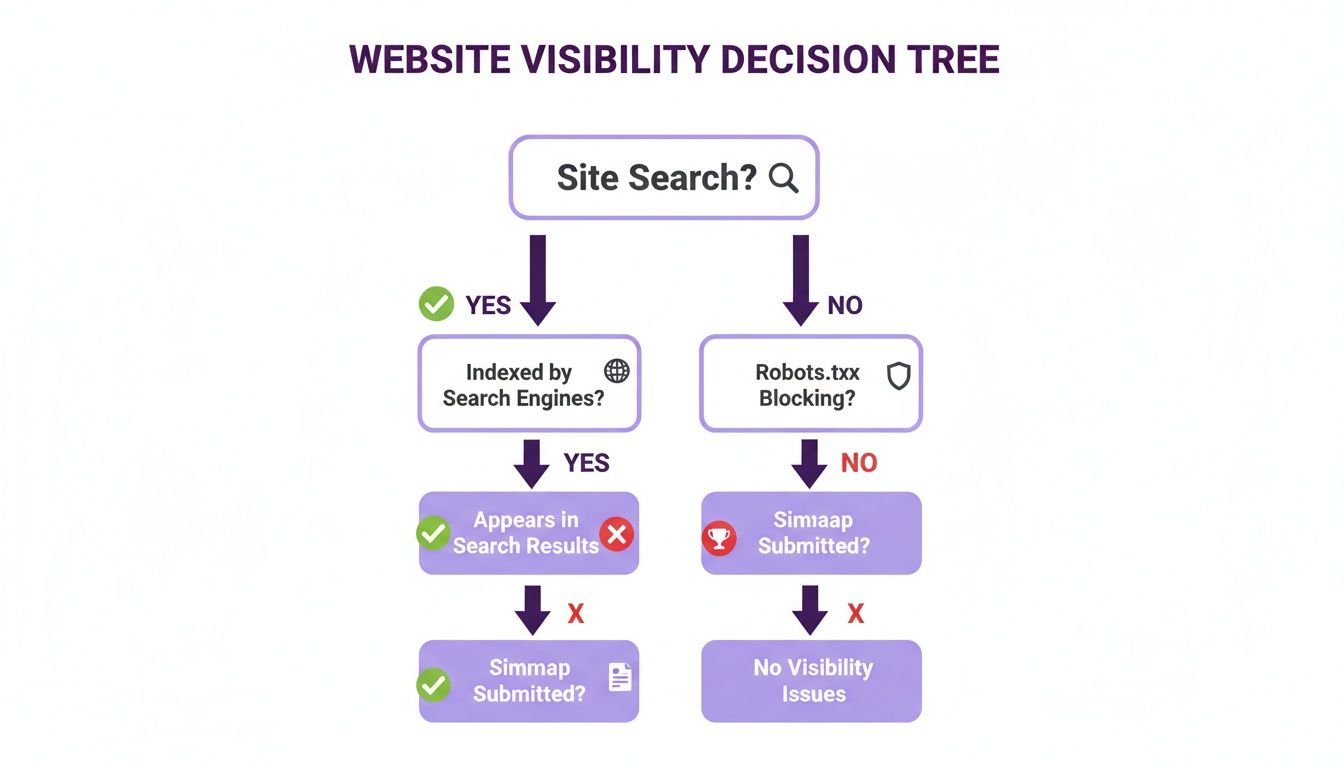
The main thing to remember is that a quick "site:" search on Google is your best friend right now. It’s the fastest way to know if you have an indexing problem (Google doesn't know you exist) or a ranking problem (Google knows you exist, but doesn't think you're important yet).
Before you start trying to fix things, it's a good idea to get a clear picture of your site's overall health with a practical website audit checklist. This will give you a solid starting point for troubleshooting.
Solving Crawling and Indexing Issues
Before your website can even think about ranking on Google, it has to be found. This discovery process is handled by Google's automated programmes, often called ‘crawlers’ or ‘spiders’. If these crawlers can't find or understand your pages, your site might as well be invisible. Let's dig into the first and most fundamental reason your website isn't showing up: crawling and indexing problems.

Think of your website as a new shop that just opened in a massive, sprawling city. For customers (or Google’s crawlers) to find you, there need to be roads leading to your front door. Without any links from other established websites (backlinks), your shop is basically on an unpaved road in the middle of nowhere. This is a common problem for brand-new websites, which can take days or even weeks to get noticed.
It gets worse if your site's structure is a mess. Imagine a shop with no clear aisles or signs. If crawlers show up and can't figure out how to get around, they’ll probably just leave without seeing everything you offer. This means important pages get left undiscovered and, crucially, unindexed.
How to Check If Google Has Indexed Your Website
First things first, let's confirm you actually have an indexing problem. The quickest check is a special search command you can type directly into Google.
Just go to Google and search for site:yourwebsite.co.uk, making sure to replace yourwebsite.co.uk with your actual domain.
- If you see a list of your pages: Great news! Google has indexed at least part of your site. Your issue is more likely about ranking than indexing.
- If you see something like "Your search – site:yourwebsite.co.uk – did not match any documents.": This is a red flag. It means Google hasn't indexed your site at all, and this is the problem you need to fix.
This simple site: operator is a powerful first step. It tells you exactly where to focus your energy.
Creating a Clear Map for Google
If it turns out your site isn't indexed, one of the best things you can do is hand Google a map. That's essentially what an XML sitemap is—a file that lists every important page on your website, making it incredibly easy for search engines to find and crawl everything.
An XML sitemap is your direct line to Google. It’s the fastest way to say, "Hello, my website is here and ready to be explored," ensuring crawlers know about all the content you want them to see.
Most modern website platforms like WordPress have plugins that will generate this for you automatically. Once you have your sitemap URL (it's usually something like yourwebsite.co.uk/sitemap.xml), you just need to submit it.
Here’s how to get it done:
- Set up Google Search Console: This free tool from Google is non-negotiable for monitoring your site's health. If you haven't already, you’ll need to add and verify your website.
- Find the Sitemaps Section: Once you're in the Search Console dashboard, look for 'Sitemaps' in the menu on the left.
- Submit Your Sitemap: Pop your sitemap URL into the box and hit 'Submit'.
Google will then process the file, which can seriously speed up how quickly it discovers and indexes your pages. If you hit any snags, you might need to learn how to fix index coverage errors in Search Console. It's also worth noting that big changes, like moving your site to a new domain, can cause unexpected crawling issues. Following a solid website migration checklist is essential to keep your Google visibility intact during the transition.
Removing Technical SEO Roadblocks
Sometimes, the reason your site isn't showing up on Google has nothing to do with your content or links. It's the technical stuff—the hidden instructions accidentally telling search engines to stay away. Think of them as ‘Keep Out’ signs you didn’t even know you’d put up.
These technical roadblocks are surprisingly common, especially if someone else built your site or a setting was changed by mistake. The good news? With a bit of know-how and some free tools, you can usually find and fix them pretty quickly.
The Problem with Robots.txt Files
Every website can have a small file called robots.txt. Its whole job is to give instructions to visiting web crawlers, including Googlebot. It’s like a set of house rules for bots, telling them which rooms they can and can’t enter.
When set up correctly, a robots.txt file is a great help. It can tell Google to ignore unimportant pages like login areas or duplicate content. But one wrong line can accidentally block Google from crawling your entire website or its most important sections, making you completely invisible in search results.
This example from Google shows a simple robots.txt file blocking one directory while allowing everything else.
The line Disallow: /private/ tells all bots not to crawl anything in the 'private' folder, which is exactly what you’d want. But a single, tiny instruction like Disallow: / would block your entire site. You can check your own file by simply typing yourdomain.co.uk/robots.txt into your browser.
Finding and Fixing 'noindex' Tags
Another classic culprit is the 'noindex' tag. This is a piece of code placed on a specific page that gives a direct order to search engines: "Do not add this page to your index." It's handy for things like 'thank you' pages or internal admin areas, but if a noindex tag ends up on your homepage or key service pages, they’ll vanish from Google altogether.
This often happens by accident. For instance, many website platforms have a checkbox that says something like, "Discourage search engines from indexing this site". If that box gets ticked, it can slap a site-wide noindex tag on everything, effectively cloaking your website from view.
The URL Inspection tool in Google Search Console is your best friend for diagnosing these issues. Just paste in the URL of a page that’s gone missing, and it will tell you exactly why it’s not indexed, whether it’s a robots.txt block or a rogue noindex tag.
Addressing Server and DNS Errors
Beyond specific tags, the very foundations of your website can also put up a barrier. If Google's crawlers try to visit your site and hit an error, they will eventually stop trying. Two critical issues to watch out for are:
- Server Errors (like 5xx errors): These signal a problem with the server where your website is hosted. If your server is down, unstable, or just overloaded, Google can't get to your content. Frequent server errors tell Google your site is unreliable, which is never good for your visibility.
- DNS Issues: The Domain Name System (DNS) is the internet’s phonebook. It translates your easy-to-remember domain name into a server's IP address. If your DNS configuration is broken, Google's crawlers won't even be able to find your server to begin with.
Both of these problems are flagged right inside Google Search Console, usually in the 'Coverage' report. Spotting these errors is the first step, but fixing them often means getting in touch with your website hosting provider for support.
Running through these checks is a core part of any site health check. You can learn more by diving into this technical SEO audit checklist. By systematically looking for these technical roadblocks, you can make sure there are no hidden barriers stopping Google from finding, crawling, and indexing all your great content.
Checking for Google Penalties and Algorithmic Issues
Sometimes, the reason your website has disappeared from Google isn't a technical slip-up. It might be that you've broken the rules. If your site’s visibility has suddenly tanked, you could be dealing with either a Google penalty or the fallout from a major algorithm update. Figuring out which one it is makes all the difference.
There are two main reasons your site can get knocked out of the search results:
- Manual Actions: This is a direct penalty handed down by a real person at Google. It happens when your site is caught red-handed, clearly violating Google's guidelines with dodgy tactics.
- Algorithmic Devaluations: This isn't a penalty in the usual sense. It's what happens when Google rolls out a big "core update," raising its quality standards, and your site just doesn't make the new grade.

And these issues are more common than you'd think. Imagine pouring your heart into your Cambridgeshire e-commerce site, only to see it vanish overnight. This became a harsh reality for many UK websites recently; around six in ten (60%) of the UK's biggest news outlets saw their Google visibility drop after a major core update. Even giants like the Daily Mail had their visibility score plummet by 27%, mostly because Google's algorithm changes came down hard on thin content and a poor user experience. You can read more about how Google updates affected UK news sites on Press Gazette.
Identifying a Manual Action
The first place you should look for trouble is Google Search Console. Think of it as your direct line to Google. If they've slapped your site with a manual action, they’ll tell you right there.
Here’s how to check:
- Log in to your Google Search Console account.
- Find the 'Security & Manual Actions' section in the menu on the left.
- Click on 'Manual actions'.
If you see a "No issues detected" message, you can breathe a sigh of relief—you haven't been manually penalised. But if there is an issue listed, Google will give you the details on what you did wrong and which pages are affected.
A manual action is Google's way of putting your site in the 'naughty corner' for breaking the rules. The only way out is to fix what you did wrong and convince a human reviewer that you’ll play fair from now on.
Common triggers for these penalties include things like buying dodgy, low-quality links to fake your site's authority, stuffing pages with irrelevant keywords, or publishing thin, auto-generated content that offers zero value.
Recovering From a Penalty
If you find a manual action notice, don't panic. The road to recovery is clear, even if it takes some work. You first need to find and fix every single instance of the violation on your site. For example, if the penalty is for "unnatural links," you'll have to get rid of or disavow all the spammy backlinks pointing to your domain.
Once you’ve done a thorough clean-up, you can submit a reconsideration request through Search Console. In this request, you need to be honest—explain what you did wrong, detail every step you took to fix it, and promise Google it won’t happen again. The process of recovering from a Google penalty can be tricky, but with a methodical approach, it's absolutely achievable.
Winning In The Modern Search Landscape
Getting your website indexed by Google is a huge first step, but it’s no longer the finish line. If you've fixed all the technical gremlins and are still wondering, "why is my website not showing up on Google?", the answer might be hiding in plain sight on the search results page itself. The traditional list of ten blue links? That’s quickly becoming a relic.
Today's search results are a bustling high street crowded with dynamic elements called SERP features. Think of the AI Overviews that give you answers right away, the Local Packs that point you to the nearest coffee shop, or the 'People Also Ask' boxes that seem to read your mind. These features often muscle their way to the top, pushing your website down the page and making you invisible even if you're technically on page one.
The New Rules Of Visibility
To survive, you have to adapt. A recent UK study really puts the scale of this shift into perspective. If your local Cambridgeshire business is struggling to get noticed, it’s probably because these features are hogging the spotlight. Research from Studio 36 Digital revealed that a staggering 98.7% of UK Google searches now display features like AI Overviews, Local Packs, or image carousels.
For service-based businesses, the numbers are even more stark. Nearly 30% of all UK searches trigger a Local Pack, and that figure skyrockets to over 90% in sectors like plumbing and legal services. You can read the full research on how SERP features are changing UK search results on Studio 36 Digital.
What this all means is that simply ranking isn't enough. You have to rank within these features.
How To Compete And Win
To reclaim your spot, you need to change your game plan. Stop just targeting keywords and start targeting these specific features. The goal is to give Google information in a format it can easily grab and repurpose for its dynamic results.
Here’s how you can start adapting your strategy:
- Embrace Structured Data: Get comfortable with Schema markup. It’s basically a special code you add to your site that helps search engines understand what your content is about. This makes it much easier for them to pull your info into rich results like event listings or product carousels.
- Dominate Local Search: Create and obsessively optimise your Google Business Profile. For any local business in Cambridgeshire, this is completely non-negotiable. A complete, active profile is your golden ticket into that all-important Local Pack.
- Create Answer-Focused Content: Shape your content to directly answer the questions your customers are asking. Use clear headings, bullet points, and numbered lists to make the information easy to digest. This dramatically increases your odds of showing up in 'People Also Ask' boxes and AI Overviews.
By focusing on becoming the source for Google's answer-driven features, you move from being buried on the page to being the featured result. This strategic pivot is the key to winning in the modern search environment.
Your Action Plan For Getting Found On Google
You've worked through the diagnostics, from crawling errors to technical roadblocks, and you should now have a much clearer idea of why your website's playing hide-and-seek with Google. The next step is turning that knowledge into a concrete plan of attack. This will help you figure out what you can tackle yourself and when it’s smarter to call in the pros.

Many foundational fixes are well within your reach. Simple tasks like submitting an XML sitemap through Google Search Console or optimising your page titles and meta descriptions can make a surprisingly big difference. Think of these as quick wins that help Google find and understand what your site is all about.
But the search world is getting more complex by the day. Recent research into Google's AI rollout paints a stark picture for UK businesses. Organic traffic growth collapsed by a staggering 86% across 16 sectors after AI Overviews were introduced, and UK firms saw their rankings drop by an average of 11.1%. This shift means that even technically sound sites are now fighting much harder for visibility. You can explore the research on how Google's AI impacted UK website traffic on PPC.land for the full story.
Deciding Your Next Steps: DIY vs Professional Help
Knowing where to draw the line between a DIY fix and professional intervention is key. It saves you time, money, and a lot of headaches. Here’s a quick guide to help you decide.
Tasks You Can Probably Handle:
- Submitting a Sitemap: This is a straightforward process in Google Search Console that basically hands Google a map of your site. Easy.
- Basic On-Page SEO: Improving page titles, writing compelling meta descriptions, and adding descriptive alt text to images are all manageable. For a structured approach, our SEO checklist for new websites provides a great starting point.
- Creating a Google Business Profile: An absolute must for any local business, and it's relatively simple to set up and manage yourself.
When to Call in an Expert:
- Penalty Recovery: If you've been hit with a manual action, getting back into Google's good graces is a meticulous process. It involves identifying all the issues, fixing them, and submitting a detailed reconsideration request. This is not a job for the faint-hearted.
- Deep Technical Audits: Resolving complex issues like persistent server errors, incorrect canonicalisation, or a messy site architecture requires specialist knowledge.
- Advanced Schema Markup: While basic schema is manageable, implementing complex structured data for things like products or events is best left to someone who lives and breathes this stuff.
A professional SEO Health Check can cut through the guesswork, pinpointing the exact cause of your site's invisibility. It provides a clear, tailored Activity Plan, so every action you take is designed to get your website seen by the customers that matter most.
Ultimately, the goal is to make an informed decision. Whether you choose to handle the basics yourself or bring in an agency for the heavier lifting, having a clear plan is the fastest way to get your website showing up where it belongs: right in front of your potential customers on Google.
Frequently Asked Questions
Here are some quick answers to the most common questions we hear from business owners when their website is playing hide-and-seek with Google. Think of this as a quick-start guide to understanding timelines, spotting red flags, and knowing the difference between earning your spot and paying for it.
How Long Does It Take For A New Website To Show Up On Google?
For a brand-new site, it can take anywhere from a few days to several weeks for Google to find, crawl, and finally index it. There's no magic number here; it really depends on factors like how well your site is built and how easily Google's bots can figure out what it's all about.
But you're not powerless. The best first step is to create an XML sitemap—which is just a fancy map of all your important pages—and submit it directly to Google through the free Google Search Console tool. This is like personally handing Google the blueprint to your site, which can seriously cut down the waiting time.
Why Is My Website Not Showing For My Brand Name?
If your site doesn't pop up when you search for its exact name, that's a massive red flag. Brand searches should be the easiest win, so when they don't work, it usually points to a critical indexing problem. Something, somewhere, is telling search engines to stay away.
The usual suspects are a "noindex" tag on your homepage or a rule in your robots.txt file that's essentially put up a "do not enter" sign for Google. You can check this in seconds with the site:yourdomain.co.uk search operator. If nothing comes back, it's time to dive into Google Search Console's URL Inspection tool to find and fix the blockage.
Key Takeaway: Failing to show up for your own brand name isn’t a ranking issue—it’s an indexing emergency. This needs to be your number one priority, as it means Google has been told to ignore your site completely.
Can I Pay Google To Show My Website?
No, you can't pay to get into the main, organic search results. Those spots are earned, not bought. Getting there is the result of good, consistent search engine optimisation (SEO), like creating genuinely useful content and making sure your website is technically sound.
However, you can use Google Ads to pay for sponsored listings that appear at the top or bottom of the results, always marked with the word "Sponsored". This is an entirely different ball game called pay-per-click (PPC) advertising. It gets you instant visibility for as long as your budget lasts, but it won't do a thing for your organic rankings.
At Bare Digital, we turn invisibility into visibility. If you're tired of guessing why your site isn't showing up, let our Cambridgeshire-based SEO experts provide a free, no-obligation Health Check and a clear Action Plan to get you found by the customers you need. Start your journey to page one today.