

User experience SEO is all about optimising your website to be as satisfying and intuitive as possible for the people visiting it. It’s a shift away from old-school keyword targeting to focusing on how people feel when they interact with your site—a factor Google now heavily rewards in its search rankings.
Why a Great User Experience Is Your New SEO Superpower
Gone are the days when you could just stuff keywords into a page, build a few backlinks, and call it a day. Google’s main job is to give its users the most helpful and satisfying answers to their questions. That means its algorithms have gotten much smarter at spotting and rewarding websites that offer a genuinely good user experience (UX).
Think of your website like a physical shop here in Cambridgeshire. If a customer walks in and finds the aisles cluttered, products hard to find, and the staff unhelpful, they'll be straight out the door. But a well-organised, brightly lit shop with clear signs and friendly staff? That encourages them to stick around, browse, and eventually buy something.
Your website works in exactly the same way. Google is the digital high street, sending potential customers your way. When they land on your site, they need to have a good experience.
Turning User Satisfaction into Ranking Signals
Google can’t personally visit your website, so it looks for digital clues—or 'user signals'—to figure out if people are happy. These signals tell Google whether visitors are finding what they need and enjoying their time on your site.
Some of the key indicators it looks for include:
- Session Duration: This is simply how long someone stays on your site. The longer they stay, the more engaged they likely are with your content.
- Engagement Rate: This shows how many visitors actually interacted with your page (scrolled, clicked a link) instead of leaving immediately. High engagement is a massive thumbs-up for Google.
- Core Web Vitals: These are the technical bits and pieces that measure your site's loading speed, how quickly it responds to clicks, and whether things jump around on the screen while it loads. They directly impact how usable a visitor finds your page from the very first second.
A seamless, intuitive, and valuable online experience is no longer just a 'nice-to-have'—it’s a fundamental part of modern SEO. Google’s algorithms are built to favour websites that prioritise their users, making user experience SEO a critical factor for sustainable growth.
By focusing on creating a website that genuinely serves your customers, you’re also sending all the right signals to the search engines. This is the heart of user experience SEO. It moves the goalposts from trying to please an algorithm to delighting your real-world customers—a strategy that builds lasting brand loyalty and drives much better search performance.
Ultimately, this approach ensures your business not only gets found but also makes a memorable impression when it does.
Understanding the Metrics That Define UX SEO
So, how do you actually measure something as vague as a ‘good experience’? It feels subjective, but Google has found a way. It relies on a specific set of technical signals that tell it whether your users are happy or frustrated. Getting to grips with these is like learning to see your website through Google's eyes.
This flow chart gives a great visual of how it all connects. A happy user sends positive signals to Google, which in turn rewards your site with better rankings. Simple, right? The trick is knowing which signals matter most.
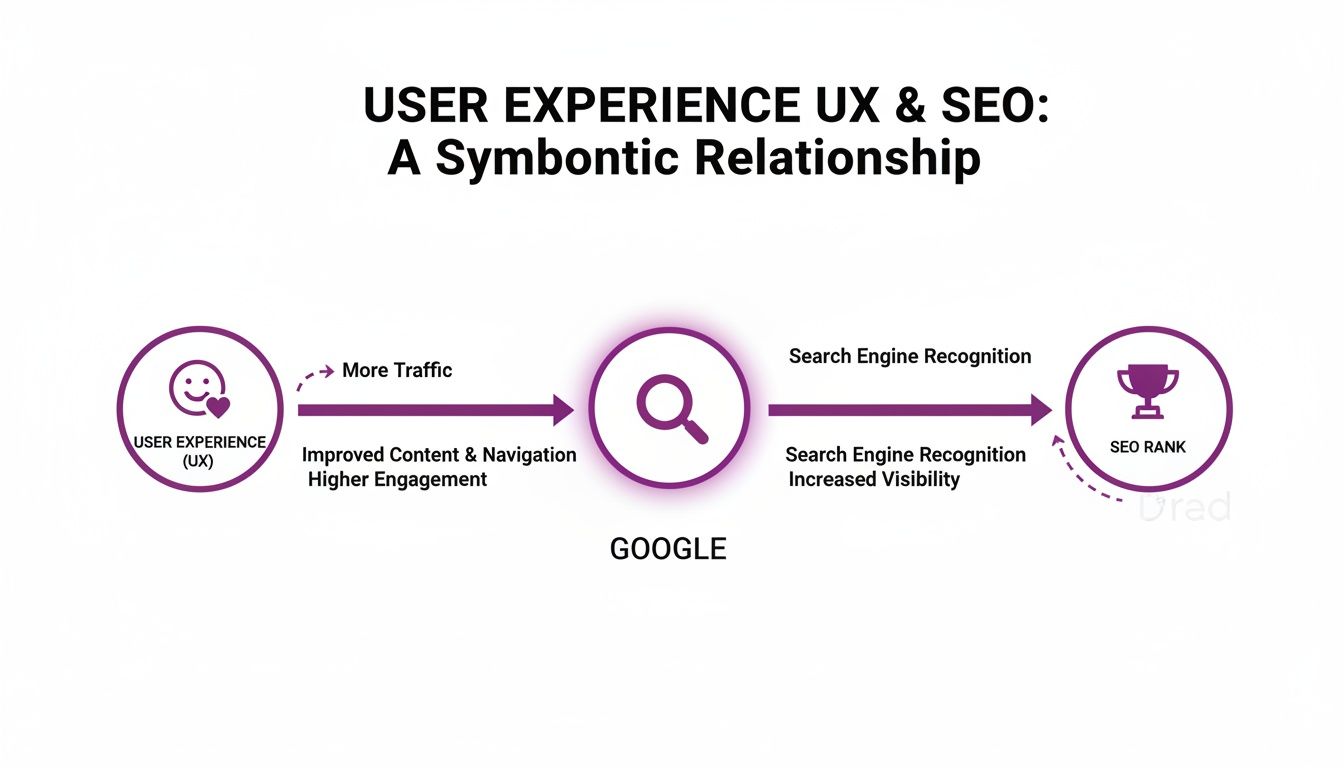
Let's break down what those signals actually are.
Demystifying Core Web Vitals
At the heart of UX SEO, you’ll find Google’s Core Web Vitals (CWV). Think of these as a basic health check for your website's performance. They aren't just for developers; they're surprisingly easy to understand once you know what they're looking for.
Core Web Vitals Explained for Business Owners
To make sense of Google's technical metrics, here’s a simple breakdown of the Core Web Vitals, what they measure, and why they're crucial for your website's success.
| Metric | What It Measures | Why It Matters for Your Business |
|---|---|---|
| Largest Contentful Paint (LCP) | Loading Speed: How quickly the main, most important content on your page appears for a user. | This is your website’s first impression. A slow load time is like a customer walking into a shop with no one at the front desk—they’ll likely turn around and leave. |
| Interaction to Next Paint (INP) | Responsiveness: How fast your page reacts when someone clicks a button, taps a link, or opens a menu. | A good INP score makes your site feel quick and responsive. A bad one is like pressing a lift button and nothing happens—it’s frustrating and makes users feel ignored. |
| Cumulative Layout Shift (CLS) | Visual Stability: How much the page layout unexpectedly jumps around while it's loading. | Imagine trying to read a menu, but someone keeps moving it. That's a high CLS score. It’s annoying and often causes people to click on the wrong thing by mistake. |
These three metrics give you a solid, data-backed look at your site's technical health. But that's only half the story.
Beyond Core Web Vitals: Behavioural Signals
While the technical stuff is important, Google also watches how people behave on your site. These actions give it clues about your content's quality and whether it's actually useful.
A technically perfect website that fails to engage its audience is like a beautifully designed library with no interesting books. To succeed, you need both excellent performance and compelling content.
These behavioural signals tell Google what happens after someone lands on your page.
Key Behavioural Metrics to Watch
To get the full picture, you need to track how people are actually interacting with your website. While we cover this in more detail in our guide on the top metrics to measure on-page SEO success, here are the three big ones:
-
Bounce Rate: This is the old-school metric. It measures the percentage of people who land on a page and leave without doing anything else. A high bounce rate often meant your content missed the mark.
-
Engagement Rate: This is the newer, more insightful metric from Google Analytics 4. It counts a session as ‘engaged’ if a user stays for more than 10 seconds, triggers a conversion, or looks at more than one page. High engagement is a massive green flag for Google.
-
Session Duration: This one’s straightforward—it’s the average amount of time people spend on your site in one visit. Longer sessions usually mean people are finding your content valuable and are sticking around to read it.
When you blend the technical health of Core Web Vitals with the real-world insights from these behavioural signals, you get a complete view of your user experience SEO. It’s this powerful combination that helps you build a website that doesn't just rank well but genuinely serves your customers, too.
How Poor UX Can Wreck Your UK Search Rankings
It’s one thing to talk about theories and metrics, but it’s another to see the real-world damage a bad user experience can do to a business. A website that frustrates visitors doesn't just lose a sale in the moment; it poisons its reputation with search engines, leading to a very real drop in traffic and revenue.
If you want proof, just look at what happened to a major UK retailer.

The Cautionary Tale of The Range
For any business, showing up on Google is everything. This is especially true in the cut-throat UK retail market. The story of The Range serves as a stark warning of just how fast that visibility can vanish when user experience is pushed to the bottom of the priority list.
User experience has become a non-negotiable ranking factor in the UK. After the August 2023 Google core update, The Range watched its Visibility Index score plummet by a staggering 41.68%. The drop was driven by poor product pages that lacked reviews, had overwhelming layouts, and offered barely any descriptive content.
These are classic signs of a poor user experience, and they fly in the face of Google's E-E-A-T guidelines, which reward Experience, Expertise, Authoritativeness, and Trustworthiness. You can dig into more details about the biggest SEO visibility losers of 2023 at SISTRIX.com.
This wasn't a minor blip. It was a catastrophic fall in organic search traffic, proving that even huge, established brands aren't safe from the consequences of bad UX. Google’s algorithm penalised the site because it simply wasn’t providing a helpful or trustworthy experience for its users.
The UX Failures That Caused the Collapse
So, what specific problems led to this freefall? The issues were fundamental to the customer journey and are common mistakes that can trip up businesses of any size.
- Confusing Page Layouts: Pages crammed with too many options and no clear visual guide just make people confused. This leads to frustration, and they’ll be gone in a flash.
- Poor Product Information: Product pages with thin descriptions and zero customer reviews don't build confidence. Shoppers are left with more questions than answers and have no reason to trust you enough to buy.
- Lack of Trust Signals: A website that feels untrustworthy will always struggle. This links directly to Google’s E-E-A-T framework, where genuine expertise and helpful content get rewarded.
For a local business here in Cambridgeshire, these same problems can be just as devastating. A slow-loading category page, a mobile menu that’s a pain to use, or a confusing checkout process are all red flags to Google that you aren’t putting your users first.
A single bad experience on your site creates a ripple effect. It drives up your bounce rate, kills engagement, and signals to Google that your page isn't the best answer for a search query. Over time, your rankings will slide.
This case study turns the abstract threat of "poor UX SEO" into something immediate and tangible. It’s not about pleasing an algorithm; it’s about preventing serious, measurable losses in traffic and sales.
Fixing these issues before they become a problem is vital for survival and growth. That's why a professional audit, like our free SEO Health Check, is the crucial first step to making sure your website is built to win over both users and search engines.
Your Practical UX SEO Audit Checklist
Knowing the theory is one thing, but actually putting it into practice is where you see the results. Before you can improve your user experience SEO, you need to pinpoint where the friction is on your website. A full professional audit is always the best way to go, but you can get a surprisingly clear picture yourself by running through this practical checklist.
Think of it as a DIY MOT for your website. It’ll help you spot the obvious issues before they snowball into bigger problems, giving you more control over your online presence. We’ve broken it down into four critical areas that directly affect how both users and Google see your site.
Technical Performance and Page Speed
Before a user even reads a single word on your page, your site's technical performance has already made an impression. Honestly, a slow, clunky website is one of the quickest ways to lose a potential customer.
- Check Your Page Load Speed: Use a free tool like Google's PageSpeed Insights to test your homepage and a few key service or product pages. Are they loading in under 3 seconds? If not, you’re almost certainly losing visitors before they even get a chance to see what you offer.
- Assess Core Web Vitals (CWV): The same report will show you scores for LCP, INP, and CLS. Don't get bogged down in the jargon; just look at the colours. Green is great, amber needs attention, and red flags a significant problem that's frustrating users and tanking your rankings.
- Confirm HTTPS Security: Glance at your browser's address bar. See that little padlock symbol next to your URL? That shows your site is secure (using HTTPS), which is a non-negotiable trust signal for both people and search engines today.
A solid technical foundation is the bedrock of good user experience SEO. For a deeper dive into this, our complete guide on conducting a technical SEO audit offers 15 essential elements to check.
On-Page and Content Clarity
Once someone lands on your site, your content has to do all the heavy lifting. It needs to be easy to read, understand, and digest. If it’s confusing or poorly structured, visitors will hit the back button without a second thought.
Your content's primary job is to answer the user's question clearly and efficiently. If finding that answer feels like hard work, your user experience is failing, no matter how well-written the text is.
- Review Heading Structure: Do your pages use a clear, logical heading structure (H1 for the title, H2s for main sections, H3s for sub-points)? Headings are like signposts, helping users skim the page and quickly find what they need.
- Assess Readability: Are you using short paragraphs (just 2-3 sentences) and straightforward language? Huge walls of text are incredibly intimidating, especially on a mobile screen. Break things up with bullet points, bold text, and images.
- Check for a Clear Call-to-Action (CTA): Does every single page guide the user on what to do next? Whether it’s “Contact Us,” “Buy Now,” or “Learn More,” a clear CTA eliminates confusion and keeps the user moving forward.
Navigation and Site Architecture
How easily can people find their way around your website? A confusing navigation system is like a supermarket with no aisle signs—customers just get lost, frustrated, and eventually leave without buying anything. An intuitive site structure is absolutely fundamental to good user experience SEO.
A great way to get honest feedback is by conducting usability testing of your website to see how real people interact with it.
Here’s what to look for:
- Is Your Main Menu Simple? Your main navigation should be clean and use clear, common-sense labels. Ditch the corporate jargon; use terms your actual customers would use, like "Services" instead of "Solutions."
- How Many Clicks to Key Pages? Can someone get from your homepage to any other important page (like a key product or your contact form) in three clicks or less? This is the old 'three-click rule', and it's still a fantastic yardstick for site efficiency.
- Is Your Search Bar Prominent? If you have a lot of content or products, a visible, working search bar is essential. Double-check that it’s easy to spot on both desktop and mobile.
Mobile Experience
With the majority of UK searches now happening on mobile devices, your website’s performance on a smartphone isn't just a nice-to-have—it's everything. A poor mobile experience is a direct signal to Google that you aren’t putting most users first.
- Test Your Responsive Design: Pull up your website on your own phone. Does it automatically resize to fit the screen? Or do you have to pinch and zoom just to read the text? All your content should be effortlessly legible.
- Check Tap Targets: Are the buttons and links easy to tap with a thumb? Buttons that are too small or packed too closely together are a classic source of mobile frustration.
- Ensure Forms are Mobile-Friendly: Try filling out your own contact form on your mobile. Is it a simple, quick process? Or are the fields a pain to select and type into?
Running through this checklist gives you a solid, actionable starting point. If you’ve spotted issues in any of these areas, it’s a clear sign your user experience SEO needs some attention.
Your Customers Are on Mobile – Is Your Website Ready?
Let's be blunt: the days of designing a website for a desktop computer and then tweaking it for mobile are long over. Here in the UK, especially for local businesses in places like Cambridgeshire, your customers are finding you, researching your services, and deciding whether to buy, all from their smartphones.
This isn't just a trend; it's the reality of how people browse and shop today. Forgetting about the mobile experience is no longer an option—it's the very foundation of good user experience SEO.
Just look at the numbers. By April 2023, desktop searches were just a tiny sliver of the market. With a staggering 96% of UK internet users now on smartphones, a clunky mobile site is a business killer. Over 50% of users will abandon a brand after just one bad mobile experience, and they become 60% less likely to ever make a purchase. You can see the full breakdown of UK search engine platform shares on Statista.com.
The data doesn't lie. A mobile-first mindset is non-negotiable for any UK business that wants to be found online.

This graph from Statcounter paints a crystal-clear picture of mobile's dominance in the United Kingdom. For all practical purposes, your mobile site is your main website.
What Is Mobile-First Indexing?
Because everyone shifted to their phones, Google made a huge change to how it sees and ranks websites. It's called mobile-first indexing, and it's simpler than it sounds.
It means Google primarily uses the mobile version of your website to understand its content and decide where it should rank in search results. There isn't a separate index for mobile and desktop; there's just one, and your mobile site is the star of the show.
Think of it this way: if your website is beautiful and slick on a desktop but slow, broken, or a nightmare to navigate on a phone, Google will judge you based on that poor mobile experience. In the eyes of the world's biggest search engine, your mobile site is the primary version.
This is a game-changing concept for every business owner to get their head around. Your mobile site isn't a "lite" or secondary version of your "real" website—it is your real website.
Common Mobile UX Pitfalls That Drive Customers Away
A great mobile journey is all about the little things. Get them wrong, and you'll frustrate users, lose sales, and send all the wrong signals to Google. Many websites are still tripping over these common hurdles.
To sidestep these issues, you need a solid grasp of mobile SEO best practices and how to put them into action. Here are the biggest offenders to watch out for on your own site:
- Non-Responsive Design: This is the most basic mistake. If your site doesn't automatically adjust to fit a mobile screen, forcing people to pinch and zoom, you've already lost them.
- Tiny Tap Targets: Buttons, links, and menu items that are too small or crammed together are impossible to use with a thumb. This just leads to wrong clicks and a whole lot of frustration.
- Intrusive Pop-ups: That newsletter sign-up box that’s easy to close on a desktop can completely hijack a mobile screen, blocking the very content a user came to see and making it impossible to dismiss.
- Small, Hard-to-Read Fonts: Text must be readable without squinting or zooming. A font size of at least 16px is a good rule of thumb for body text on mobile.
- Slow Mobile Page Speed: People on their phones are often on the move, using less-than-perfect mobile data connections. They have zero patience for slow-loading pages. Every single second counts.
By actively steering clear of these pitfalls, you're building a smooth, intuitive path for your users, from the moment they land on your site to the final click. For any local business in Cambridgeshire, perfecting this mobile presence is how you capture the attention—and the business—of the vast majority of your potential customers.
Your Action Plan for Better User Experience SEO
Knowing the theory behind user experience SEO is one thing, but turning that knowledge into real growth is what actually matters. This is where you move from concepts to tangible business results. The good news? You don't need to tear down your website and start again. A clear, step-by-step plan makes the whole process manageable and surprisingly effective.
We’ve put together a straightforward pathway for Cambridgeshire SMEs to find and fix issues without the guesswork. The goal is simple: move from uncertainty to a clear, prioritised strategy that improves how users see you—and just as importantly, how Google ranks you.
Your Three-Step Implementation Plan
Transforming your website’s performance starts with getting a professional baseline. From there, a strategy built just for you ensures every action taken is focused on delivering the best possible return.
-
Get Your Free SEO Health Check: It all begins with our no-obligation SEO Health Check. This isn't some generic, automated report. Our specialists will perform a deep dive into your website's current performance, pinpointing the specific UX and technical SEO problems holding you back.
-
Review Your Tailored Activity Plan: Within 24 hours, we’ll send over a custom-built Activity Plan. This document gives you a clear roadmap, outlining prioritised fixes from critical technical tweaks to on-page content improvements.
-
Partner with a Local Specialist: With your plan in hand, you can choose to partner with us to get the work done. As a local Cambridgeshire agency, we provide cost-effective solutions on flexible monthly contracts, combining top-tier expertise with honest, transparent service.
Improving your user experience is one of the most powerful levers for growth. It not only boosts your search rankings but also directly impacts your bottom line by making it easier for visitors to become customers.
A better user experience almost always leads to better conversions. For some great, actionable insights, you can explore proven UX tactics for improving conversion rates from other industry experts. We've also put together our own guide on how to improve website conversion rates with practical steps.
This structured approach takes the complexity out of improving your user experience SEO. It’s a transparent, risk-free process designed to deliver sustainable growth for your business. Take the first step today by claiming your free SEO Health Check and discover your website's true potential.
Frequently Asked Questions
When it comes to blending user experience with SEO, a few questions always pop up. Business owners here in Cambridgeshire and beyond often ask us about the practical side of things, so let’s tackle the most common ones.
How Long Until I See Results from UX SEO?
This is the big one, and the honest answer is: it depends on what you’re fixing. We usually see results play out in two stages.
-
Quick Wins (Weeks to a Month): Technical tweaks can make a surprisingly fast impact. Things like boosting your site speed, squashing broken links, or making sure your site works beautifully on a phone can give you a noticeable lift in rankings and user engagement within weeks. Once Google re-crawls your site, it often rewards these kinds of improvements quickly.
-
Gradual Gains (Months): Deeper, more structural changes take a bit longer to pay off. If you’re rethinking your entire site navigation or overhauling your content to be more helpful, you’re playing the long game. These improvements build serious trust with both your users and search engines, leading to the kind of sustainable growth that really lasts.
Is UX SEO More Important Than Traditional SEO?
That’s a bit like asking if an engine is more important than the wheels on a car. You need both to get anywhere. They’re two sides of the same coin.
Traditional SEO—like earning high-quality backlinks—is still vital for showing Google that your site is an authority. But a brilliant user experience is what makes your site worthy of that authority in the first place. Think about it: people are far more likely to link to a resource that’s genuinely useful and a pleasure to use. Good UX makes your traditional SEO efforts work ten times harder.
Can I Improve UX Without a Full Website Redesign?
Absolutely. The idea of a complete website overhaul is enough to give anyone a headache, especially when you’re watching the budget. The good news is you don’t have to tear everything down to make a real difference.
Focus on the small changes that pack the biggest punch. Simple fixes like increasing your font size for readability, simplifying a clunky contact form, or optimising your images to make pages load faster can completely change how a visitor feels about your site. These targeted tweaks often deliver the best return on your time and investment, making user experience SEO something any business can start tackling today.
Ready to stop guessing and start improving? Let Bare Digital provide a clear path forward. Claim your free, no-obligation SEO Health Check today and receive a tailored Activity Plan that shows you exactly where to focus your efforts for maximum impact. Visit https://www.bare-digital.com to get started.