
Almost half of Google searches carry local intent. In practice, that means Google Business Profile often sits closer to the sale than paid social, display, or a chunk of brochure-style website traffic. For UK businesses, google local for business is usually the first real filter buyers use before they enquire, book, or move on.
That matters even more in sectors where the shortlist forms fast. A wedding venue in Kent can win or lose an enquiry on photos, review quality, and whether key details are visible at a glance. A construction firm covering Manchester, Leeds, and Liverpool has a different problem. It needs to show relevance across several areas without creating a mess of duplicate or weak local signals. Single-location advice only gets you so far.
At Bare Digital, we treat Google Business Profile as an operating channel, not a one-off setup task. The work starts with correct setup and verification, but that is only the base layer. Key gains come from improving the profile for conversion, handling multi-location and service-area complexity properly, and tying profile activity back to calls, form leads, site visits, bookings, and revenue.
If you want a broader primer first, this UK guide on Google My Business covers the basics well. If you want to assess the nuts and bolts before making changes, our local SEO checklist for UK businesses is a practical place to start.
Your Most Powerful Local Marketing Tool
Google Business Profile affects two things at once. It affects whether you appear, and it affects whether people choose you once you do.
That’s why I don’t treat GBP as “set up your hours and move on”. The profile is part search asset, part conversion asset. It feeds Google the context it needs, then gives the customer enough confidence to act. If either side is weak, performance stalls.
Practical rule: If your profile doesn’t answer the customer’s immediate questions, your ranking alone won’t save you.
A strong profile usually does a few simple things well:
- States the business clearly: Your category, services, opening hours, and contact details remove friction.
- Proves legitimacy: Photos, reviews, and accurate location signals help a searcher trust that you’re real and active.
- Supports buying intent: A construction company needs visible service types. A photographer needs portfolio images. A wedding venue needs atmosphere, availability cues, and enquiry paths.
- Matches the website: Your profile and website should reinforce each other, not contradict each other.
What works is disciplined execution. Correct setup. Clean verification. Tight categories. Useful content. Ongoing review management. Regional strategy when one location isn’t enough. Tracking that ties activity back to leads and bookings.
What doesn’t work is guesswork, bulk shortcuts, and generic advice copied from single-location retail examples that don’t fit UK service businesses.
Laying Your Foundation with Flawless Setup and Verification
Most local SEO problems start before optimisation. They start during setup, when a business chooses the wrong profile type, uses inconsistent contact details, or rushes verification.
In the UK, 97% of consumers read online reviews for local services, 72% use Google as their primary tool for local business discovery, and 56% of local businesses still have unclaimed listings, according to this Google business statistics roundup. If you haven’t claimed and cleaned your profile, you’re handing control of a major buying touchpoint to Google’s defaults.
Start with the right business model
Before entering anything, decide what Google should understand about your business.
A storefront profile suits businesses where customers visit a real location during stated hours. That could be a wedding venue in Suffolk, an architect’s studio in Cambridge, or a funeral home with a public-facing branch.
A service-area setup suits businesses that travel to clients, such as electricians, cleaning companies, home care providers, or some construction firms. If customers don’t visit your address during opening hours, don’t force a storefront setup because it “looks bigger”. That often creates verification issues later.
If a listing already exists, claim that one rather than creating a duplicate. Duplicates waste time, split signals, and can trigger a mess when Google tries to merge or suppress profiles.
Enter the core details carefully
The basics sound obvious, but many profiles go wrong in these fundamental areas.
Focus on these fields first:
- Business name: Use your real trading name. Don’t stuff in town names or service keywords.
- Address: Match your website and legal business records exactly if you’re using a visible address.
- Phone number: Use a consistent local or standard business line that appears elsewhere online.
- Website URL: Send users to the most relevant page. For many firms, that’s the homepage at launch, then location pages later.
- Opening hours: Add genuine hours only. If calls aren’t answered on Sundays, don’t list Sunday availability.
For a wedding venue, “The Old Hall Weddings” is fine if that’s the actual trading name. “The Old Hall Weddings Best Wedding Venue Essex” is asking for trouble.
Your business name is not an advert. It’s an identity field.
Categories decide relevance
Category choice is one of the highest-impact setup decisions you’ll make. Google uses it to decide which searches your profile should compete in.
Your primary category should describe your main commercial offer, not every possible thing you do. A wedding venue should usually lead with wedding venue, not event planner, conference centre, or function room hire unless that’s the actual main offer. A construction company shouldn’t default to builder if most of its profitable work comes from loft conversions or extensions and there’s a more accurate category available.
Secondary categories help widen relevance, but they shouldn’t dilute the profile. Add only what you can support with services, website content, and customer evidence.
A quick sense-check helps. Ask: if a customer had one sentence to describe what we are, what would they say first?
Verification needs evidence, not improvisation
Verification methods vary. You may be asked for postcard, phone, email, or video verification. Video is common and often causes delays because businesses overcomplicate it or film the wrong proof.
Google typically wants to see that the business exists, operates where claimed, and is controlled by the person submitting the request. That means your signage, building access, tools of the trade, branded vehicle, internal workspace, or proof of management access may all matter depending on business type.
If you’re filming a verification video:
- Start outside: Show the street, number, signage, or other identifying markers.
- Show access: Open the door, enter the premises, or demonstrate legitimate access.
- Show the business operating: Reception desk, treatment room, office setup, specialist equipment, branded materials.
- Keep it natural: Don’t edit, narrate excessively, or try to make it look polished.
This walkthrough gives a useful visual overview of the process and common sticking points:
NAP consistency is the bedrock
NAP means name, address, and phone number. It needs to match across your website, directories, socials, and existing citations.
This doesn’t mean every punctuation mark has to be obsessive, but essential business details must stay aligned. If your website says “Unit 4, King’s Court” and an old directory says “Suite 4 Kings Court Business Park” with a dead phone number, Google and users both get mixed signals.
A simple audit catches most issues:
| Checkpoint | What to confirm |
|---|---|
| Website footer | Same business name, address, and phone as GBP |
| Contact page | Same formatting and correct opening hours |
| Key directories | No old addresses, duplicate listings, or tracking numbers |
| Social profiles | Same brand naming and contact details |
| Existing GBP entries | No duplicate or legacy profiles |
If you want a practical way to review the setup issues that usually block performance, a Google Business Profile audit tool helps surface the obvious faults before they become expensive ones.
Transforming Your Profile into a Conversion Engine
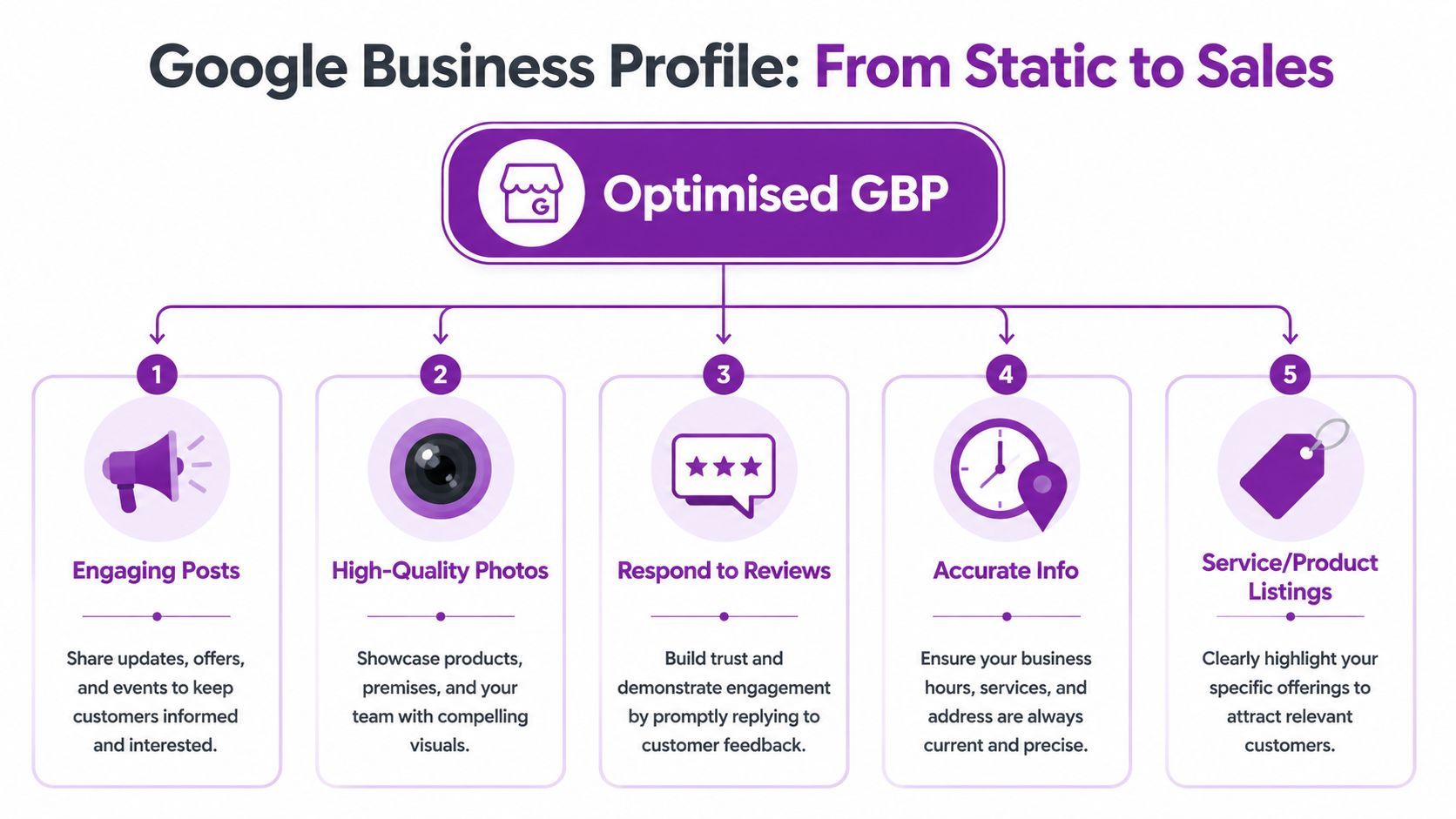
A complete Google Business Profile can still underperform if it does not help people choose you. Rankings get you seen. Conversion elements get the call, the booking, or the enquiry.
That gap shows up constantly in local SEO work. Two businesses can appear in the same map pack, but the one with better photos, clearer services, stronger review handling, and sharper proof usually wins the lead. For multi-location firms and service-area businesses, the stakes are even higher because each profile has to convert local intent into measurable commercial action.
Write for decision-making, not just discovery
Your business description should answer the questions a buyer has before they click.
State the core service early. Mention the areas you serve in natural language. Add the details that reduce hesitation. For a wedding venue, that might be exclusive hire, licensed ceremony spaces, on-site accommodation, and in-house coordination. For a construction company, it might be extensions, refurbishments, commercial fit-outs, and listed building experience across specific parts of the UK.
Good descriptions do three jobs at once. They help relevance, set expectations, and qualify leads. A profile that says "construction services" is vague. A profile that says "house extensions, structural renovations, and design-and-build projects across Cambridge, Ely, and Newmarket" gives a prospect something concrete to act on.
Keep it plain:
- Lead with the main service
- Mention real coverage areas
- Use genuine differentiators
- Match the language on your website
- Cut repeated keywords
Keyword stuffing still hurts. It makes the profile look weak to users and low quality to Google.
Turn services into pre-sales content
The services section is often treated like admin. It should be treated like sales support.
List services the way customers search and compare. A wedding venue should split out venue hire, civil ceremony hosting, catering options, accommodation, and private wedding packages if they offer them. A care provider should separate live-in care, dementia care, respite care, and companionship. A builder should avoid lumping everything under "general building services" and break out kitchens, loft conversions, extensions, and commercial refurbishments.
This matters more for complex businesses. A multi-location company can use service lists to reflect what each branch delivers, instead of forcing one generic template across every listing. A service-area business can use them to align local intent with the right landing page and the right conversion path.
Consistency matters here. If the profile lists a service, the website should support it with a relevant page, case study, or at minimum a clear explanation. Otherwise, users click through and lose confidence.
Posts work best when they answer sales questions
Posts do not compensate for a thin profile, but they can improve conversion quality.
The strongest posts are tied to real commercial activity. A wedding venue can promote an open evening with a clear booking link. A construction firm can show a completed extension in St Albans and explain the brief, budget range, and timeline. A funeral director can publish practical guidance about arranging a service, memorial options, or what families should prepare before a first conversation.
Useful post types include:
- Recent projects with location details
- Seasonal offers where the sector allows them
- Events and open days
- New service announcements
- Awards, accreditations, and team updates
One specific post each month is usually better than a burst of weak updates. Freshness helps, but relevance and clarity matter more.
Photos often decide whether a prospect trusts you
Photos shape first impressions faster than any description field.
Poor images make a credible business look disorganised. Good images reduce uncertainty. That is particularly important in sectors where the customer is making a high-trust decision, such as wedding venues, care, legal services, or construction.
Use images that reflect what a buyer will see:
| Photo type | Why it matters |
|---|---|
| Exterior | Helps visitors recognise the premises |
| Interior | Sets expectations before a visit or call |
| Team | Adds credibility and reassurance |
| Work in progress | Shows how the service is delivered |
| Finished projects or spaces | Helps the buyer judge quality |
| Branded details | Reinforces professionalism |
For wedding venues, include ceremony areas, reception layouts, guest accommodation, and how the venue looks in different seasons. For construction firms, show finished workmanship, not just vans, tools, or site signage. For service-area businesses without a public office, use team, project, and process photography that proves the business is active and established.
Avoid stock imagery where possible. It fills space, but it rarely builds trust.
Reviews influence conversion long before they influence ranking
Review strategy should sit inside operations, not outside it.
The practical question is not "how do we get more reviews?" It is "when is the right moment to ask, and what kind of feedback helps the next buyer say yes?" For a construction company, that is often at handover, when the client has seen the finished job. For a wedding venue, it is after the event, once the couple has had time to come up for air. For a funeral home, the timing needs more care and more judgement.
A strong review process usually includes four parts:
- Ask after a clear positive milestone
- Send people to the right review link
- Encourage honest detail without scripting it
- Reply to every legitimate review
Specific reviews convert better than vague praise. "Great service" is fine. "Managed our winter wedding for 120 guests, handled the catering smoothly, and kept the day running to time" does far more sales work.
Response quality affects trust
Review replies are public sales copy, whether the business intends that or not.
A strong response sounds human, refers to the actual service, and keeps the tone right for the sector. For positive reviews, thank the customer and mention a real detail where appropriate. For negative reviews, acknowledge the issue, state the next step, and take sensitive details offline. Public arguments put off future customers far more than the original complaint.
I see the same mistake across UK profiles. Businesses either ignore reviews entirely or paste the same generic paragraph under each one. Neither approach helps. Responses should show that the business pays attention and handles people properly.
Add proof that can be tracked back to sales
A conversion-focused profile should support measurement, not just visibility.
That means connecting key actions to bookings, calls, enquiries, and branch-level performance. For single-location firms, that is straightforward. For multi-location and service-area businesses, it takes a tighter setup because each profile may serve different towns, service lines, and buying journeys. If one branch gets direction requests but another drives phone calls, the reporting should show that difference clearly.
A proper GBP reporting dashboard helps you monitor review growth, post activity, profile interactions, and local trends in one place, then compare that activity against lead volume and sales outcomes. Without that link back to revenue, businesses tend to optimise for vanity metrics instead of booked work.
The goal is simple. Make the profile persuasive enough to win the click, and structured enough to prove what that click was worth.
Winning Across Regions with Multi-Location and Service-Area Strategy
Single-location advice breaks down fast when a business serves multiple towns or operates from several branches. That’s where many UK firms waste time. They either create too many profiles, or they try to make one listing rank everywhere.
The common assumption is that a huge service radius solves the problem. It doesn’t. For UK service-area businesses, the better approach is to define service areas with up to 20 specific cities or postcodes, while broad radius targeting is largely ignored by Google Maps, as outlined in this guide to Google Business Profile optimisation.
Choose the right profile structure
The first decision is structural. Are you a business with one base serving many places, or a business with multiple legitimate physical locations?
Here's the simplest way to understand it:
| Factor | Service-Area Business (SAB) | Physical Location (Storefront) |
|---|---|---|
| Customer visits your premises | Usually no | Yes |
| Address shown publicly | Often hidden | Visible |
| Best for | Trades, home care, mobile services | Venues, clinics, offices, branches |
| Local landing pages needed | Yes | Yes |
| Risk if misused | Looking spammy or irrelevant across too wide an area | Duplicate or overlapping profiles |
A plumber in Peterborough covering nearby towns doesn’t need a separate profile for every postcode. A funeral group with staffed branches in Cambridge, Ely, and Huntingdon usually does need separate profiles, because each branch is a real customer-facing location.
What multi-location businesses get wrong
The biggest mistakes are operational.
Some firms clone the same business description, categories, and photos across every branch. Others point every profile to the homepage and give Google no location-specific website support. Some create listings for virtual offices or shared spaces where they don’t genuinely operate face to face. None of that holds up well.
What works is differentiation. Each location needs its own identity signals:
- Unique location page: Not a spun version of another town page
- Branch-specific photos: Real frontage, team, interior, or local work examples
- Correct local phone details where possible: Or a routing setup that still preserves consistency
- Specific services and copy: Reflect what that branch handles
- Local references: Nearby landmarks, service areas, community relevance, local case examples
Multi-location SEO isn’t one campaign repeated. It’s one system managed with local nuance.
For service-area businesses, define real service zones. If a builder based in Cambridge works in Ely, Newmarket, St Ives, and surrounding postcodes, list those areas with intention. Don’t throw half of East Anglia into the profile because the dropdown allows it.
The website has to carry its share
Google Business Profile can’t do all the work alone. If you want stronger regional visibility, the site needs supporting pages.
A good location page does three things. It matches the profile, it proves local relevance, and it gives the user the next step. That means clear service information, local context, trust signals, and obvious contact paths.
For example, a construction firm targeting Cambridgeshire doesn’t just need a generic “services” page. It benefits from pages for the towns it actively serves, supported by examples and local relevance. If you’re planning those pages, this example of SEO services in Cambridge shows the kind of location-led structure that supports stronger local intent targeting.
Measuring What Matters to Prove Your ROI
A profile can look busy and still fail commercially. Views are nice. Rankings are useful. Neither pays the invoices on its own.
The right question is simple. What did Google Business Profile contribute to leads, bookings, visits, and sales?
That’s where a lot of local SEO reporting falls apart. Businesses get screenshots of rankings and a handful of visibility graphs, but no clean path from Maps activity to commercial outcomes. You can’t manage what you don’t measure.

Start with action metrics
The most useful GBP indicators usually sit closest to intent:
- Phone calls: Especially for funeral homes, trades, healthcare, and urgent services
- Website clicks: Useful when tracked properly into enquiries
- Direction requests: More relevant for venues, clinics, offices, and showrooms
- Booking actions or form completions: The clearest lead indicator when connected through the site
- Message enquiries: Where enabled and monitored properly
A wedding venue and an emergency electrician shouldn’t be judged the same way. The venue may see longer lead times and more website-assisted journeys. The electrician may convert directly from a call without much site browsing.
Use UTM tagging and call tracking
If you want attribution beyond guesswork, set up tracking at the link level.
Add UTM parameters to the website link in GBP so traffic from the profile is identifiable inside analytics. That lets you separate general organic traffic from profile-driven visits. Once that’s in place, you can look at what those visitors do on the site, such as submit an enquiry form, view a location page, or call from mobile.
Call tracking needs care. The tracking setup must preserve NAP consistency across the web, not create conflicting core business details. Used properly, call tracking gives a much clearer view of which enquiries came through Google local activity.
A simple measurement stack often includes:
- GBP Insights for platform-level interaction data
- Google Analytics with UTM-tagged profile links
- Call tracking for phone attribution
- CRM or lead log for sales outcome tracking
- Spreadsheet or dashboard tying enquiries back to source and branch
This is also where some businesses use Bare Digital alongside tools like BrightLocal and Local Falcon, especially when they need profile tracking connected to local SEO reporting rather than isolated snapshots.
Geo-grid tracking exposes hidden weakness
A profile can rank well in its immediate centre and still disappear a few miles away. That matters a lot for service businesses and regional operators.
Using geo-grid tools reveals those visibility gaps. 68% of multi-location profiles suffer from rank drops, appearing at the top in their city centre but falling to #7 or lower in nearby suburbs, according to this geo-grid tracking overview. That’s often why a business “feels strong” in one postcode but weak everywhere else.
A single ranking check from your office doesn’t tell you how customers across your service area actually see you.
A practical review cycle looks like this:
| What to check | Why it matters |
|---|---|
| Calls and enquiries by location | Shows where visibility turns into demand |
| Landing page visits from GBP | Confirms whether profile traffic reaches the site |
| Geo-grid gaps | Reveals weak suburbs or postcode clusters |
| Review trend and response speed | Indicates whether trust signals are improving |
| Branch-by-branch outcomes | Prevents strong locations hiding weak ones |
If you need to model whether local SEO investment can produce viable returns against lead value, a self-storage ROI calculator for SEO is niche by sector, but it shows the sort of commercial thinking more businesses should apply to local visibility.
Common Pitfalls and How to Sidestep Them
Most GBP damage is self-inflicted. Not malicious. Just careless.
The first mistake is keyword stuffing the business name. Businesses do it because they see others doing it. The short-term temptation is obvious. The risk is profile edits, suspensions, and a listing that looks untrustworthy to customers.
The second is using an address that doesn’t qualify, such as a virtual office or mailbox setup for a service business that doesn’t meet clients there. That usually creates problems at verification and even bigger problems later if the profile gets reviewed.
The third is review manipulation. Don’t offer incentives, don’t gate unhappy customers away from leaving public feedback, and don’t ask staff to flood the profile with “natural-looking” reviews. Ask real customers, consistently, and let the review mix develop organically.
The fourth is making repeated edits without evidence when Google rejects changes. If a category, address, or business name update won’t stick, stop submitting random variations. Check whether the website, signage, and supporting citations support the change.
A fifth problem sits outside GBP but affects trust all the same. Businesses often push out messy public updates and low-quality announcements that confuse branding and local relevance. If you publish news, offers, or announcements around your business, this guide to press release mistakes to avoid is worth reading because the same principle applies. Clarity beats noise.
If fake reviews appear, report them through the proper route, document them, and respond calmly if needed. Don’t launch into a public argument. Customers read your reply as closely as the complaint.
Conclusion: Make Your Profile Your Best Salesperson
A strong Google Business Profile does more than help you appear on a map. It answers questions, reduces doubt, proves credibility, and moves people towards action. When the setup is clean, the profile content is active, the regional strategy fits the business model, and the tracking is tied back to enquiries, GBP becomes a genuine sales channel.
That’s the shift many UK businesses need to make. Stop treating it as admin. Treat it like a member of the team that works every day, handles first impressions, and influences buying decisions before anyone reaches your website.
For a single-location venue, that means sharper presentation and better enquiry flow. For a regional service business, it means disciplined area targeting and location support. For a multi-branch business, it means operational consistency without making every branch look identical.
The businesses that stay organised and keep improving usually compound results over time. The ones that neglect the profile often lose local demand they never even realise was available.
If you want a practical next step, Bare Digital helps UK businesses turn local visibility into measurable leads through Google Business Profile management, local SEO strategy, and a free SEO health check that shows what’s holding performance back.