
If a potential customer is searching for your services on their phone and you don't show up, you might as well be invisible. The first step to add your business on Google Map is creating and verifying a Google Business Profile. Think of it as your digital shopfront, right inside Google's search results.
Why Your Business Needs to Be on Google Maps
Let's cut to the chase: if customers can't find you on Google Maps, you're losing business. It’s not just about getting a pin on a map; it's about plugging into the huge wave of 'near me' searches that drive how people shop today. A well-managed Google Business Profile (GBP) is probably the most powerful local marketing tool you have.
For any small or medium-sized business, especially in a competitive area, visibility is everything. A Google Maps listing levels the playing field. It lets a local bakery or a specialist plumbing service show up right next to the big chains the moment a nearby customer decides they need something.
The Power of Local Search Intent
Today's customers expect instant answers. When they search for "cafes near me" or "emergency plumber in Cambridge," they want relevant results immediately. Your Google Business Profile is what connects that search directly to your front door.
It gives them all the vital information at a glance:
- Your exact location and directions.
- Up-to-date opening hours, including any holiday changes.
- Customer reviews that build instant trust.
- Contact details they can tap to call you directly.
This immediate access to info makes it incredibly easy for a customer to choose you.
From Visibility to Tangible Growth
The link between a Google Maps listing and real-world growth is clear. Local searches are booming, with 46% of all Google searches seeking local information. And those 'near me' queries? They've shot up by over 900% in recent years.
Businesses that land in the top three local results—the ‘local pack’—see a massive 126% more traffic. Even better, a huge 76% of people who search for something nearby on their phone visit a business within 24 hours, and 28% of those searches result in a purchase.
For SMEs, particularly those on a tight budget, a fully optimised Google Business Profile offers an incredible return on investment. It's not just a listing; it's a dynamic tool for attracting footfall, generating leads, and building a loyal local customer base.
Effectively managing your profile is a cornerstone of any good local marketing strategy. By understanding the core benefits of local SEO, you can turn your Google Maps presence from a simple pin into a consistent source of new business. This guide will show you exactly how to get it done.
Setting Up Your Google Business Profile
Right, let's get down to the practical stuff. The tool you'll use to get your business onto Google Maps is called Google Business Profile (or GBP). Think of this section as your hands-on guide to creating or claiming your profile, covering the essential details that so many businesses get wrong right out of the gate.
First things first, you need to head over to the official Google Business Profile page. Make sure you're signed in with your business's Google account, not your personal one – it just keeps everything cleaner. Once you're in, you'll either be creating a new profile from scratch or, more likely, finding an existing one that Google has already cobbled together for you.
Finding or Creating Your Business Listing
Start by typing your business name into the search bar. If you see it pop up in the drop-down list, that means a profile already exists. Don't panic; this is completely normal. Google often pulls public data to create basic listings. If this happens, just select it and click "Own this business?" to start the claiming process.
If your business name doesn't show up, you'll be prompted to create a new profile from the ground up. This is great, as it gives you a clean slate to get all your information in correctly from the start.
Key Takeaway: Don't be alarmed if a listing for your business already exists. Claiming it simply means you're taking official ownership, allowing you to manage and update all the information customers see when they search for you.
Nailing the Core Details
Accuracy is everything when you add business on google map. Google rewards consistency, and your customers depend on it. Getting these foundational bits right is non-negotiable.
-
Business Name: This needs to be your official business name. Whatever is on your shop sign, your website, and your business registration documents – use that. It's tempting to stuff keywords in here like "Best Plumber in Cambridge," but resist. It’s against Google's guidelines and can get your profile penalised.
-
Business Category: This is a huge one. Your primary category should be the most accurate description of what you do. For instance, if you run a coffee shop that also sells incredible pastries, your primary category is "Coffee shop," not "Bakery." You can always add secondary categories later to cover everything else you offer.
This screenshot shows exactly where you'll be asked for your business name and category during the initial setup.
Choosing the right category helps Google show your business to people making relevant searches, which has a direct impact on how many potential customers find you.
Defining Your Location and Service Area
Next up, you’ll tell Google how you serve your customers. This is a critical step that differs for bricks-and-mortar shops and service-based businesses.
If you have a physical shop that customers can actually visit, like a bookshop in Ely, you'll need to enter your full, precise address. This address is what puts your pin on Google Maps for everyone to see.
But what if you're a service-area business, like a mobile dog groomer who travels to clients across Cambridgeshire? In that case, you’ll tick the box saying you don't have a location customers can visit. Instead of a single pin, you'll define your service area by listing the postcodes, towns, or counties you cover. This is how you show up in "near me" searches in those places, without giving away your home or office address. If you want to get a better handle on what a Google Business Profile is and how it works, our introductory guide is a great place to start.
Adding Contact Information and Your Website
Finally, pop in your business phone number and website URL. It is absolutely crucial that these details are identical to what’s listed on your website and any other online directories. This consistency is what the SEO world calls NAP (Name, Address, Phone Number) consistency. It's a massive trust signal for Google; when your NAP is consistent everywhere, the algorithm sees your information as reliable and is more likely to rank you higher. For a deeper dive, check out these more resources on Google Business Profiles.
Once you've submitted these initial details, you're ready for the next critical phase: verification. This is the final gatekeeper before your profile goes live, and we'll walk you through exactly how to get it done smoothly in the next section.
Navigating the Verification Process in the UK
Once you’ve put in your core business details, Google needs to confirm you’re a real, legitimate operation at the address you’ve given. This is the verification stage, and honestly, it can sometimes feel like the final boss battle before you can properly add your business to Google Maps.
Don’t worry, though. With a bit of prep, it’s a pretty straightforward process. Google’s main goal here is to weed out fake listings and make sure the information on Maps is trustworthy. For UK businesses, they offer a few different ways to get verified, and the options you see often depend on your business type, how long you've been around, and what Google can already find about you online.
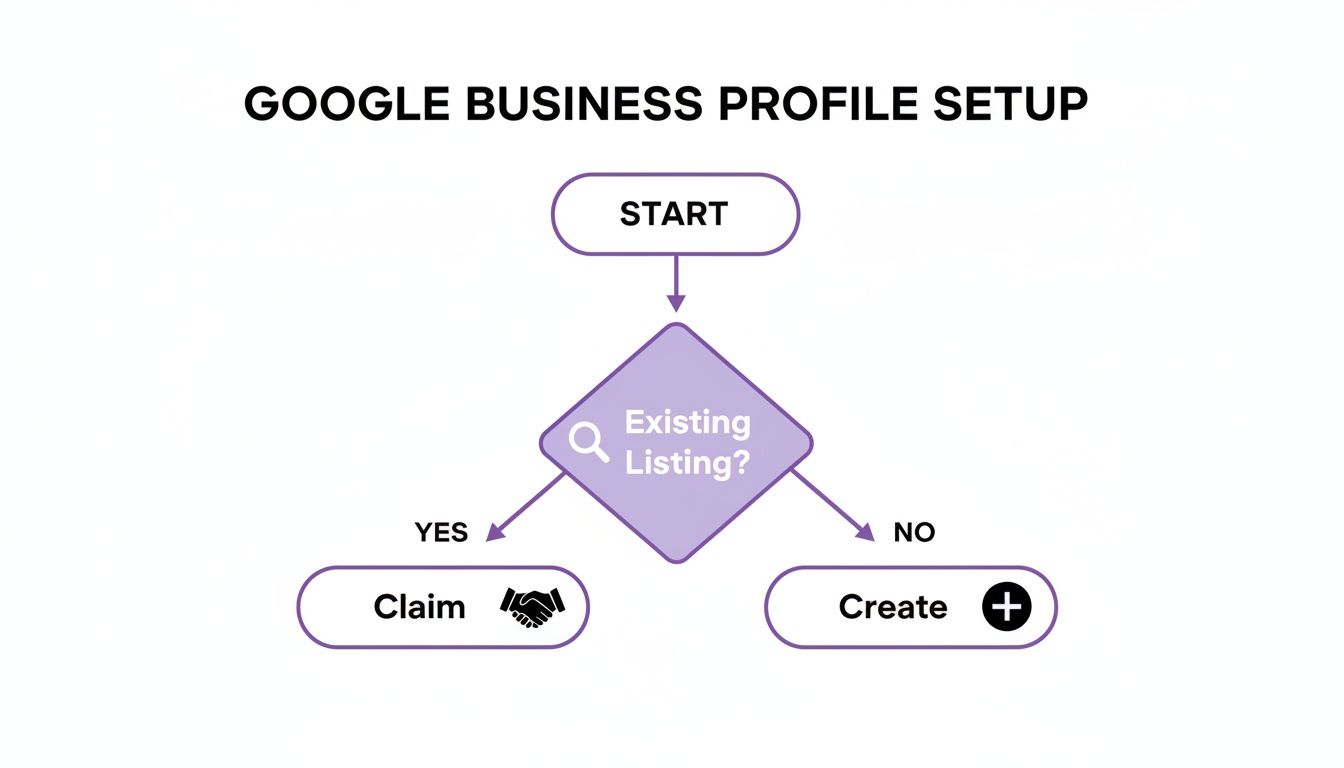
This flowchart neatly sums up that first decision: are you claiming a profile that already exists, or starting from scratch? If you're creating a new one, verification is your next stop.
Understanding Your Verification Options
Not everyone gets the same choices. A brand-new business might face a few more checks than an established company with a solid digital footprint.
Here’s a rundown of the most common methods you’ll likely come across:
- Postcard Verification: The old classic. Google pops a postcard in the mail with a unique verification code, sent directly to your business address. When it arrives (usually within 14 days), you just log back into your profile and punch in the code.
- Phone Verification: Some businesses get the option to verify via a phone call or text to their official business number. An automated system will give you a code. Simple.
- Email Verification: Much like the phone method, a code is sent to your business email address (think
yourname@yourwebsite.co.uk). This one is a bit less common and usually only pops up if Google can already connect your domain to the business. - Video Verification: This is becoming the go-to method, especially for new profiles or service-area businesses that don't have a physical shopfront. You'll need to record a quick video showing proof of your business in action.
Choosing the right verification method is key to getting your profile live without any hiccups. To help you decide which one works best for your situation, have a look at this comparison.
Google Business Profile Verification Methods Compared
| Verification Method | How It Works | Best Suited For | Common Pitfalls |
|---|---|---|---|
| Postcard | Google mails a postcard with a 5-digit code to your physical business address. | Businesses with a clear, staffed physical location (e.g., retail shops, offices). | Postcard gets lost in the mail; delays beyond 14 days; incorrect address entered. |
| Phone | An automated call or text sends a code to your registered business phone number. | Businesses with a dedicated, listed phone number that can be publicly verified. | Not available for all businesses; calls can be missed if you're not ready. |
| A verification code is sent to an email address associated with your business domain. | Businesses with a professional domain and website (e.g., info@mycompany.co.uk). |
Not offered if Google can't link your domain to the business; email ends up in spam. | |
| Video | You record a video showing your location, business assets, and proof of management. | Service-area businesses (e.g., plumbers, cleaners) and home-based businesses. | Poor video quality; not showing all required elements clearly; failing automated checks. |
Each method has its place, so pick the one that aligns best with how your business operates. If you're a tradesperson working from home, video is likely your best bet, while a high-street shop will probably find the postcard method easiest.
Preparing for a Smooth Verification
A little preparation goes a long way, especially if you get asked for a video verification. Think of it as gathering your evidence before you start the process to avoid any back-and-forth.
If you’re asked to record a video, you'll generally need to show three things:
- Your Location: Start the video outside. Capture the street sign and any exterior branding on your building. This proves you are where you say you are.
- Proof of Business: Walk inside and show your workspace. This could be your shop floor, your office, or even a storage area with company-branded gear.
- Proof of Management: This is about showing you’re in charge. Film yourself unlocking the front door, accessing a staff-only area, or showing official paperwork like a business licence or a recent utility bill with the correct address.
Pro Tip: Before you hit record, get all your props ready. If you're a mobile mechanic, have your branded van, tools, and a business card handy. If you’re in an office, have your business registration documents sitting on your desk. The smoother and more convincing your video is, the faster you’ll get approved.
Troubleshooting Common Verification Problems
Sometimes things just don’t go to plan. It’s one of the most common headaches when you're trying to add a business to Google Maps, but nearly every issue has a solution.
A classic problem is the postcard not showing up. If 14 days have passed, don’t just sit and wait. Log back into your Google Business Profile, and you should find an option to request a new one. Before you do, triple-check that you entered the address perfectly, right down to the postcode.
And if you fail a video verification, don't throw in the towel. The automated system can be a bit picky. Just review the requirements again, make sure your next video is clear and steady, and shows undeniable proof that your business is real. If you’re still stuck after a couple of tries, you might need to reach out to Google support, but a bit of persistence usually gets the job done.
Optimising Your Profile for Maximum Local Impact
Getting your business verified is a huge step, but it’s really just the starting line. Now the real work begins: turning that basic listing into a powerful tool that actively pulls in new customers.
Simply existing on Google Maps isn't enough anymore. You need to give Google every possible reason to show your profile to potential customers over your competitors. A fully fleshed-out profile doesn't just look better—it performs better. Think of it this way: every section you complete acts as another positive signal to Google about your business's relevance and authority.
This is the difference between having a simple pin on the map and having a dynamic digital shopfront that works for you around the clock.
Crafting a Compelling Business Description
Your business description is your 750-character elevator pitch. It’s your chance to quickly tell potential customers who you are, what you do, and—most importantly—why they should choose you. Don't just list your services; tell a bit of a story.
Instead of a generic "Plumbing and heating services in Cambridge," try something with more personality: "A family-run plumbing firm serving Cambridgeshire for over 20 years. From emergency boiler repairs to full bathroom installations, our certified engineers provide reliable, friendly service you can count on."
See the difference? This version is not only more personable but also includes valuable keywords like "boiler repairs" and "bathroom installations" that people are actually searching for.
The key is to blend persuasive language with locally-focused keywords. Mentioning the specific areas you serve, like "Ely," "St Ives," or "across Cambridgeshire," reinforces your local relevance, which is a massive ranking factor.
The Power of High-Quality Photos and Videos
Photos are completely non-negotiable. They are often the first thing a potential customer looks at, and they build trust much faster than words ever could. The stats back this up: businesses with photos receive 42% more requests for directions and 35% more website clicks than those without.
Your goal should be to upload a variety of high-quality images that showcase every part of your business:
- Exterior Shots: Show your shopfront from different angles so customers can easily recognise it when they arrive.
- Interior Photos: Give people a feel for your atmosphere, whether it’s a bustling café or a professional office.
- Team Photos: Putting faces to your business makes it far more approachable and builds a personal connection.
- Products & Services: Show your products on the shelves or, even better, your team in action providing a service.
And don’t just stop at static images. Short videos (up to 30 seconds) can have an even greater impact. A quick tour of your premises, a demonstration of a product, or a clip of your team at work can really make your profile stand out. Keep your visuals fresh by adding new ones every few weeks.
Showcasing Your Services and Products
The "Services" and "Products" sections are vital for telling both customers and Google exactly what you offer. You need to be specific here. Instead of a single service entry for "Hairdressing," break it down into "Ladies' Cut & Finish," "Balayage Colouring," and "Gents' Haircut."
For each service, you can add a description and even a price. This level of detail helps you appear in more specific searches (e.g., "balayage near me") and gives customers the information they need to make a decision without having to click away to your website.
If you're interested in a deeper dive, our comprehensive guide to Google Business Profile optimisation covers these features in much more detail.
Engaging Customers with Google Posts and Messaging
Think of Google Posts as mini-adverts that appear directly on your profile. Use them to announce special offers, highlight new products, share company news, or promote upcoming events. Each post stays live for seven days (or until an event date passes), making them a fantastic way to create a sense of urgency and show that your business is active and current.
Enabling the Messaging feature is another must. It allows customers to send you a direct message straight from your profile. In an age of instant communication, this simple, low-friction contact method can be the difference between securing a new lead and losing them to a competitor who's easier to reach. Just be sure to respond promptly—Google actually tracks and displays your average response time.
On top of this, a huge part of optimisation is actively engaging with customer feedback. Learning about leveraging customer feedback and maps reviews can seriously help refine your online presence and build trust.
The effort you put into optimisation really does pay off. UK businesses with complete and optimised profiles receive 7 times more clicks and are seen as 2.7 times more credible. By methodically working through each section of your profile, you build a comprehensive and compelling picture of your business that both Google and your future customers will reward.
Advanced Strategies for Local SEO Success
Once your profile is set up and fully optimised, the real work begins. It’s time to connect it to a wider, more powerful local SEO strategy. A complete profile is a fantastic starting point, but genuine local dominance comes from sending consistent trust signals to Google from every corner of the web. This is where you move beyond just managing the profile and start actively building its authority.
These next steps are what separate the businesses that show up occasionally from those that consistently own the top spots in the local pack. It's all about managing your reputation, keeping your business data consistent online, and making smart decisions based on the data you have.
Harnessing the Power of Customer Reviews
Customer reviews are the lifeblood of local SEO. They're a huge ranking factor because they provide powerful, unbiased social proof that Google loves. A steady stream of positive reviews tells both Google and potential customers that your business is legitimate, active, and trusted by the local community.
You should actively, but ethically, encourage happy customers to leave feedback. Never offer incentives for reviews—that’s a fast track to violating Google's terms. Instead, just make it incredibly easy for them. A simple follow-up email after a sale or a QR code at your checkout linking directly to your review page can work wonders.
Responding to every single review—good and bad—is completely non-negotiable.
- For positive reviews: Thank the customer by name. Mentioning the specific product or service they enjoyed helps reinforce those keywords for Google, too.
- For negative reviews: Always respond professionally and quickly. Acknowledge their issue, offer to take the conversation offline to find a solution, and show other potential customers that you take feedback seriously.
A well-handled negative review can sometimes be more powerful than a positive one. It demonstrates excellent customer service and shows that you are a responsible business owner who values feedback, which builds immense trust.
Building Consistent Local Citations
Beyond your own profile, Google scours the web for mentions of your business to verify its details. These mentions are called local citations, and they are simply listings of your business's Name, Address, and Phone number (NAP) on other websites and directories.
Consistency here is absolutely critical. Your NAP information must be identical across every single platform. Even a small variation, like using "St." instead of "Street" or "&" instead of "and," can create confusion for search engines and water down your profile's authority.
In the UK, it’s vital to get your business listed on high-authority local directories. Focus on getting your details perfectly correct on platforms like:
- Yell
- FreeIndex
- Thomson Local
- Your local Chamber of Commerce website
The goal is to weave a consistent, reliable web of information that confirms to Google that your business is exactly who and where you say it is. Maintaining this consistency is a true game-changer. In fact, research shows that UK businesses with consistent citations can see up to 32% higher visibility in local search results—a massive advantage for SMEs in competitive areas like Cambridgeshire.
Using GBP Insights for Data-Driven Decisions
Your Google Business Profile comes with a treasure trove of data in its "Insights" or "Performance" dashboard. These aren't just vanity metrics; they are a roadmap showing you exactly how customers are finding and interacting with your listing.
This dashboard reveals key information, such as:
- How customers search for you: Are they typing your business name (a direct search) or finding you by looking for a category, product, or service (a discovery search)?
- Where customers view you: Are they finding you on Google Search or directly on Google Maps?
- Customer actions: How many people called you, visited your website, or asked for directions?
Reviewing this data regularly allows you to make properly informed decisions. For instance, if you see a spike in calls right after publishing a specific Google Post, you know that type of content is hitting the mark. If lots of people are finding you through "discovery" searches for a particular service, you should probably create more content around that service to boost your ranking even further. To learn more about using this data effectively, check out our guide on how to rank in Google Maps.
By combining a strong review strategy, consistent local citations, and a smart analysis of your performance data, you can seriously amplify your local SEO efforts. This approach ensures that when you add your business on Google Maps, you’re not just creating a listing—you’re building a dominant local presence.
Common Questions About Google Business Profiles
Even with a perfectly optimised profile, a few practical questions always seem to pop up. Let's run through some of the most common ones we hear from business owners after they add their business on Google Maps. Think of this as your go-to guide for handling those tricky, real-world situations you're bound to come across.
What Should I Do if My Business Address Is My Home?
This is a massive concern for service-area and home-based businesses in the UK, but the solution is thankfully straightforward. For privacy and security, you absolutely should hide your home address.
When you're setting up your profile, Google will ask for a location. You'll need to provide your real address for verification, but you must select the option that says you serve customers at their locations.
From there, you simply define your service area by listing the postcodes, towns, or counties you cover (e.g., 'Cambridgeshire' or 'CB1, CB4, CB5'). This makes sure your profile shows up in relevant local searches without ever putting your private address on the map.
How Long Does It Take for My Business to Appear on Google Maps?
Patience is key here, but usually not for too long. Once your business profile is successfully verified, it typically appears on Google Maps and in Search results within just a few hours. That said, it can sometimes take a couple of days for everything to fully sync up across Google's systems.
The verification step itself is what usually takes the most time. A verification postcard, for example, can take up to 14 days to arrive in the UK. After you’re live, any edits you make—like updating your bank holiday opening hours—are usually reflected almost instantly.
Can I Add My Business if I Don't Have a Physical Shopfront?
Yes, absolutely. A Google Business Profile isn't just for businesses with a traditional bricks-and-mortar presence. It’s actually designed to accommodate three main business models:
- Shopfronts: Businesses customers can visit in person, like a café or a retail shop.
- Service-Area Businesses: Professionals who travel to their customers, like a mobile dog groomer or an electrician.
- Hybrid Businesses: Those that do both, such as a bakery that has a shop but also offers a local delivery service.
The one crucial requirement is that you have some form of in-person contact with your customers. Purely online businesses that operate without any face-to-face interaction generally aren't eligible for a Google Business Profile listing.
Ready to stop worrying about your local visibility and start dominating search results? The team at Bare Digital specialises in turning your Google Business Profile into your most powerful customer acquisition tool. We offer a free SEO Health Check to show you exactly where you stand. Get your free, no-obligation SEO proposal from Bare Digital today!