

It’s a heart-sinking moment for any business owner: you check your Google Business Profile, only to find your hard-earned reviews have vanished into thin air. You're not alone—it’s a widespread issue caused by everything from aggressive AI spam filters to accidental policy slip-ups. This guide will cut through the confusion and give you a clear plan to figure out what went wrong and how to fix it.
Why Your Google Reviews Disappeared and What to Do Next
Realising your customer reviews are gone is genuinely alarming. These testimonials are more than just feedback; they're the bedrock of your online reputation and a massive signal for local SEO. When they disappear, it can hit your visibility and customer trust hard.
The reasons are often complex, ranging from automated moderation doing its job a little too well to simple technical glitches. It’s a common headache for businesses of all sizes, and getting to the root cause is the first real step towards a solution.
The UK's Stricter Review Landscape
Businesses in the United Kingdom are under a particularly watchful eye. This is largely thanks to the Competition and Markets Authority's (CMA) deep dive into fake reviews. Following their investigation, Google committed to rolling out much stricter systems to sniff out and remove dodgy feedback.
With research suggesting that a staggering £23 billion of UK consumer spending is influenced by online reviews each year, the stakes are incredibly high. This heightened scrutiny means UK businesses often see more reviews getting zapped than their counterparts elsewhere. You can read the full report from the CMA on GOV.UK to get the full picture.
This pressure from regulators has forced Google's hand, leading to an algorithm that can sometimes be overzealous, flagging genuine, hard-won reviews right alongside the fakes.
The core issue is that Google's automated systems are built to spot patterns. A sudden surge of five-star reviews, even if they're all completely legitimate, can trigger the same red flags as a coordinated fake review campaign. It's a classic case of collateral damage.
Common Causes for Disappearing Reviews
To actually tackle the problem, you need to know what you’re up against. When your reviews vanish, it usually falls into one of three buckets:
-
Policy Violations: The review itself, your business's response, or even the reviewer has broken one of Google’s rules. This could be anything from a customer including a URL in their review to a staff member leaving well-intentioned feedback from their personal account.
-
Spam Filter False Positives: Google's AI has mistakenly flagged a genuine review as spam. This is a classic one. It often happens if multiple reviews are posted from the same location or IP address, like from an in-store tablet.
-
Technical Glitches: Sometimes, the reviews aren't actually deleted. They might just be hidden due to a display bug or a temporary hiccup with your Google Business Profile, which is an absolutely crucial asset for your local visibility.
To help you get started, here's a quick way to diagnose what might be happening.
Quick Diagnostic Chart for Disappearing Reviews
This chart breaks down the most common symptoms and their likely causes, giving you a starting point for your investigation.
| Symptom | Potential Cause | First Action Step |
|---|---|---|
| A single, specific review is missing. | Policy Violation or Spam Filter | Check the review content for prohibited elements like links or profanity. |
| Multiple reviews disappeared at once. | Profile Suspension or Technical Glitch | Check your GBP dashboard for any suspension notices or verification requests. |
| Reviews from a specific period are gone. | Algorithm Update or Spam Filter Sweep | Look for industry news about recent Google algorithm changes. |
| A customer says they left a review, but you can't see it. | Reviewer's Account Issue or Spam Filter | Ask the customer to check if their review is visible from their own account. |
Use this table to quickly narrow down the possibilities. If one of these scenarios fits, it gives you a much clearer path forward instead of just guessing.
The following sections will dive deeper into each of these areas, giving you actionable steps to identify the cause and begin the process of recovering your valuable social proof.
So, Why Do Reviews Vanish Into Thin Air?
When a glowing customer review suddenly disappears from your Google Business Profile, it’s easy to assume the worst. But it's rarely a random glitch. Most of the time, it’s Google's own complex, automated systems doing their job—just not always perfectly. These systems are built to shield users from spam and fake feedback, but sometimes, genuine reviews get caught in the crossfire.
The usual suspect is Google’s increasingly sensitive AI spam filter. Think of it as an overzealous bouncer. It’s trained to spot shady patterns, but it can easily mistake a genuine flood of happy customers for a fake review campaign. One minute you’re celebrating a surge of positive feedback, the next it’s gone without a trace.
This isn't just a hunch; it's a growing problem. Recent industry analysis shows a massive spike in review deletions worldwide. A deep dive into over 5 million reviews found that a staggering 73% of all deleted reviews were actually 5-star ratings. This tells us that Google's algorithm isn't just hunting for negative spam. It's scrutinising positive feedback with the same intensity, creating a real headache for businesses earning honest praise. You can read more about these startling review deletion trends on Search Engine Land.
Accidental Policy Slips
Plenty of businesses fall foul of Google's strict content policies without even realising it. These aren't sneaky attempts to game the system, but small, innocent mistakes that trigger an automated removal. Knowing what these are is the first step to avoiding them.
Here are a few common, unintentional slip-ups:
- Reviews from Your Own Team: Even if a staff member genuinely loves their job and wants to leave a five-star review from their personal account, Google sees this as a clear conflict of interest. It will almost certainly be taken down.
- Offering a Bit Too Much Encouragement: You simply can't offer discounts, vouchers, or any reward for a review. A sign in your window saying, "Leave a review for 10% off," is a massive red flag for Google’s bots.
- The In-Store Review Kiosk: Setting up a tablet or laptop at your shop for customers to leave reviews seems like a great idea, but it’s a recipe for disaster. Multiple reviews coming from the same IP address look highly suspicious to the spam filter.
Picture a popular Cambridgeshire café that runs a special promotion. Delighted customers start leaving feedback, but dozens of reviews pop up in a single day, many written while connected to the café’s free Wi-Fi. The algorithm sees this sudden, localised activity, mistakes it for spam, and wipes the lot.
The Maddening Reality of Display Bugs
Sometimes, the review isn’t actually gone for good. Instead, it’s stuck in a frustrating technical limbo—a display bug. In this scenario, the review is safe and sound in Google's backend system, but for some reason, it just isn't showing up on your public profile.
This can be one of the most confusing issues because there’s no policy violation to fix. Your review count might drop, or certain reviews might become invisible, even though you’ve done everything by the book. These bugs often pop up after Google rolls out an algorithm update or makes changes to the Business Profile interface.
For instance, a business might update its address or change its primary service category. This can trigger a temporary sync issue, causing reviews to vanish while the system processes the new information. They usually reappear on their own, but not knowing what’s happened can cause a lot of anxiety. Figuring out whether you’re dealing with a permanent deletion or a temporary glitch is key to deciding what to do next.
A Practical Playbook for Recovering Lost Reviews
It’s a gut-wrenching moment: you log in to your Google Business Profile and notice a handful of genuine reviews have simply vanished. The first instinct is often to panic or fire off an angry email, but a methodical approach is far more effective. This isn't about complaining; it's about building a clear, evidence-based case for reinstatement.
Your first port of call should always be your own Google Business Profile dashboard. Check for any notifications or alerts from Google. While they don't always send an email, sometimes you'll find a notification directly within your profile manager that sheds light on what’s happened. If there’s nothing obvious, your next job is to play detective.
Assembling Your Evidence
Before you even think about contacting support, you need to collect every piece of information you can. This is easily the most important step in the recovery process. Without solid proof, your request is likely to go nowhere.
Your evidence file should ideally include:
- Screenshots of the Missing Reviews: This is the gold standard. If you have screenshots of the reviews before they disappeared, it provides undeniable proof they once existed.
- Reviewer Information: Note down the customer's name and the approximate date they posted the review. If you can get the specific URL of their Google Maps profile, even better.
- Your Business Details: Have your business name, address, and the URL for your Google Business Profile ready to go.
This level of preparation shows Google Support that you’re organised and serious, making it much easier for them to investigate your claim.
Of course, the process of dealing with Google can be frustrating, especially when it comes to negative feedback you want removed. While this guide focuses on recovering lost positive reviews, understanding the rules for both is essential. If you're also dealing with malicious feedback, you can check out our guide on how to remove a bad Google review.
Display Bug vs Policy Deletion
It’s critical to understand what you're reporting. Is it a genuine policy deletion, or is it a display bug? Your approach will differ significantly depending on the answer. This flowchart breaks down the common reasons a review might vanish.
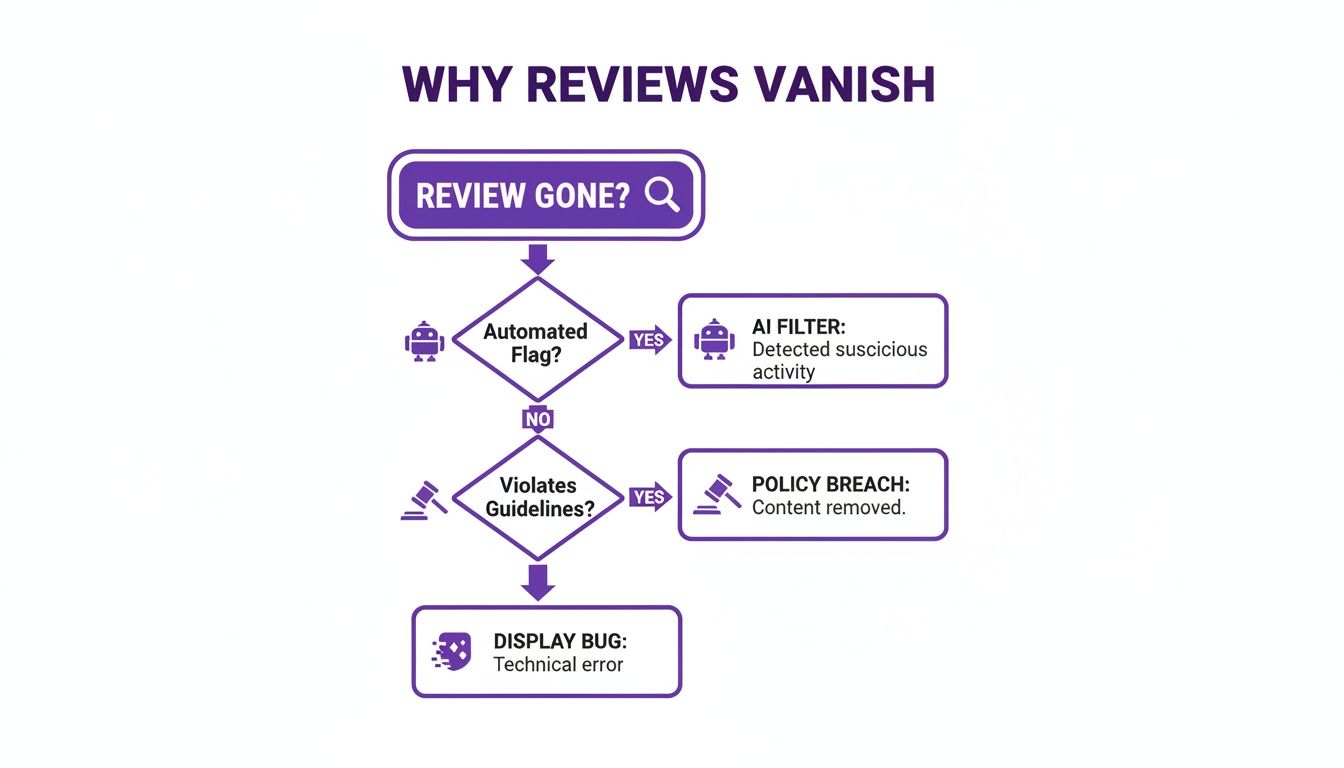
This visual helps you quickly diagnose whether you're likely facing an automated moderation issue, a rule violation, or a technical glitch on Google's end.
A surprising amount of the time, the problem isn't a deletion at all. Google has officially acknowledged widespread display bugs where reviews exist in the backend but the public count is wrong. In fact, analysis suggests that around 50% of disappearance cases are actual algorithmic removals, while the other half are simply display glitches. Knowing this helps you frame your support request correctly.
Crafting Your Support Request
When you contact Google Support, clarity and professionalism are key. Use a structured format that presents your evidence logically and makes it easy for the agent to understand the problem.
Pro Tip: Open your support ticket by stating you are reporting a potential display bug or an incorrectly filtered genuine review. Avoid accusatory language. Your goal is to help them help you. Present the facts clearly and concisely.
Start by stating your business name and profile URL. Then, list the missing reviews with the details you gathered. For each one, explain why you believe it is a legitimate, policy-compliant review from a real customer. Keep it brief, factual, and polite. This simple, organised approach dramatically increases your chances of a swift and positive resolution.
Proactive Strategies to Safeguard Your Online Reputation

Trying to recover reviews after they’ve vanished is a reactive, and frankly, stressful process. The smarter, long-term approach is to build a resilient review profile that can weather algorithm updates and reduce the risk of genuine feedback getting flagged in the first place.
This means shifting your mindset from frantic recovery to proactive reputation management.
A solid strategy begins with ethically encouraging customer feedback in a way that aligns perfectly with Google's policies. This isn't about finding loopholes; it's about creating a smooth, compliant process that makes it incredibly easy for happy customers to share their experiences.
The aim is to generate a steady, natural flow of reviews over time. This looks far more authentic to Google’s algorithm than a sudden, suspicious burst of activity.
Building a Compliant Review Generation System
A system that consistently brings in new reviews is the bedrock of a healthy online reputation. One of the most effective tools in your arsenal is a direct Google review link. This link cuts through the noise, taking customers straight to the review submission box for your profile. No friction, no confusion.
You can easily embed this link in follow-up emails, print it on receipts, or create a simple QR code to display at your business. The trick is to make the request at the right moment—usually right after a great customer interaction or a successful job, while the positive experience is still fresh in their mind.
For a deeper dive into this, our guide on https://www.bare-digital.com/how-to-get-more-reviews/ is packed with actionable tactics.
It’s vital to remember that Google wants authentic, unsolicited feedback. Your job is to make leaving that feedback as straightforward as possible, not to pressure or incentivise customers. A simple, polite request is all you need.
To streamline all of this, many businesses find that dedicated reputation management software is a game-changer. It can automate much of the process, helping you stay on top of your online feedback without the manual grind.
Review Generation Do's and Don'ts
Many well-meaning businesses accidentally sabotage their own efforts with tactics that violate Google's policies. Knowing the difference between what’s safe and what’s risky is essential for protecting your profile.
Here’s a clear comparison to keep you on the right side of the guidelines.
| Do (Safe & Effective) | Don't (Risky & Against Policy) |
|---|---|
| Send a follow-up email with a direct review link after a purchase. | Offer a discount or gift in exchange for a review. |
| Use a QR code on your marketing materials that links to your review page. | Set up an on-site 'review station' (e.g., a tablet) for customers to use. |
| Politely ask satisfied customers in person if they would consider leaving feedback. | Filter feedback, only asking happy customers for reviews (known as review-gating). |
| Respond professionally to all reviews, both positive and negative. | Have employees or family members post reviews from their personal accounts. |
Avoiding the tactics in the 'Don't' column is non-negotiable. For instance, using a review kiosk results in multiple reviews coming from the same IP address—a huge red flag for spam filters.
Likewise, review-gating, where you screen customers and only direct the happy ones to Google, is a direct policy violation that can lead to severe penalties. A consistent, ethical approach isn't just the safest path; it's the only sustainable one.
When and How to Escalate Your Case
So, you’ve contacted Google Support. But instead of a resolution, you got a generic, unhelpful response. Maybe your ticket was closed without a real explanation, or worse, you were met with complete silence. It’s a frustrating spot to be in, but don’t throw in the towel just yet. You still have options.
Your next move is to take your case public—or at least, more public. This is where the Google Business Profile Help Community comes in. It’s a peer-to-peer forum, but it’s actively monitored by Google Product Experts. These aren’t Google employees, but they’re experienced volunteers who have a direct line to Google’s internal teams. A well-put-together post here can finally get the right eyes on your problem.
Crafting a Post That Gets Noticed
Simply posting "My reviews are gone" won’t cut it. That kind of post gets ignored. To get a Product Expert’s attention, you need to be clear, detailed, and professional. Think of it less like a complaint and more like you’re presenting a case file for investigation.
To give your post the best chance of success, make sure you include these key details:
- Your Case ID: Always, always include the reference number from your initial ticket with Google Support. It immediately shows you’ve already done your due diligence.
- Clear Business Information: Don't make them hunt for it. Provide your full business name, address, and the public URL of your Google Business Profile.
- Detailed Evidence: This is your proof. Attach screenshots of the missing reviews if you have them, the names of the reviewers, and the rough dates they were posted. The more evidence you can provide, the stronger your case.
- A Concise Summary: Briefly explain the issue and what you’ve already done. State clearly that you believe legitimate, policy-abiding reviews have been incorrectly filtered.
A common mistake I see is people writing long, emotional posts venting their frustration. While understandable, it’s not effective. Stick to the facts. Product Experts are far more likely to jump in and help someone who presents a clear, organised case that they can easily escalate.
Partnering with a Specialist Agency
Let's be honest—for most small and medium-sized businesses, this whole process is a massive drain on time and energy you probably don't have. This is where bringing in a specialist SEO agency can be a game-changer, especially for businesses in Cambridgeshire and across the UK who need that local expertise.
A good agency often has established channels and relationships that can speed up the escalation process. They know exactly how to frame the issue and who to talk to, which usually leads to a better and faster outcome. At Bare Digital, we handle these headaches for our clients all the time, protecting their digital footprint. Our work in online reputation management SEO isn't just about damage control; it's about making sure your profile is fully optimised to prevent these kinds of problems in the first place.
Your Burning Questions Answered
When reviews start vanishing, it's natural to have a lot of questions. I get it. It's confusing and frankly, pretty frustrating. Here are some straight answers to the questions I hear most often from business owners dealing with this exact problem.
How Long Does It Take to Get a Review Back?
Honestly, this one is all over the map. The timeline for getting a review reinstated really depends on why it disappeared in the first place.
If it’s just a simple display bug on Google’s side, you might see it pop back up within a few days or a couple of weeks. These things often get sorted out in batches when Google pushes a system update.
But if a review was flagged for a potential policy violation, you’re in for a longer wait, and there's absolutely no guarantee it'll come back. Your best bet is to put together a solid, evidence-backed case for Google Support. Even then, you'll need to be patient.
Is It Okay to Ask a Customer to Repost Their Review?
Yes, you absolutely can, and it's often the quickest way to solve the problem. If you're certain a genuine review was removed by mistake and you're hitting a wall with Google, there's nothing wrong with reaching out to the customer.
Just be polite about it. A quick, friendly message explaining that a technical glitch might have zapped their feedback usually works well. Ask if they’d be willing to post it again, but don't pressure them.
A quick tip: Make it incredibly easy for them. Send a direct link to your review page so they don't have to go hunting for it. The less work it is for them, the more likely they are to help you out.
Will Missing Reviews Actually Hurt My SEO?
I wish I could say no, but unfortunately, it can have a real impact. Google reviews are a massive ranking signal for local SEO.
When your total review count drops or your average star rating takes a hit, it can definitely hurt your visibility in local search and on Google Maps. It sends a negative signal to both potential customers and Google's algorithm. This is exactly why being proactive about managing and protecting your reviews is so important for keeping your local SEO performance strong.
Does This Mean My Whole Profile Is Suspended?
Take a breath—disappearing reviews don't automatically mean your entire profile is suspended. While it's alarming, a suspension is a much bigger deal where your whole Google Business Profile gets pulled from public view.
The first thing to do is check your GBP dashboard for any big red warning banners. If you see a notification telling you the profile is suspended, you've got a different problem to solve. You’ll need to go through the official reinstatement process for the profile itself. If there’s no warning, the issue is almost certainly isolated to the reviews.
At Bare Digital, we know just how much your online reputation matters. If you’re fed up with fighting to keep your reviews and want to build a resilient, high-ranking local presence, we can help. Get your free SEO Health Check and a tailored activity plan today.