
Improving your click-through rate is all about making your search result more appealing than everyone else's on the page. You do this by crafting compelling title tags and meta descriptions, grabbing rich snippets with structured data, and making sure your URL is clean and descriptive. Together, these elements boost your visibility and convince more people to click.
Auditing Your Current Click Through Rate Performance
Before you can start boosting your click-through rate (CTR), you need a solid baseline. Trying to improve CTR without knowing where you stand is like driving in a new city without a map—you might move forward, but you're probably going to get lost. A proper audit is the first step, turning pure guesswork into a data-driven strategy.
The best place to kick things off is Google Search Console (GSC). This free tool is your direct line to how your site performs in search, giving you hard data on impressions, clicks, CTR, and average position. Forget surface-level stats; GSC is where you dig in and find your biggest opportunities.
Pinpointing Your Quick Wins
Your initial audit is all about finding the low-hanging fruit: pages that are already getting plenty of visibility (high impressions) but just aren't attracting clicks (low CTR). These are your quick wins. Google already thinks they're relevant enough to show people; they just need a better sales pitch on the search results page.
Here’s how to find these opportunities in GSC:
- Head over to the 'Performance' report.
- Make sure 'Total clicks', 'Total impressions', and 'Average CTR' are all selected.
- Click on the 'Pages' or 'Queries' tab to see performance by URL or keyword.
- Filter your results to show pages with a high number of impressions but a CTR that's below average for your site.
This simple filtering process gives you a prioritised list of URLs and keywords with the most potential for a quick turnaround. This workflow helps you put your energy where it will make the biggest difference.
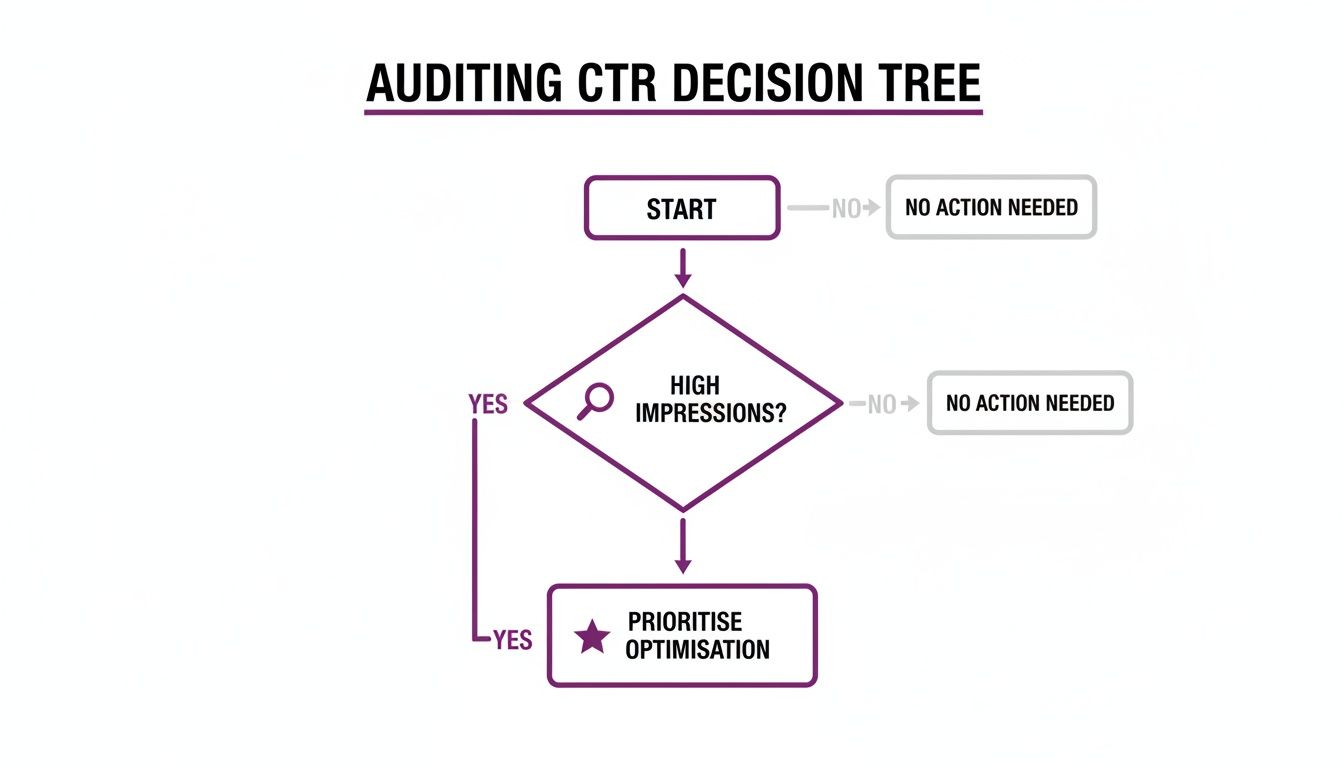
This flowchart lays out a clear path: focus on pages that are already visible (high impressions) but are underperforming (low clicks). That's how you maximise the impact of your optimisations.
Understanding What a 'Good' CTR Looks Like
It's really important to look at your CTR data in the right context. There's no universal number for a 'good' CTR; it changes massively depending on your industry, the searcher's intent, and where you rank. For example, branded keywords will naturally pull in a much higher CTR than non-branded, informational ones.
Recent UK benchmarks really drive this point home. Optimising for top spots in high-growth sectors like Travel can lift CTR by up to 2.46 percentage points. This shows just how much industry and ranking position matter. By getting familiar with these benchmarks and the other top metrics to measure on-page SEO success, you can set realistic goals that actually mean something for your business.
To really get a handle on your performance, it's worth understanding what Google Quality Score really cares about, as it's directly tied to expected CTR and ad rank.
By the time you finish this audit, you won't just have a spreadsheet of data. You'll have a clear, prioritised action plan, giving you a solid, data-backed foundation for the powerful optimisation strategies we'll get into next.
Crafting Titles and Meta Descriptions That Earn Clicks
Your title tag and meta description are your digital shop window on Google. They're your first—and often only—chance to convince someone that your page has the answer they're looking for. Nailing this SERP snippet is absolutely fundamental to improving your click-through rate.

Think of it this way: a high ranking gets you on the right street, but a compelling title and description are what get people through the door. This isn't just about keywords; it's about crafting copy that grabs attention, builds trust, and makes someone need to click.
Writing Titles That Attract Attention
The title tag is the most prominent part of your search result and carries huge weight, both for SEO and for users. A great title does both jobs at once, using a few psychological triggers to stand out from the crowd.
Here are a few tactics I've seen work time and time again:
-
Use Numbers and Data: Our brains are hardwired to notice numbers. They suggest something concrete and easy to digest. A title like "10 Ways to…" or "How We Increased Sales by 47%" feels more tangible and clickable than a vague statement.
-
Incorporate Power Words: Sprinkle in words that create a sense of urgency, value, or curiosity. Think of words like 'Ultimate', 'Proven', 'Effortless', 'Essential', or 'Step-by-Step'. They add a little punch and make your result feel more valuable.
-
Ask a Question: Directly engaging the user with a question can be incredibly effective. A title like "Are You Making These SEO Mistakes?" immediately sparks curiosity and makes them want to find out the answer.
-
Add Brackets or Parentheses: This is a simple but powerful trick. Studies have shown that including brackets in a title can increase clicks by almost 40%. Use them to add extra context or highlight a key benefit, like
[Checklist Included]or(Updated for 2024).
It's worth noting the parallels here with other forms of digital marketing. The principles behind good email subject line best practices are almost identical. Both rely on creating a powerful, concise first impression that promises real value.
To keep your titles sharp and effective, it helps to have a quick checklist on hand. I've put together a simple table that covers the essentials for crafting title tags that get noticed.
Title Tag Optimisation Checklist
| Element | Best Practice | Example |
|---|---|---|
| Length | Keep it under 60 characters to avoid truncation in the SERPs. | "10 Expert SEO Tips for Small Businesses" |
| Keywords | Place your primary keyword as close to the beginning as possible. | "Waterproof Walking Boots | Free UK Delivery" |
| Uniqueness | Ensure every page on your site has a unique title tag. | Avoid generic titles like "Home" or "Services". |
| Clarity | Clearly communicate what the page is about. | "How to Clean Leather Walking Boots" |
| Branding | Include your brand name at the end for recognition. | "…in 5 Easy Steps | TrailTrekker" |
Following these guidelines gives you a solid framework for writing titles that not only rank but also attract the right kind of attention from potential customers.
Creating Meta Descriptions That Convert
While the meta description isn't a direct ranking factor, it is your sales pitch. This is your space to expand on the title's promise and give searchers an undeniable reason to choose your result over the others. Think of it as a concise summary that has to hit the searcher's intent right on the nose.
A great meta description doesn't just describe what's on the page; it sells the benefit of visiting it. It should answer the user's silent question: "What's in it for me?"
If you need more in-depth guidance, we have a complete guide on how to write meta descriptions that really drive clicks.
Matching Your Snippet to Search Intent
Here's the golden rule: your title and description must be an honest reflection of what's on the page. A clickbait title might get you the click, but if the user immediately bounces, you're sending a strong negative signal to Google. The goal isn't just any click; it's the right click.
Let's look at a couple of examples. A search for "buy waterproof walking boots" has clear commercial intent. A good snippet would look something like this:
- Title: Buy Waterproof Walking Boots | Free UK Delivery | BrandName
- Description: Discover our range of durable, waterproof walking boots for men and women. Shop top brands with our price match promise. Order today for next-day delivery.
Now, consider a search like "how to clean walking boots". This has informational intent. A good snippet needs to reflect that:
- Title: How to Clean Walking Boots in 5 Easy Steps | BrandName
- Description: Learn the best way to clean and care for your leather or fabric walking boots. Our expert guide helps you extend their life and keep them waterproof.
When you align your snippets with what the user is actually looking for, you don't just improve your CTR. You also guarantee that the traffic landing on your site is relevant, engaged, and far more likely to convert.
Make Your Result Pop with Rich Snippets and Structured Data
Even with the perfect title and meta description, your listing can easily get lost in a sea of plain blue links. If you really want to own the SERP and boost your click-through rate, you need to stand out visually. This is where structured data—and the rich snippets it creates—becomes your secret weapon.

Think of structured data as a special language you use to tell search engines exactly what your page is about. When Google understands that your page is a recipe, a product, or a local event, it can reward you with eye-catching listings known as rich snippets. These enhanced results take up more screen space and cram in extra info like star ratings, prices, and FAQs right there on the results page.
This extra real estate and information can give your visibility and CTR a massive lift, often without you climbing a single spot in the rankings. It’s all about making your existing listing impossible to ignore. For a deeper look at the technical side, our guide on what is Schema markup breaks down the fundamentals.
Key Types of Schema for UK Businesses
There are hundreds of types of Schema, but for UK businesses, a handful deliver the biggest bang for your buck. Focusing on the right ones for your specific business is how you'll see a real jump in clicks.
Here are the heavy hitters you should consider:
- Product Schema: Absolutely essential for any e-commerce site. This lets you show off pricing, stock availability, and review ratings directly in the search results. Imagine a shopper seeing your product has a 4.8-star rating and is in stock before they even click—it’s a powerful trust signal.
- Review Schema: This is what generates those coveted gold stars under your result. Whether it’s for a product, a service, or even an article, social proof is incredibly persuasive and can make your listing the obvious choice.
- FAQ Schema: Does your page answer common questions? This markup can display those Q&As in a neat accordion-style dropdown right in the SERP. It takes up a ton of space and instantly positions you as an authority.
- Local Business Schema: This is non-negotiable for any business with a physical location. It helps Google understand your address, opening hours, and phone number, which can supercharge your appearance in local map packs and knowledge panels.
Choosing the right Schema isn’t just a technical box-ticking exercise; it’s a strategic decision. It’s about aligning what your page offers with what a searcher needs to see to click with confidence.
How to Implement Structured Data
Adding structured data to your site might sound like a job for a developer, but it’s more accessible than ever. The most common format is JSON-LD, which is just a script you pop into the <head> section of your page’s HTML.
If you’re using a CMS like WordPress, plugins like Rank Math or Yoast SEO have built-in tools that make generating Schema a breeze. You just fill in the fields—like product name, price, or your FAQs—and the plugin writes the code for you.
Once the code is in place, you have one final, crucial step: validation.
Before you can even hope to see rich snippets, you have to make sure your markup is flawless. Use Google's Rich Results Test tool to paste in your URL or code. It’ll tell you if your page is eligible for rich results and flag any errors that need fixing.
Don't skip this. This step confirms that Google can actually read and understand your data, which is the entire point.
Let's take a practical example. A Cambridgeshire bakery wants to promote its popular sourdough bread. By adding Product and Review Schema, its search result could go from a boring blue link to a rich snippet showing a £4.50 price, "In Stock" status, and a glowing 4.9-star rating from 82 reviews. This kind of listing doesn't just inform; it sells, making it far more likely to win the click over a competitor's plain-text result.
Getting Your URLs, Sitelinks, and Local Presence Right
Getting more clicks from search isn't just about tweaking your title tags and meta descriptions. Other parts of your search listing—things people often forget—play a huge role in convincing someone to choose your link over another.
Think about your URL structure, the sitelinks that pop up under your main result, and your local business info. Each one is a signal to a potential customer about how trustworthy and relevant you are. A clean, logical URL, for instance, subtly tells someone you’re professional and organised. It's a small detail, but these small optimisations add up to create a much more compelling presence on the results page.
Crafting User-Friendly URLs
Your URL is basically the signpost to your content. If it's a long, jumbled mess of numbers and symbols, it’s like a dodgy, unmarked back road. Nobody feels confident going down it. But a simple, keyword-rich URL? That’s a clearly marked A-road, telling people exactly where they’re headed.
A good URL is short, descriptive, and easy for both people and search engines to understand. It should ideally use your main keyword and have a folder structure that makes sense. For example, yourshop.co.uk/mens-footwear/waterproof-boots is a world away from yourshop.co.uk/cat?id=45&prod=8129. The first one instantly tells you what the page is about.
If you want to go deeper on this, our guide on how to optimise URLs for SEO rankings has all the best practices covered.
How to Influence Google Sitelinks
Sitelinks are those extra links that sometimes show up under your main result, giving people shortcuts to key pages on your site. You can't directly edit them, but you can definitely nudge Google in the right direction. When they appear, they're a great sign of authority and make your listing take up much more space on the page.
To encourage Google to show the right sitelinks, you need to get your house in order:
- Have a Clear Site Structure: A logical, hierarchical layout helps Google understand how your content is organised and which pages are most important.
- Use Consistent Internal Linking: Always link to your most important pages (like 'Contact Us' or 'About') with clear, consistent anchor text. This reinforces their value to Google.
- Keep Your XML Sitemap Updated: Make sure you have an up-to-date sitemap submitted in Google Search Console. It’s like giving Google a map of your website so it can find everything easily.
Basically, you’re showing Google which pages you think are the most important, making it far more likely they’ll be chosen for sitelinks.
Winning the Click in the Local Pack
For any business with a physical location in the UK—from a Cambridgeshire café to a Manchester marketing agency—the local pack is where the action is. Your Google Business Profile (GBP) is your ticket to getting seen by local customers right when they’re searching.
A fully optimised Google Business Profile isn't just a listing; it’s a dynamic, free advert in local search. It gives people essential info, builds trust with reviews, and lets you engage with potential customers directly.
Make sure every part of your profile is filled out: accurate opening times, your address, and phone number. Actively ask happy customers to leave reviews, because that star rating is one of the biggest magnets for clicks in local search. And don't forget to use Google Posts to share updates, offers, or news to keep your profile looking fresh and active.
This whole idea of giving people specific, helpful information is a winning strategy everywhere. Take social media ads, for example. Recent UK data shows B2B ads on LinkedIn hit a 0.65% CTR, which is well above average. Why? Because they’re precisely targeted. Optimising your local pack and sitelinks does the same thing organically—it serves the right info to the right searchers, which naturally boosts your clicks.
Testing and Measuring for Continuous CTR Growth
Getting your click-through rate where you want it isn't a "set it and forget it" job. It's more of a living process, an ongoing cycle of testing, learning, and tweaking. The real magic happens when you let data guide your decisions, making small, calculated improvements that add up over time.
To see that long-term growth, you have to move past hunches and gut feelings. It's all about building a solid framework for testing your changes, measuring what happens, and learning from the results.
This approach means every change you make to a title tag or meta description is a deliberate move, not just a shot in the dark. By systematically testing different versions, you'll start to uncover what really gets your audience clicking.
Running Controlled A/B Tests
At the heart of any solid improvement strategy is A/B testing—or split testing, as it's often called. The idea is wonderfully simple. You take your original SERP snippet (let's call it 'A') and create a new variation ('B'). The key is to only change one thing at a time and see which one performs better.
You might, for instance, test a title that includes a number against one that asks a question. But if you change both the title and the meta description at the same time, you'll be left guessing. Was it the new title that boosted clicks, or was it the description? You'll never know for sure.
By isolating a single variable, you get clean, actionable data on what words, phrases, or formats truly motivate people to click on your result.
To run these experiments effectively, it helps to have a clear structure. A simple framework ensures you're testing methodically and tracking everything properly.
A/B Testing Framework for SERP Snippets
| Step | Action | Tool/Metric |
|---|---|---|
| 1. Identify | Select a high-impression, low-CTR page to test. | Google Search Console |
| 2. Hypothesise | Form a clear hypothesis (e.g., "Adding '2024' will increase CTR"). | Your testing log |
| 3. Create | Write the new variation ('B'), changing only one element. | Your CMS |
| 4. Implement | Update the title or meta description on the live page. | Your CMS |
| 5. Measure | Wait for re-indexing, then compare performance over a set period. | Google Search Console |
| 6. Analyse | Determine if the change resulted in a statistically significant lift. | Your testing log |
| 7. Scale | If successful, apply the winning formula to other relevant pages. | Your CMS |
Following a framework like this turns random acts of optimisation into a scalable, repeatable process for growth.
Using Google Search Console for Measurement
Google Search Console is your best friend for this. Its comparison feature is practically built for measuring the impact of your tests.
Once you’ve updated a title or description, you need to give Google some time to recrawl the page and update its index. This can take anywhere from a few days to a couple of weeks, so be patient.
When you've got enough data to work with, here's what to do:
- Head over to the 'Performance' report in GSC.
- Click the 'Compare' tab and set a custom date range that captures the period before and after you made the change.
- Filter the report down to the specific URL you updated.
You’ll get a clean, side-by-side comparison of clicks, impressions, and CTR for the two periods. If your 'B' version shows a clear, statistically significant jump in CTR, you've got yourself a winner.
Remember that other things can influence your CTR, like seasonality, algorithm updates, or a competitor's big marketing push. A single test is an indicator, not an absolute truth. Always look at the bigger picture when you analyse your results.
For an extra layer of clarity, get into the habit of using annotations in Google Analytics. Whenever you push a title or meta change live, add a quick note on that date. It creates a historical timeline of your optimisations, making it much easier to connect your actions to performance shifts down the road.
Documenting and Scaling Your Successes
A successful testing programme is built on good organisation. You don't need anything fancy; a simple spreadsheet is often all it takes to build a powerful testing log. This document becomes your single source of truth—what you've tested, what worked, what didn't, and your best guess as to why.
Your testing log should capture these key details:
- Page URL: The page you're testing.
- Original Title/Description: The 'A' version.
- Variation Title/Description: The 'B' version.
- Hypothesis: What you thought would happen (e.g., "Adding brackets will draw more attention and lift CTR").
- Test Start/End Dates: The measurement period.
- Results: The raw change in CTR, clicks, and impressions.
- Conclusion & Next Steps: Was the test a success? Should the change be rolled out more widely?
This organised approach stops you from repeating tests that have already failed and helps you build a playbook of proven tactics. When you discover a winning formula—maybe you find that including brackets in your titles consistently boosts CTR by 15%—you can then proactively roll that strategy out across other relevant pages.
This is how you scale your successes for maximum impact. This iterative cycle of testing, measuring, and scaling is the real engine behind sustainable CTR growth.
Your Top Click-Through Rate Questions Answered
When you start digging into click-through rate optimisation, a few questions always seem to pop up. Getting your head around these helps set the right expectations and sharpens your strategy. Let's tackle some of the most common ones we hear from businesses across the UK.
What’s a Good Organic CTR in the UK?
This is the million-pound question, and the honest-to-goodness answer is: it depends. There’s no magic number for a "good" CTR because it’s a moving target, shaped by a few key things.
- Search Engine Position: This is the big one. The top spot on Google gets the lion’s share of clicks—often over 30%. From there, the CTR drops off a cliff for each position down the page.
- Industry and Niche: Some fields just naturally pull in higher CTRs. A search for a niche, technical component will probably get a better click-through rate than a broad search for a popular holiday spot.
- Brand Recognition: If people already know and trust your name, they’re far more likely to click on your result, even if you’re not ranking number one. Searches for your brand name can easily hit CTRs of 50% or more.
- Search Intent: Think about the user’s mindset. Someone searching "buy waterproof walking boots" is ready to act and will click decisively. Compare that to someone just browsing with a query like "what are waterproof walking boots."
Instead of chasing some universal benchmark, your best bet is to figure out your own baseline. Dive into Google Search Console, see what your average CTR is right now, and then aim to make steady, incremental gains from there.
How Long Does It Take to See Results After CTR Optimisation?
When it comes to seeing the fruits of your CTR labour, you’ll need a bit of patience. This isn't like flicking a switch on a paid ad campaign. Organic SEO plays a longer game.
Once you’ve tweaked a title tag, rewritten a meta description, or added some structured data, a couple of things need to happen.
First, Google has to come back, recrawl your page, and update its index. If you have a well-established site that’s updated often, this might only take a day or two. But for newer or less active sites, you could be waiting a week or more.
Second, you need to let enough new data roll in to see a real pattern. A handful of extra clicks doesn’t prove anything. The best practice is to let any test run for at least two to four weeks. This helps smooth out any random daily spikes or dips and gives you enough data to be confident that your changes actually made a difference.
Can a High CTR Negatively Impact My SEO?
This is a worry I hear a lot, but it’s usually based on a slight misunderstanding of how Google looks at user behaviour. On its own, a high CTR is almost always a good thing. It’s a strong signal to Google that your snippet in the search results is compelling and relevant to what people are looking for.
The trouble starts not with the high CTR, but with what happens after the click. If you’ve used a misleading, clickbait-style title just to get the click, and your page content doesn’t deliver, people will hit the back button in seconds. That behaviour is called "pogo-sticking," and it sends a massive red flag to Google that your page failed to satisfy the user.
A genuinely high click-through rate, earned by accurately promising and then delivering real value, is one of the best user engagement signals you can send to search engines.
So, the goal is a high CTR combined with low bounce rates and solid on-page engagement. That’s the magic formula. It shows Google you not only won the click but also gave the user exactly what they wanted, which can help lock in—and even boost—your rankings over time.
Ready to turn more search impressions into valuable website traffic? The team at Bare Digital specialises in data-driven SEO strategies that improve visibility and drive clicks. Get in touch for a free, no-obligation SEO Health Check and a personalised plan to grow your business. Find out more at https://www.bare-digital.com.