
Think of Google Search Console as having a direct line to Google’s headquarters. It’s a free service that gives you a backstage pass to your website’s performance in search results, showing you exactly how Google sees your site.
Your Website's Direct Line to Google

Google Search Console (or GSC for short) is your website's mission control. It’s not just another analytics tool; it's the place you go for a behind-the-scenes look at your site’s health and visibility straight from the source. You might remember it as Google Webmaster Tools, but since its rebranding in 2015, it’s become a cornerstone for UK website owners.
It’s like getting a detailed daily report for your digital shopfront. It tells you who's window shopping (impressions), who’s actually stepping inside (clicks), and whether your front door is unlocked and accessible to everyone (indexing issues). For any UK business, marketer, or blogger aiming for organic growth, these insights are gold.
The True Purpose of Search Console
At its core, Google Search Console bridges the gap between your website and the world’s biggest search engine. It helps you understand—and improve—how Google finds, crawls, and indexes your content. The data it provides lets you stop guessing and start making informed decisions for your SEO strategy.
Google Search Console demystifies your site's search performance, translating complex data into actionable steps. It helps you diagnose problems, identify growth opportunities, and measure the impact of your SEO efforts, ensuring your website is working as hard as you are.
The platform is always evolving. For instance, you might remember the major update in September 2025 that changed how impressions were recorded, causing a sudden drop for many UK sites. This wasn’t a penalty but a much-needed correction to filter out bot traffic, giving businesses cleaner, more reliable data. You can read more about it in these in-depth Google search statistics.
Ultimately, GSC empowers you to:
- Confirm that Google can discover and crawl your site.
- Fix technical hiccups that stop pages from appearing in search results—a crucial part of search engine indexing.
- See the exact search queries people are using to find you.
- Analyse your site's impressions, clicks, and average position on Google.
- Get alerts when Google runs into indexing problems, spam, or other issues on your site.
Setting Up Your Google Search Console Account
Getting your website hooked up to Google Search Console is the very first step to unlocking a goldmine of SEO data. The process is called verification, and it’s basically just you proving to Google that you own the site. Think of it like getting the keys to your new shop; once you're inside, you can finally see what’s working and what needs a bit of a fix.
The good news? You don't need to be a coding genius to get this sorted. Google offers a few different ways to get verified, each designed for different levels of technical comfort.
Choosing Your Verification Method
When you add your site (or ‘property’, as Google calls it) to Search Console, it’ll ask you to prove you’re the owner. There are a handful of common ways to do this, and each comes with its own simple set of instructions.
- HTML File Upload: This is a popular one. Google gives you a specific HTML file to download, and you just upload it to the main folder of your website. It's quick and easy if you have back-end access.
- Google Analytics Tracking Code: If you’re already using Google Analytics, this is by far the simplest option. As long as both accounts are under the same Google login, Search Console can verify your site in a click.
- DNS Record: This method sounds a bit more technical, but it’s incredibly reliable. You'll add a simple TXT record to your domain's settings through your provider (like GoDaddy or Namecheap). It’s the best way to verify your entire domain at once, including any subdomains.
Verifying your website is non-negotiable for getting into Search Console. It’s a one-off security check that keeps your site’s performance data private, making sure only authorised people can see the insights and make changes. Just pick the method that feels the least intimidating to you.
Once you’re verified, Google starts collecting data right away. From there, you can take other crucial steps, like submitting a digital map of your site so Google can find all your pages. To get a better handle on this, it's worth exploring what an XML sitemap is and why it's so important. With a verified property, you’re all set to start gathering the data you need to climb the search rankings.
Getting to Grips With Your Core GSC Reports
Once you’re logged into Google Search Console, the sheer amount of data can feel a bit much. Don’t worry. This is where the real fun begins. Think of these reports less like complicated charts and more like Google giving you a direct line into how your website is actually doing out there.
The first place you’ll want to get familiar with is the Performance report. This is your mission control for search visibility, breaking down exactly how people are finding you and what they do when they see your site in the search results.
Understanding Your Search Performance
The Performance report is built on four key pillars. Nailing these down is your first step to making smarter SEO choices.
- Clicks: Simple enough—this is how many times someone actually clicked on your website from a Google search. It’s a direct measure of the traffic you’re pulling in.
- Impressions: An impression is counted every time your site appears in a search result someone sees. Lots of impressions mean you’re getting seen, but they don’t mean much without the clicks to back them up.
- Average CTR (Click-Through Rate): This is the good stuff. It’s the percentage of people who saw your link (impressions) and decided to click it. A low CTR is a huge red flag that your page titles and descriptions just aren't cutting it. To learn more, check out our guide on what click-through rate is and how to fix it.
- Average Position: This shows your average ranking in Google for different search terms. The lower the number, the better, since a position closer to 1 gets the lion's share of attention.
For a local UK business, this data is gold. Picture a boutique hotel in the Cotswolds. The Performance report might show they get hundreds of impressions for "luxury weekend break Cotswolds" but almost no clicks. That’s an immediate signal their page title is probably too bland. A quick tweak to something like "Award-Winning Luxury Weekend Breaks | Cotswolds Hotel" could make all the difference.
Checking URLs and Index Coverage
Beyond clicks and impressions, GSC lets you pop the bonnet and check your website’s technical health. The two most important tools for this are the URL Inspection tool and the Index Coverage report.
The URL Inspection tool is like giving a specific page on your site an X-ray. Just paste in any URL from your website, and Google will tell you everything it knows about it—whether it's indexed, if it’s mobile-friendly, or if any gremlins are stopping it from showing up in search.
Meanwhile, the Index Coverage report gives you the bigger picture. It tells you which of your pages Google has managed to index and, more importantly, which ones it’s struggling with. For an online shop, this is non-negotiable. You can use it to make sure every last product page is indexed and ready to be found by customers. If you see pages marked as 'Excluded' or flagged with errors, you know exactly where to point your technical SEO efforts.
To even get to these reports, you first need to prove to Google you own the website. The diagram below shows the common ways to get this done.
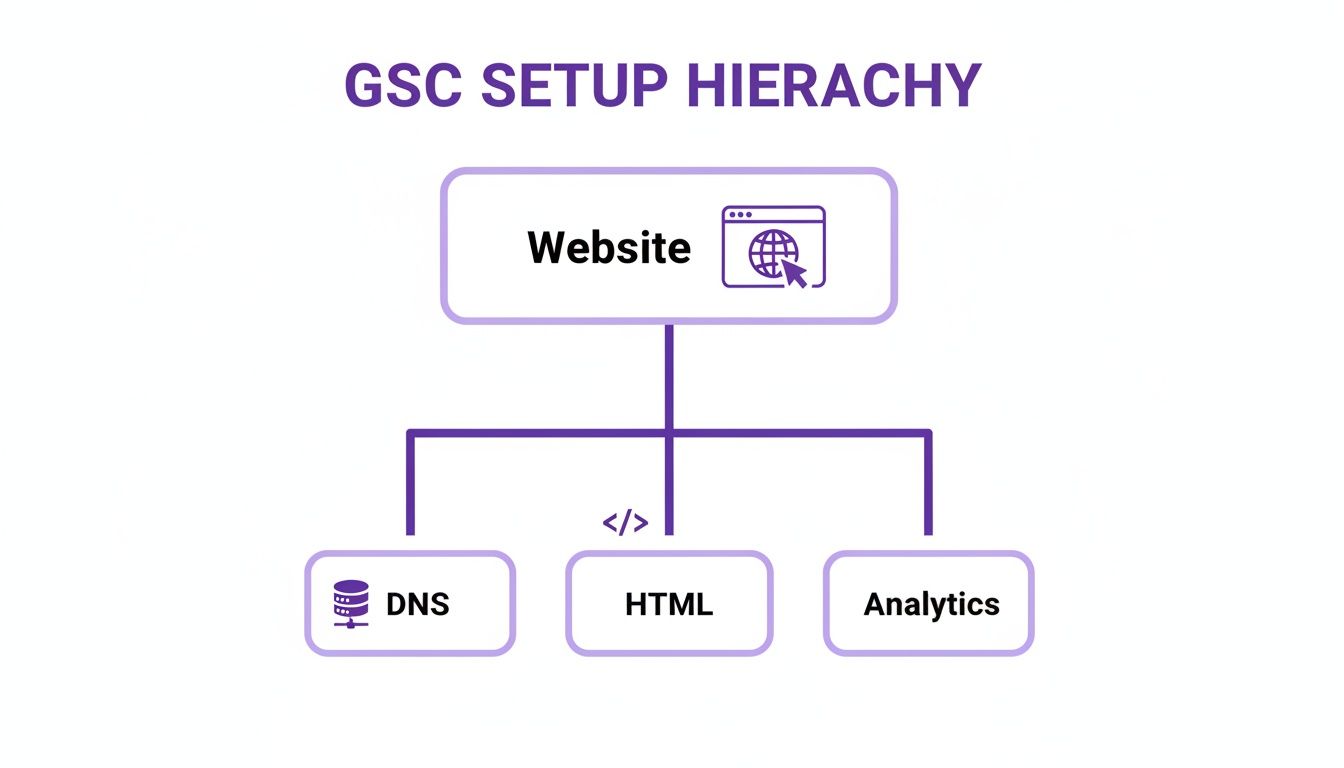
As you can see, you’ve got a few options—like using your domain's DNS records, uploading a file, or linking through Google Analytics—to complete the setup and unlock all that valuable data.
Your GSC reports are a direct feedback loop from Google. They take the guesswork out of SEO, letting you build a strategy based on what users are really searching for and how they see your site.
From GSC Data to Smarter SEO Decisions
Raw data is just a pile of numbers until you know what to do with it. Google Search Console gives you the stats, but your real job is to turn those figures into an SEO strategy that actually grows your business.
This is all about moving from being a passive observer to an active strategist. Instead of just glancing at clicks and impressions, you can start making informed decisions that get real results, turning GSC into your most powerful SEO ally.
Finding Your Low-Hanging Fruit
One of the smartest ways to use GSC is to hunt for ‘low-hanging fruit’. These are the search queries where you’re already ranking on the second page of Google, usually somewhere in positions 11-20.
Think about it—a small, focused push on these pages could be all it takes to leap onto the first page, where almost all the clicks happen. You can quickly build a priority list by filtering your Performance report to show queries with an average position greater than 10. Once you've identified these opportunities, you can implement proven content optimisation strategies to give them the boost they need.
Diagnosing Content Gaps and User Intent
Another powerful move is to spot content gaps. Ever seen a search term get thousands of impressions but almost zero clicks? That’s a classic sign of a mismatch between what people are looking for and what your page is offering.
This high-impression, low-click scenario is telling you something important. While your page is relevant enough for Google to show it, your title tag and meta description just aren't convincing enough to earn the click. This is your chance to either rewrite your snippet to better match what the user wants or create entirely new content that answers their query head-on.
Your GSC data is a direct window into your audience’s behaviour. By digging into their queries, you can understand what they really want and refine your content to serve them better.
Adapting to a Changing Search Landscape
The world of search is always in flux, especially now with the rise of AI-driven results. GSC is your frontline tool for seeing how these changes are hitting your website's performance here in the UK.
For instance, a significant update in September 2025 really shook things up. The data showed that 77.6% of UK websites lost unique ranking keywords, while a massive 87.7% saw a drop in impressions. Part of this was Google cleaning up inflated bot data, but it also pointed to the growth of 'no-click searches' thanks to AI Overviews.
This trend signals a shift where users get their answers directly from AI and then perform a specific brand search. GSC helps you track this, pushing you to focus more on building brand authority rather than just chasing broad impressions. Keeping a close eye on these shifts is essential, and using a structured tool like our monthly SEO report template can help you organise your findings and adapt your strategy effectively.
Unlocking Advanced GSC Features for UK Businesses

While the core reports in GSC are your bread and butter, the real magic for UK e-commerce and local businesses happens in the specialised tools. These are the features that give you a serious competitive edge, and they live in a section called ‘Enhancements’. Think of it as the control panel for making your search listings impossible to ignore.
This part of GSC keeps an eye on how well you’ve implemented structured data. That’s just a fancy term for special code that helps Google understand your content in much greater detail. Get it right, and Google rewards you with ‘rich results’—things like star ratings, product prices, and event times appearing right there in the search results. It makes your listing far more eye-catching than a plain blue link.
Driving E-commerce and Local Business Success
For a UK online shop, these reports are non-negotiable. They give you a quick, clear view of whether Google is correctly reading your product info, from prices and stock levels to those all-important review ratings.
Let's say you run an online clothing boutique. The Products enhancement report will tell you:
- Which of your items are eligible for those shiny rich results.
- If there are any errors holding you back, like a missing price field.
- The total number of valid product pages Google has actually found.
Fixing these little issues is a game-changer. It ensures your products pop up in search with pricing and availability, which massively boosts click-through rates from people who are ready to buy. It's just as powerful for a local service business. A plumber in Bristol, for example, can use the Local Business report to double-check that Google is indexing their address, opening hours, and contact details correctly, helping them pull in more customers from their patch.
Think of Enhancements reports as your quality control checklist for rich results. They don’t just flag errors; they give you a clear roadmap for making your search listings more appealing and informative than your competitors'.
The search landscape is always changing, with Google rolling out more complex features all the time. In 2025, for example, UK retailers using schema markup saw a 28% higher CTR in SERPs, even as competition from AI features grew. Agencies in Bristol found that GSC's updates provided cleaner data, helping businesses focus on actionable insights like these to get ahead. You can find more on these major Google Search Console updates and key insights to stay on top of the changes.
By regularly checking these advanced reports, you move beyond basic SEO. You start optimising for a richer, more engaging search experience that drives real-world business results.
Your Google Search Console Questions Answered
Even a tool as powerful as Google Search Console can leave you scratching your head with a few questions. Let's tackle some of the most common queries and clear up any confusion, so you can start using it with confidence.
Is Google Search Console Completely Free to Use?
Yes, it is. Google Search Console is a 100% free service straight from Google. There are no hidden costs, premium upgrades, or subscriptions to worry about.
Its entire purpose is to give everyone with a website—from a local blogger to a huge corporation—the tools to understand and improve how they show up in Google Search. All you need is a way to prove you own or have permission to manage the website. This is just a quick security check to keep your performance data private. Every single feature is available to you at no cost.
How Is Google Search Console Different from Google Analytics?
This is a classic question, and it’s a good one. The easiest way to separate the two is to think about where they fit in a customer's journey.
- Google Search Console (GSC) tells you everything that happens before someone lands on your website. It’s all about your performance in the search results—what search terms people used, how many times your site was shown (impressions), and how many actually clicked through to visit.
- Google Analytics (GA) picks up the story after someone arrives on your site. It focuses on their behaviour: which pages they looked at, how long they stuck around, and whether they did something important, like fill out a contact form.
In short, GSC is your go-to for search engine optimisation (SEO). GA is your tool for analysing what people do on your site. When you link them together, you get the full picture from start to finish.
Can Using GSC Directly Improve My SEO Rankings?
Just installing Google Search Console won’t magically push you up the rankings. Think of GSC as a diagnostic tool, not an automatic “fix-it” button. Its real value is in the data and insights it gives you, which are the building blocks of any solid SEO strategy.
It’s what you do with that information that makes the difference. Acting on the data from GSC helps you make smart decisions that lead to better rankings and more traffic over time.
For example, you can:
- Spot technical glitches that are stopping Google from properly indexing your pages.
- Uncover high-potential keywords you didn't even realise you were ranking for.
- Find pages with a low click-through rate that could be improved with a catchier title or description.
- Submit sitemaps to help Google discover all your important content much faster.
How Often Should I Check My Google Search Console Account?
For most small to medium-sized UK businesses, popping into your Google Search Console account once a week is a brilliant habit to build. It’s frequent enough to catch any critical errors, monitor your performance, and spot new opportunities without feeling buried in data.
Of course, there are times when you’ll want to check in more often, maybe two or three times a week. This is a good idea if you’ve recently:
- Launched a brand-new website.
- Finished a big site migration.
- Kicked off an intensive SEO campaign.
The good news is that Google will email you alerts for major problems, like security issues or new indexing errors, so you don’t need to be glued to the screen 24/7. The key is to be consistent. A regular check-in means you can be proactive with your SEO, not just reactive when something goes wrong.
At Bare Digital, we turn the insights from Google Search Console into measurable growth for your business. If you're ready to transform your data into a powerful SEO strategy, get your free, no-obligation SEO audit today. Visit us at https://www.bare-digital.com to get started.