
On-page SEO is all about optimising the individual pages on your website so they can climb higher in search results.
Picture your website as a high-street shop in Cambridge. You'd want to label the aisles clearly, create an eye-catching window display, and make sure the layout is so intuitive that customers find exactly what they're looking for without a fuss. On-page SEO is the digital equivalent of that. It covers everything you do directly on your site to signal to search engines like Google what you're all about, helping you attract more of the right kind of visitors.
What Is On-Page SEO and Why It Matters
At its heart, on-page SEO (sometimes called on-site SEO) is the practice of making your website’s pages speak clearly to two audiences at once: your human visitors and the search engine bots. Before diving deeper, it helps to understand what Search Engine Optimization truly entails, as on-page is one of its most fundamental pillars.
The great thing about on-page SEO is that it's entirely within your control. This is what sets it apart from off-page SEO, which relies on external signals like getting backlinks from other websites. Here, you're the one calling the shots—from the words you use to the way you structure your content.
The Foundation of Your Digital Shopfront
Think of it this way: when you get your on-page SEO right, you’re giving search engines a crystal-clear map of your content. This process always starts with solid research to figure out the exact words and phrases your customers are typing into Google. If you’re new to this, our guide on what is keyword research is the perfect place to start.
Getting this right has never been more important. The UK SEO market was valued at a massive £19.2 billion in 2023, and it’s on track to blow past £25 billion by 2028. Why? Because 42% of UK consumers turn to search engines first when looking for a product or service. If your pages aren't optimised, you're invisible to a huge chunk of potential customers.
To give you a clearer picture, let's break down the core components you'll be working with. The following table summarises the main pillars of on-page SEO and what each one does.
The Core Pillars of On-Page SEO at a Glance
| Pillar | Primary Function | Key Example |
|---|---|---|
| Content Quality | Answering the searcher's query thoroughly and engagingly. | A detailed blog post that fully explains a topic. |
| Keywords | Aligning your page with what people are searching for. | Placing "plumber in Cambridge" in your page title. |
| Title & Meta Tags | Enticing users to click on your page from search results. | A meta description that promises a solution. |
| Page Structure | Organising content logically with headings (H1, H2). | Using an H2 for each major section of a guide. |
| Internal Linking | Guiding users and search engines to related content on your site. | Linking from a blog post to a relevant service page. |
Each of these elements acts as a signal, helping to build a complete picture for search engines that says, "This page is high-quality, relevant, and deserves to be at the top."
Ultimately, mastering on-page SEO isn't just about pleasing Google—it's about creating a fantastic experience for your visitors. When you do that, the positive search engine signals naturally follow.
On-Page vs Off-Page and Technical SEO Explained
To really get your head around on-page SEO, you need to see where it fits in the bigger picture. Think of your entire SEO strategy like building and promoting a brand-new restaurant in Cambridgeshire. It’s not just one thing that makes it a success, but three core pillars working together: technical SEO, on-page SEO, and off-page SEO.
Each one has a distinct, vital job to do. And while they're separate disciplines, they're completely interconnected. If you let one slide, you'll end up undermining all the hard work you’re putting into the others.
Technical SEO: The Foundation of Your Restaurant
Before you can even dream about menus or decor, you need a solid building. That’s technical SEO. It’s all the essential, behind-the-scenes work that makes sure your restaurant (your website) is built to code, accessible, and works without a hitch.
This is the digital equivalent of laying the foundations, sorting out the plumbing and wiring, and getting the right permits from the council. These are the absolute non-negotiables that allow your business to operate. After all, if your building has dodgy wiring or no running water, it doesn’t matter how brilliant your chef is—your customers are going to have a terrible time.
In SEO terms, this means making sure your site is fast, mobile-friendly, secure (with HTTPS), and easy for Google's crawlers to explore. It’s the groundwork that makes everything else possible. To dig deeper into these critical elements, check out our detailed guide on what is technical SEO.
On-Page SEO: The Customer Experience Inside
Once the foundations are solid, you can shift your focus to what happens inside the restaurant. This is where on-page SEO comes into play. It’s everything you do to create a brilliant experience for your diners (your website visitors) and to communicate exactly what your restaurant is all about.
This includes things like:
- The Menu (Your Content): Writing high-quality, delicious-sounding descriptions that perfectly match what your customers are searching for.
- The Décor (Page Structure): Arranging your space with clear signage (headings and subheadings) and a logical layout so people can find their way around easily.
- The Service (User Experience): Making sure your staff (your website design) are friendly, helpful, and make the whole visit enjoyable and simple.
In short, on-page SEO is all about optimising the content and structure of your individual pages. It’s making sure everything your visitors see and interact with is clear, relevant, and genuinely helpful.
Off-Page SEO: Your Reputation Around Town
Finally, no matter how incredible your restaurant is, you need people to know it exists. Off-page SEO is all about building your restaurant's reputation beyond its four walls. It’s the word-of-mouth, the glowing reviews in the local paper, and the features on food blogs that get new customers queuing at your door.
This covers activities that happen away from your website, like earning backlinks from other reputable sites (which act as a vote of confidence), getting people to share your content on social media, and managing your online reviews. A strong off-page presence signals to search engines that your site is a credible, authoritative, and trustworthy place to send people.
While all three pillars are essential, on-page SEO is what you have the most direct, day-to-day control over. It’s where you can make immediate changes that directly shape how both users and search engines see your website.
Your Essential On-Page SEO Checklist: 10 Areas to Master
Right, we've covered the theory. Now it’s time to roll up our sleeves and get practical. This is where you can make direct, impactful changes to your website that Google and your customers will notice.
Think of this section as your hands-on checklist. We're going to walk through the most important elements you can control, transforming each page into a well-oiled machine that signals relevance and quality.
As this flowchart shows, on-page SEO is one of the three core pillars of a solid strategy. It works hand-in-hand with the technical foundation and the off-page authority building.
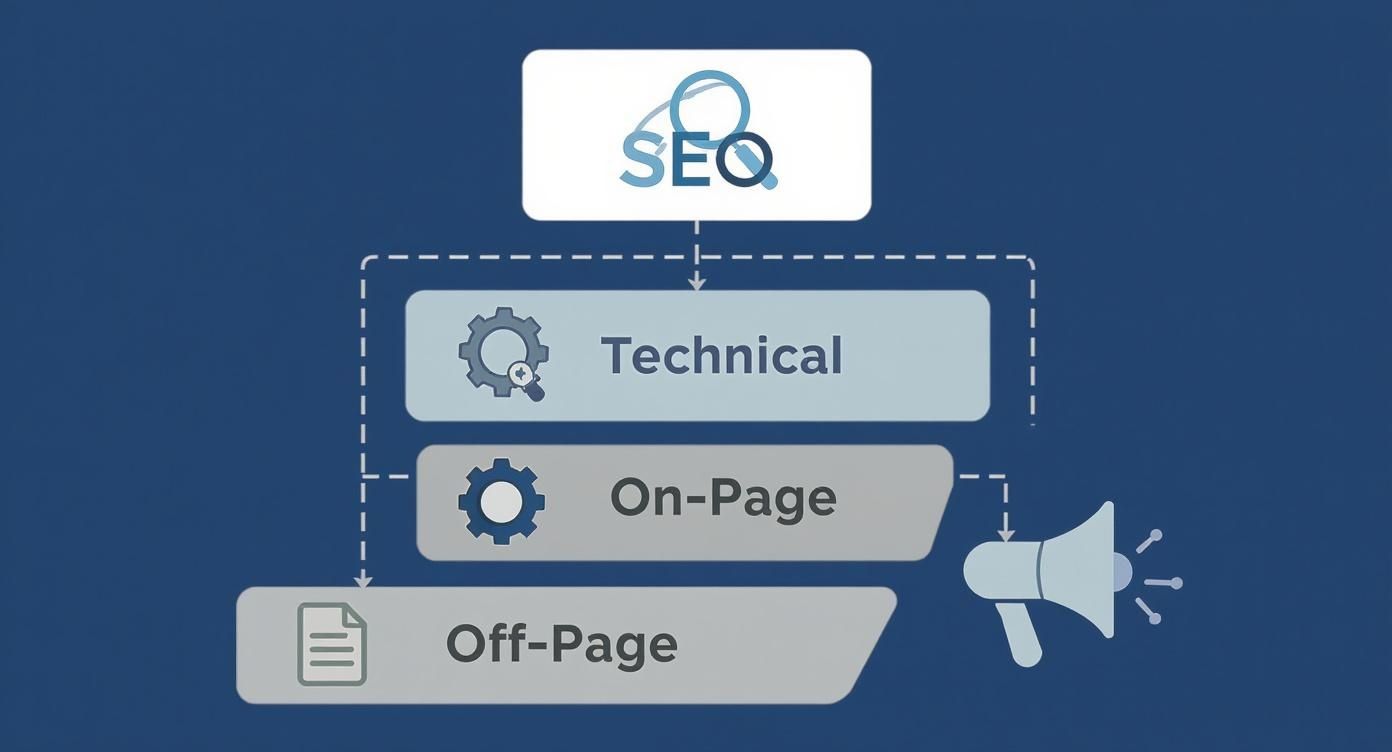
While technical SEO gets the site running smoothly and off-page SEO builds its reputation, on-page is all about the content and structure you actually present to the world. Let's dive in.
1. Craft Compelling Title Tags
If there's one thing you focus on, make it the title tag. This is the blue, clickable headline that appears in Google's search results—it's your digital shop sign, and it has to be spot on.
A great title tag does two jobs at once. It tells search engines exactly what the page is about and, crucially, convinces a real person that your page holds the answer they're looking for. Aim for under 60 characters to stop it getting cut off, and always try to get your main keyword in near the start.
For a plumber in Cambridge, a title like "Emergency Plumber Cambridge | 24/7 Call Out | Bare Digital" is miles better than a generic "Plumbing Services." It's specific, highlights a key benefit, and includes the brand.
2. Write Enticing Meta Descriptions
While Google says meta descriptions aren't a direct ranking factor, they are your sales pitch in the search results. This little snippet of text (around 155 characters) sits under your title and is your chance to explain why someone should click your link over the nine others on the page.
Think of it as the window display for your shop. It should build on the promise of the title, use persuasive language, and ideally include a call to action. Simple words like "discover," "learn," or "get a free quote" can make a huge difference to your click-through rate.
Key Takeaway: A well-crafted title tag and meta description work as a team to win the click. A compelling snippet can often steal traffic from the top result, even if you’re ranking second or third.
3. Structure Content with Heading Tags
Heading tags (H1, H2, H3, etc.) are your best friends for organising content. They create a clear hierarchy on the page, just like chapters in a book, making it scannable for both people and search engine bots.
Your H1 tag is the main headline of the page—and you should only ever have one. Use H2s for the main sections and H3s for the sub-points within them. This simple structure helps Google grasp the main topics and see how all the ideas connect.
4. Optimise Your Content for E-E-A-T
Google is obsessed with content that shows Experience, Expertise, Authoritativeness, and Trustworthiness (E-E-A-T). Your words on the page need to do more than just repeat keywords; they must be genuinely helpful, accurate, and comprehensive.
This is especially vital in the UK, where on-page SEO is a huge factor for ranking on Google, which holds a massive 92.6% of all search engine traffic. Getting onto that first page is critical—sites there enjoy an average click-through rate of 27.4%. While long-form content (over 2,000 words) often performs well, the real goal is to fully answer the searcher's question, whatever it takes.
5. Create Clean, Simple URL Structures
Your page's URL might seem like a small detail, but it’s another on-page signal. A good URL is short, descriptive, and easy for a human to read. It should ideally include your main keyword, giving everyone an instant clue about the page's topic.
For example, a clean URL looks like this:https://www.your-cambridge-shop.co.uk/mens-leather-jackets
Avoid messy, computer-generated URLs like this:https://www.your-cambridge-shop.co.uk/cat/p?id=481&session=992
The first one is user-friendly and reinforces the topic, helping build trust before someone even lands on your site.
6. Build Authority with Internal Linking
Internal links are just links that point from one page on your website to another. They are incredibly powerful for on-page SEO for a few key reasons.
First, they help search engines find other pages on your site and understand how they're all related. Second, they pass authority (or "link equity") between your pages, which can help boost the ranking power of your most important content. And finally, they guide your visitors to other relevant information, keeping them on your site longer.
When you add a link, always use descriptive anchor text (the clickable words) that gives context. For a deeper dive into this and other tactics, we have a comprehensive guide covering on-page SEO best practices that you might find useful.
7. Nail Your Image Optimisation
Images bring a page to life, but they can also kill your performance if they're not optimised. Large image files are a common cause of slow loading speeds, which is a major ranking factor. Always compress your images before you upload them.
It doesn’t stop there. Use descriptive file names (like black-leather-jacket.jpg instead of IMG_1234.jpg) and always fill in the alt text. Alt text is a short description of the image that helps visually impaired users and tells search engines what the image shows, giving you another chance to signal relevance.
8. Use Schema Markup for Rich Results
Schema markup is a snippet of code you add to your site to help search engines understand your content on a deeper level. This can unlock "rich results" in the search listings, like star ratings, event details, or FAQ dropdowns appearing right under your title.
These enhanced listings make your result stand out from the crowd and can seriously boost your click-through rate. An even more powerful tactic is optimizing for featured snippets, often called "Position Zero," which can put you right at the very top of the results page.
To pull these key practices together, here’s a quick-reference table.
On-Page Element Best Practices
| Element | Key Best Practice | Common Mistake to Avoid |
|---|---|---|
| Title Tag | Place primary keyword near the start; keep under 60 characters. | Using a generic or vague title like "Home Page." |
| Meta Description | Write a compelling summary (around 155 characters) with a call to action. | Forgetting to write one, letting Google pull random text. |
| H1 Tag | Use one unique H1 per page that clearly states the page topic. | Using multiple H1 tags or stuffing it with keywords. |
| Content | Write in-depth, helpful content that satisfies the user's intent. | Creating thin, low-quality content just for keywords. |
| Internal Links | Link to relevant pages using descriptive anchor text. | Using generic anchor text like "click here." |
| Image Alt Text | Write a concise, descriptive alt text for every important image. | Leaving alt text blank or stuffing it with keywords. |
| URL Structure | Keep it short, readable, and include the primary keyword. | Using long URLs with random numbers and characters. |
Treat this table as your go-to guide. Getting these fundamentals right is the foundation of any successful on-page SEO effort.
Why User Experience Is the New On-Page SEO

For years, on-page SEO felt like a box-ticking exercise. Keyword in the title? Check. Keyword in the first paragraph? Check. But the rulebook has been completely rewritten. Today, it’s less about pleasing search engine bots and far more about delighting your human visitors.
Modern on-page SEO is really all about user experience (UX). Google’s algorithms are now incredibly good at figuring out how people interact with your site. If someone lands on your page and has a smooth, helpful, and enjoyable time, Google takes notice and rewards you for it.
Think of your website like a shop. A bright, well-organised shop where it's easy to find what you need will keep people browsing for ages. On the other hand, a dark, cluttered one with confusing signs will make them walk straight back out. Your website is no different.
Decoding Google's Core Web Vitals
To put a number on what makes a "good" user experience, Google introduced the Core Web Vitals. These are specific, technical metrics that measure the real-world experience a visitor has on your page. They might sound complicated, but they boil down to three simple questions about how your site performs:
-
Largest Contentful Paint (LCP): How fast does the main content load? LCP measures the time it takes for the biggest image or block of text to appear. A slow LCP leaves users staring at a blank screen, which is a sure-fire way to make them leave.
-
Interaction to Next Paint (INP): How quickly does the page react when someone interacts with it? INP measures the delay from when a user clicks a button or taps the screen to when something actually happens. A high INP makes a site feel sluggish, laggy, and broken.
-
Cumulative Layout Shift (CLS): Does the page stay still while it loads? CLS measures how much things jump around on the page as it's loading. We've all been there—you go to click a button, and an ad loads above it, pushing the button down and making you click the ad instead. That’s high CLS, and it’s universally annoying.
These metrics aren't just suggestions; they are direct ranking signals. Improving your Core Web Vitals is a fundamental part of on-page SEO today because it directly improves your visitor's journey.
The Non-Negotiable Need for Mobile-Friendliness
Here in the UK, the shift to mobile isn't a trend—it's the norm. With the vast majority of your potential customers in Cambridgeshire and beyond looking you up on their phones, a mobile-friendly site is absolutely non-negotiable.
Google now uses mobile-first indexing. This simply means it looks at the mobile version of your website first to decide how to rank you. If your site looks fantastic on a desktop but is a jumbled mess on a phone, your search rankings are going to take a serious hit.
A truly mobile-friendly experience is more than just a site that shrinks to fit a smaller screen. It means:
- Readable Text: No one should have to pinch and zoom to read your content.
- Tap-Friendly Buttons: Links and buttons need to be big enough and spaced far enough apart for a thumb to tap easily.
- Fast Load Times: People on mobile are often using slower connections, so page speed becomes even more important.
A poor mobile experience is a huge red flag for Google. It signals that you aren't providing a quality experience, which often leads to people leaving your site straight away. You can find practical advice in our guide on how to reduce bounce rate and keep visitors engaged.
Connecting UX to SEO Success
The link between good UX and your SEO is direct and measurable. A fast, intuitive, and mobile-friendly site keeps users on your page longer, encourages them to explore other pages, and makes them far more likely to get in touch or make a purchase.
This behaviour sends a powerful signal to Google. When it sees people are happy with your site, it marks you down as a high-quality result that deserves to be shown to more people. This is especially true after major algorithm updates. For instance, following a recent Google core update, an incredible 85% of monitored UK websites saw their impressions effectively double. This jump highlights just how much well-tuned on-page elements can boost your visibility.
Ultimately, when you prioritise user experience, you're doing more than just optimising for an algorithm. You’re building a better, more effective digital asset for your business—one that wins over both people and search engines.
How to Measure Your On-Page SEO Success
Making changes to your on-page SEO without tracking the results is like sailing without a compass. You’re moving, but you have no idea if you’re heading in the right direction. To really understand what’s working, you have to measure the impact of your efforts.
The good news is you don’t need a bunch of expensive tools to get started. Free platforms like Google Search Console and Google Analytics provide all the data you need to connect your on-page tweaks to real-world business outcomes.
Key Performance Indicators for On-Page SEO
When measuring success, it's best to focus on a few key performance indicators (KPIs) that show how users and search engines are responding to your changes. These metrics tell the real story of your progress.
Here are the four most important KPIs to keep an eye on:
-
Organic Traffic: This is simply the number of visitors who land on your site from search engine results. A steady increase in organic traffic to a page you’ve just optimised is the clearest sign that your strategy is paying off.
-
Keyword Rankings: Watch your position in search results for your target keywords like a hawk. Moving from page two to page one, or even from position five to position one for a key term can dramatically increase your visibility and traffic.
-
Click-Through Rate (CTR): Your CTR is the percentage of people who see your page in search results and actually click on it. Improving your title tags and meta descriptions should lead to a higher CTR, even if your ranking doesn’t budge an inch.
-
User Engagement Metrics: Once visitors are on your site, you want them to stick around. Metrics like Average Session Duration (how long they stay) and Bounce Rate (the percentage who leave after viewing only one page) tell you if your content is genuinely engaging and meeting their needs.
Using Google Search Console to Track Progress
Google Search Console is an essential free tool that shows you exactly how your site performs in Google search. It's non-negotiable for anyone serious about SEO.
Once you’ve verified your website, head straight to the 'Performance' report to monitor your progress.
Here, you can filter by specific pages to see which queries are driving traffic, what your average ranking position is, and what your CTR looks like. If you've just optimised a page, this is where you'll see the direct impact of those changes over the following weeks and months.
By checking these metrics regularly, you can move beyond guesswork. Data gives you the power to double down on what works, fix what doesn't, and consistently prove the value of your on-page SEO efforts.
On-Page SEO: Your Questions Answered
To wrap things up, let's tackle some of the most common questions we hear from small business owners in Cambridgeshire when they're first getting to grips with on-page SEO. These quick answers should clear up any confusion and help you move forward with confidence.
How Often Should I Review My On-Page Optimisation?
On-page SEO isn't a "set it and forget it" job. Think of it like tending a garden. For your most important pages—your homepage, key service pages, the real money-makers—it’s smart to have a look every 3 to 6 months. For blog posts, an annual refresh to update the content and hunt for new keyword opportunities is usually enough.
That said, if you suddenly notice a drop in your rankings or a local competitor zips past you, that’s your signal to dive in immediately. SEO is a continuous cycle of tweaking and improving, not a one-off project.
Can I Do On-Page SEO Myself, or Do I Need an Expert?
Absolutely, you can get started yourself. Many business owners successfully handle the basics of on-page SEO. If you're using a platform like WordPress with a plugin like Yoast, simple but vital tasks like editing title tags and meta descriptions become much more straightforward. You can achieve a surprising amount with a little bit of learning.
However, once your business starts to grow, or if you find yourself in a really competitive local market, an expert can bring a much deeper level of strategy to the table. An agency can manage the more technical bits and stay on top of all the constant algorithm changes, leaving you free to actually run your business.
Key Takeaway: Start by handling the fundamentals yourself. It’s the best way to understand the process. When you feel you've hit a ceiling, or simply run out of time, bringing in a specialist can deliver a serious return on your investment.
What Is the Single Most Important On-Page SEO Factor?
If you have to nail one thing, make it this: high-quality, relevant content that genuinely satisfies search intent. Everything else, from your title tags to your internal links, is there to support and highlight the value of that content.
Think about it—if your page doesn't truly answer the searcher's question or solve their problem, all the other optimisation tricks in the world won't save it. Your number one job is to create the best, most helpful resource on the web for that specific query.
How Long Does It Take to See Results from On-Page SEO Changes?
This is the classic "how long is a piece of string?" question, but I can give you a rough idea. If you’re targeting a low-competition local keyword, you might see a nice jump in rankings within a few weeks. For the more competitive terms, it could easily take three to six months to see a significant, lasting impact.
Google needs time to crawl your pages again, make sense of the changes, and see how real users are interacting with your newly optimised content. Patience is vital. On-page SEO is a long-term strategy that builds momentum over time, not an overnight fix.
Ready to stop guessing and start ranking? Bare Digital offers a free, no-obligation SEO Health Check to show you exactly where your on-page opportunities are. Get your custom proposal within 24 hours and discover how our expert, Cambridgeshire-based team can drive real growth for your business. Visit https://www.bare-digital.com to get started.