
You're probably seeing the same pattern every week. A potential customer lands on your site, can't quickly find whether you cover their town, what your prices look like, how booking works, or whether you're open on Saturdays, then they either ring you with a basic question or leave and try the next business in Google.
That's where most FAQ pages go wrong. They're treated as a support page buried in the footer, when they should be built as a local SEO asset that helps you rank for buyer questions, win more clicks, and turn local searches into enquiries.
A good FAQ in website structure doesn't just answer questions. It matches how people search, supports service and location pages, and gives Google clearer signals about relevance for local intent.
Your Untapped Local SEO Superpower
A customer searches “emergency plumber BS3”, lands on your site, and still cannot tell whether you cover their postcode, how quickly you can get there, or what counts as an out-of-hours callout. In local search, that gap costs twice. You lose the enquiry, and you lose the chance to rank for the exact questions local buyers ask before they book.
That is why FAQ content matters more than many UK businesses realise. Done properly, it is not a filler page in the footer. It is search content that supports your service pages, strengthens your location relevance, and gives Google more evidence that your site answers local intent better than nearby competitors.
The shift from support content to search content
A weak FAQ page sticks to generic company information. A useful local SEO FAQ covers the questions that sit between a search and an enquiry.
For example:
- “Do you serve Bath and the surrounding villages?”
- “How much does wedding photography cost in Somerset?”
- “Can you attend same-day emergency callouts in Leeds?”
- “Is there parking at your Birmingham clinic?”
Those are the queries that bring in buyers, not just browsers.
I see the same pattern on local sites across trades, healthcare, hospitality, and professional services. The business already knows the recurring questions because staff answer them every week by phone, email, or DM. The missed opportunity is leaving those answers off the pages that could rank in local search and support visibility in Google Maps.
Practical rule: If prospects ask the same question before booking, publish the answer where it can support rankings and conversions.
A lot of businesses already recognise good help content when they use it themselves. If you want to see a clean example of a user-first help setup, get your Wispra questions answered and notice how quickly the format reduces friction.
Why local businesses underuse FAQs
The usual problem is treating the FAQ as one isolated page. That limits its SEO value. The stronger approach is to use FAQs across the site, based on intent and page type.
In practice, that usually means:
- One central FAQ page for broad business questions
- Service-page FAQs for pricing, process, and objections
- Location-page FAQs for coverage areas, travel, parking, availability, and other local details
That structure gives you more opportunities to rank for long-tail local searches and answer the practical questions that stop people from enquiring.
If you are auditing your site, include FAQs in the same review as your service pages, internal links, and Google Business Profile signals. A proper local SEO checklist for UK businesses should include question targeting, local modifiers, and clear intent matching at page level.
Handled well, your FAQ becomes part of your lead generation system. It helps the right local customer find you, trust you, and contact you.
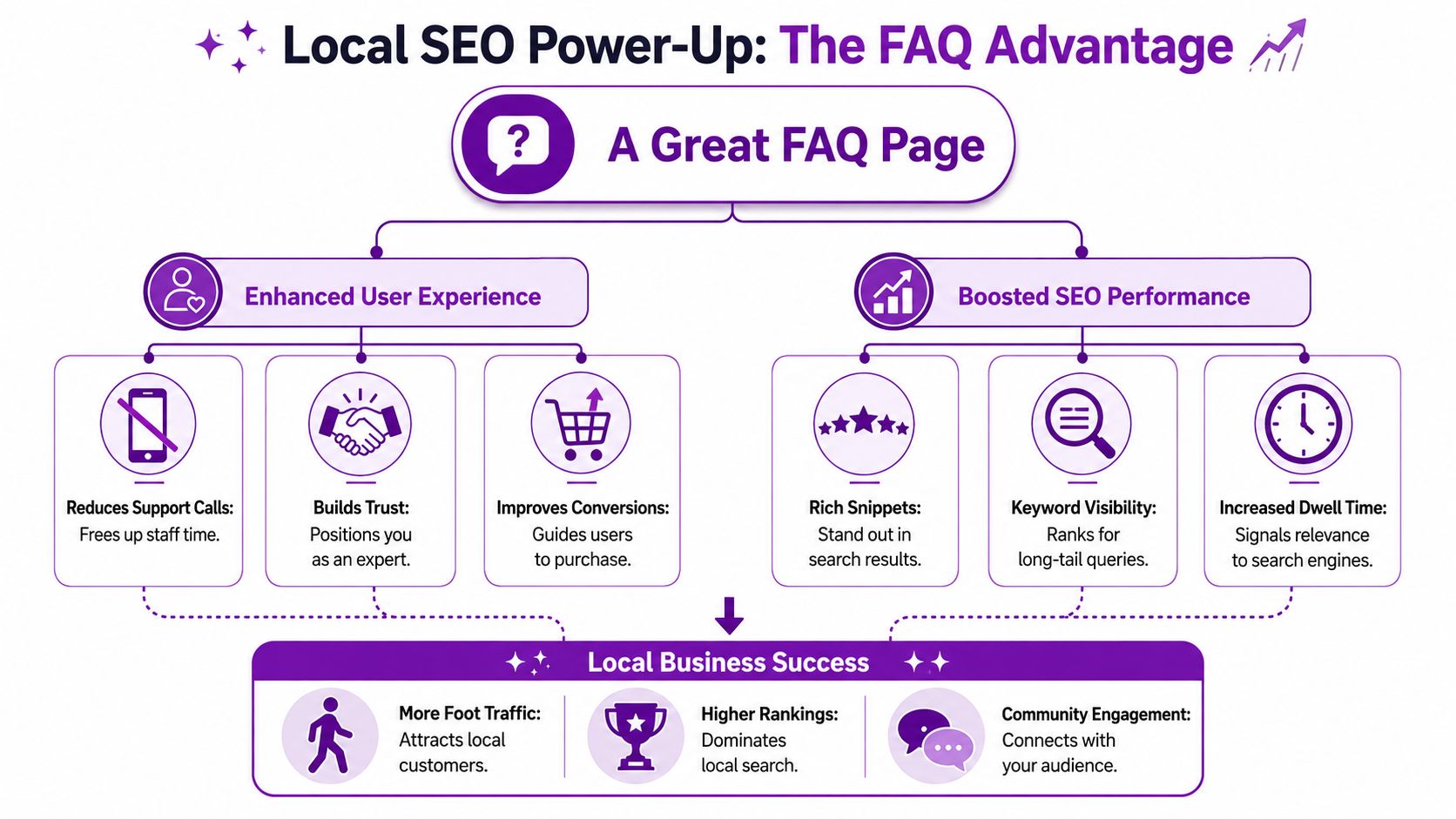
How a Great FAQ Drives Local SEO Success
A local customer lands on your service page from Google, scans for ten seconds, and still cannot tell whether you cover their area, what the job costs, or how quickly you can book them in. They leave and try the next business. A good FAQ prevents that drop-off by answering the practical questions that decide whether someone enquires.
Better answers keep local visitors on the page
FAQ content improves local SEO because it helps the page satisfy intent more completely. Google wants to rank pages that answer the search, not pages that force users to click around for basic details.
That matters on local landing pages. A visitor searching for a nearby provider is often checking a small number of practical points before contacting you: availability, travel area, parking, turnaround time, pricing, or whether you handle a specific type of job. If those answers sit clearly on the page, people stay longer, scroll further, and convert at a higher rate.
Google has also stated that helpful, people-first content is designed to leave visitors feeling they have learned enough to achieve their goal, rather than needing to search again, in its guidance on creating helpful, reliable, people-first content. That is exactly what a strong FAQ should do on a local service or location page.
FAQ content strengthens local relevance
An FAQ gives you room to cover the supporting details that your main service copy cannot carry on its own. That is where local SEO value starts to compound.
A plumber in Leeds can answer questions about emergency callout areas, weekend rates, and response times by postcode. A wedding venue can cover guest capacity, ceremony licensing, nearby accommodation, accessibility, and parking. If you work in that sector, our guide to SEO for wedding venues shows how these supporting details help a page rank for more qualified local searches.
The gain is not just extra words on the page. It is tighter relevance between the query, the page, and the actual concerns a nearby customer has before they pick up the phone.
The best FAQ sections remove buying friction. They answer the question that would otherwise delay or stop the enquiry.
Rich results can improve SERP visibility
FAQ content can also improve how your listing appears in search if it is marked up correctly and Google chooses to show enhanced results. That extra visibility matters on mobile and in competitive local results, where a clearer listing can win more attention before the click.
Google explains the eligibility and limits for this in its documentation on FAQ structured data. Rich results are never guaranteed, and many businesses miss that point. Schema helps Google understand the content. It does not force Google to display it.
For local businesses, the upside is still real. A well-written FAQ can support visibility for searches such as:
- “Do you cover [postcode]”
- “How much does [service] cost in [town]”
- “Is [service] available weekends”
- “How long does [service] take”
These are often high-intent searches. They come from people narrowing options, not casually browsing.
What works in practice
The trade-off is straightforward. More FAQ content does not automatically mean better rankings. Relevance, placement, and wording matter more than volume.
What usually works:
- Questions tied to a service, location, or buying concern
- Answers that are direct, specific, and written in plain English
- FAQ sections placed on service and location pages close to enquiry points
- Local details such as coverage areas, response times, parking, access, or licensing
What usually fails:
- Generic questions such as “Why choose us?”
- Answers that read like sales copy instead of useful information
- Large standalone FAQ pages with no connection to service or location intent
- Repeating the same answer across multiple pages without adapting it to local context
A strong FAQ helps you rank for more long-tail local searches, supports Google's understanding of the page, and removes objections before the customer contacts you. Used properly, it does more than tidy up the user experience. It helps turn local search visibility into enquiries.
Finding Questions That Attract Local Customers
Most FAQ pages fail before the writing starts. The business guesses what customers ask, then publishes generic content that could sit on any competitor's site.
That's the wrong approach for local SEO. You need questions with place, service, and buying intent built into them.

A useful starting point is this: 85% of UK adults search online for local services, and many use hyperlocal queries such as “Is [business] licensed in [postcode]?” or “Do you serve [nearby town]?”, as noted in this local FAQ best-practice reference. Most local business FAQs stay generic, which means they miss the exact searches that bring qualified visitors in.
Start with your own customer data
Your best FAQ research usually isn't in a keyword tool first. It's in the questions your team already handles.
Look through:
- Email enquiries for repeated objections or clarifications
- Contact form submissions for common pre-sales questions
- Phone notes if your staff keep them
- Live chat transcripts if you use chat on the site
- Sales calls where prospects ask the same practical details before booking
Don't clean the language up too much. If customers ask, “Do you travel to the Cotswolds?” that phrasing is useful. If they ask, “Can I book a family session in Salford on a Sunday?” that's even better.
For visually led local services, this is often where the best search opportunities come from. A photographer, for example, shouldn't stop at “What photography services do you offer?” They should be targeting place-based buyer questions that support pages like SEO for photographers.
Use search data to refine the list
Once you've got the raw questions, check what searchers are already telling Google.
Check Google Search Console
Look in the Queries report for question-style phrases and longer local terms. Pay attention to wording that includes:
- Who
- What
- How
- When
- Near me
- Town names
- Postcodes
- Service modifiers
You may also find impressions for searches where you're visible but not winning many clicks. Those are often strong FAQ candidates because intent exists already.
Review People Also Ask and autosuggest
Search your main services manually in Google and note:
- People Also Ask questions
- Autocomplete variations
- Related searches at the bottom of results
These are useful because they reflect how searchers phrase uncertainty. That phrasing often works better than polished internal wording.
If your FAQ sounds like your brochure, rewrite it. If it sounds like your customer, keep it.
Separate broad questions from local-intent questions
Not every question belongs on the same page, a common oversight that leads many businesses to create content bloat.
A better split looks like this:
| Question type | Best location |
|---|---|
| General company questions | Main FAQ page |
| Service-specific objections | Service page FAQ |
| Area coverage and logistics | Location page FAQ |
| Compliance or licensing by area | Relevant local page |
Examples:
- “What happens at the first consultation?” belongs on a service page.
- “Do you cover Harrogate and surrounding villages?” belongs on a Harrogate page.
- “Where are you based?” can sit on the main FAQ page if needed.
That separation helps both rankings and usability. People get the answer in context, and Google gets clearer topical signals from each page.
Structuring Your FAQ for Users and Google
Once you've found the right questions, structure decides whether they help or just clutter the page.
The strongest setup is usually simple. Keep one dedicated FAQ page for broad company information, then add smaller FAQ sections to service and location pages where those answers directly support an enquiry.
Orbit Media's survey found that 72% of organisations with FAQ content attribute a 15 to 20% reduction in direct customer support queries to it, according to their website requirements article. That tells you something important. Good FAQ design isn't only about rankings. It also removes repetitive work from your team.
Put the FAQ where the question naturally occurs
A dedicated FAQ hub is useful, but it shouldn't carry all the weight.
Use page-level placement like this:
- Homepage FAQ for trust-building basics if your homepage targets branded and broad local traffic
- Service-page FAQ for pricing, process, timescales, and suitability
- Location-page FAQ for travel, coverage, parking, service radius, and local trust signals
If you run a multi-location or facility-based business, this matters even more. For example, storage customers often search for practical details before they convert, which is why FAQ placement fits naturally alongside pages focused on SEO for self-storage.
Keep answers short and literal
The answer should resolve the question fast. Don't turn every reply into a sales pitch.
A strong answer usually does three things:
- Addresses the question directly
- Adds one useful detail
- Offers the next step if needed
We pride ourselves on delivering an exceptional and customer-focused service customized for every client's unique needs.
Better answer:
“Yes, we cover most of South Birmingham, including B13, B14 and B28. If you're just outside those areas, contact us and we'll confirm availability.”
Key check: If you remove your brand name and the answer could fit any business in the UK, it's too vague.
FAQ Content Best Practices
| Do | Don't |
|---|---|
| Use real customer wording from emails, calls, and search data | Invent polished questions nobody actually asks |
| Group questions by page intent such as service, location, or company-wide | Dump every question onto one long page |
| Write direct answers first and add detail second | Lead with marketing fluff before the answer |
| Use accordions carefully if they improve scanning on mobile | Hide critical information behind awkward UX |
| Add internal links where helpful to booking, contact, or service pages | Stuff answers with repeated keywords |
| Review FAQs regularly when services, hours, or areas change | Leave outdated answers live for months |
Formatting choices that usually work
Accordions can be helpful, especially on mobile, but don't use them to bury key selling information. If a question is central to conversion, make sure the answer is visible or easy to expand.
Also keep categories obvious. A clean structure such as “Pricing”, “Coverage Areas”, “Booking”, and “On the Day” is easier to scan than a random list.
The main job of an FAQ in website content is clarity. If users have to hunt, the section has already lost value.
Implementing FAQPage Schema for Rich Results
Schema sounds technical, but the practical version is straightforward. FAQPage schema is a piece of structured data that helps search engines understand that part of your page is a question-and-answer format.
That extra clarity matters. A 2024 UK-focused study found that websites implementing FAQPage schema saw a 24% average increase in impressions for related queries, with 38% acquiring at least one rich snippet, according to this FAQ schema reference. The effect was stronger on pages using location-specific questions.
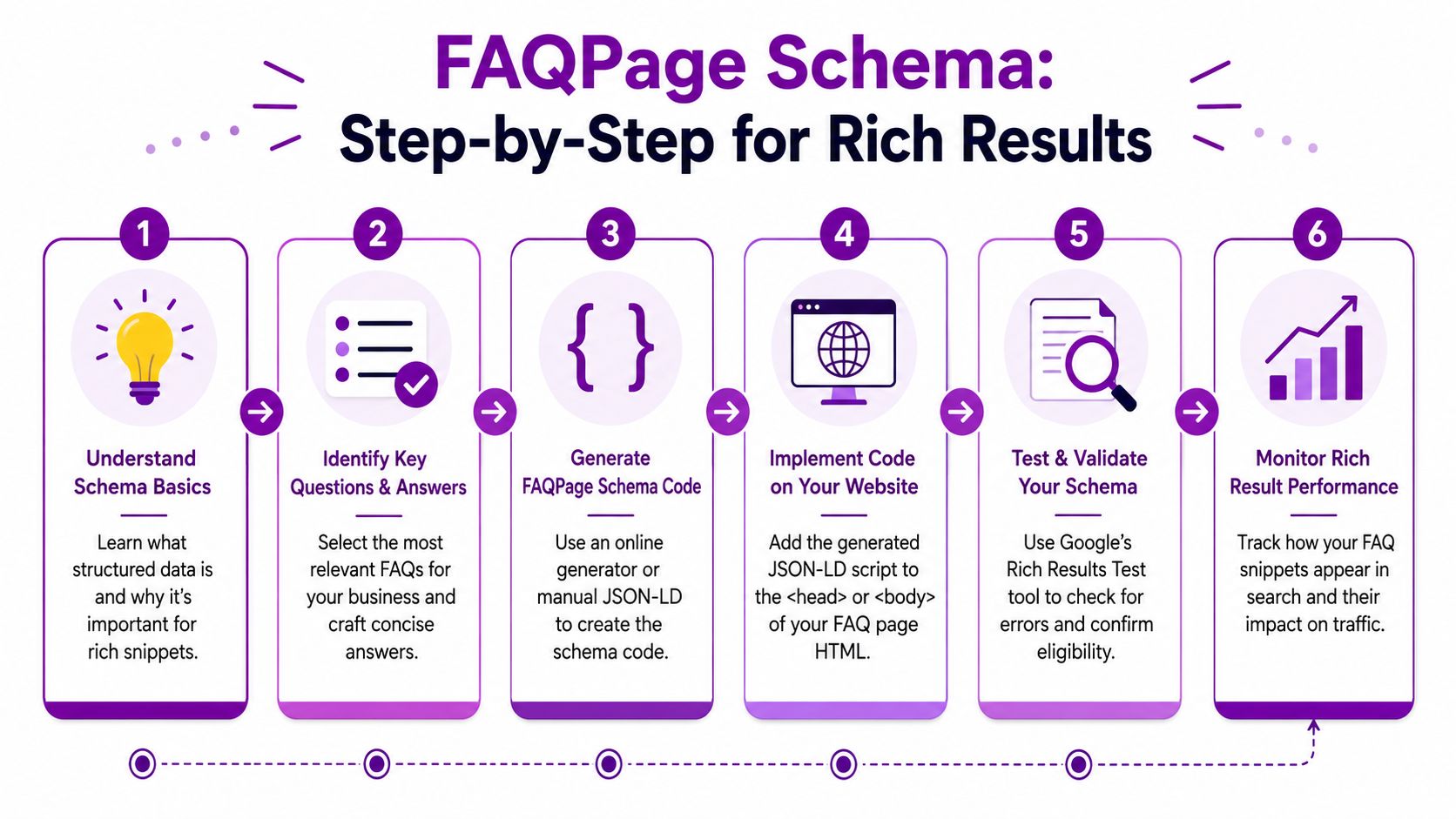
A quick visual makes the process easier to grasp.
What schema actually does
Schema doesn't improve weak content by itself. It helps Google interpret strong content more accurately.
Think of it as a label. Your page already contains the questions and answers. Schema tells search engines, “This section is an FAQ, and here are the exact question-answer pairs.”
That can improve eligibility for enhanced presentation in search results. If you want extra context on how concise answers support snippet visibility, Outrank's SEO visibility tips are worth reviewing alongside your FAQ writing.
A simple implementation process
You don't need to be a developer to get this done if your site is on WordPress, Shopify, or another mainstream CMS.
Finalise the visible FAQ content
Write the questions and answers on the page first. The schema must match the content users can see.Generate the FAQPage code
Use a schema generator that outputs JSON-LD. Most tools will ask for each question and answer and then produce the markup automatically.Add the code to the page
Place the generated JSON-LD in the page's head section or use a plugin or theme setting if your platform supports custom scripts. On WordPress, many SEO or schema plugins can handle this without editing template files.Test the page
Run the URL through Google's Rich Results Test. Check for errors, warnings, and whether Google recognises the FAQ element correctly.Publish and monitor
Once live, track impressions and appearance in search. Keep the schema updated when the page content changes.
Here's a walkthrough video if you prefer seeing the process in action.
Common schema mistakes
Most implementation problems aren't technical. They're process issues.
Marking up content that isn't visible
If the schema contains questions or answers that don't appear on the page, that creates a mismatch. Keep your structured data aligned with the front-end copy.
Using vague questions
“Why choose us?” is weak schema content because it's weak content generally. Use factual, intent-led questions with clear wording.
Forgetting local relevance
A national-style FAQ often misses the point for local businesses. Questions such as service area, travel radius, parking, licensing, and appointment availability by location are often more commercially useful than broad educational queries.
Mark up the questions that help a local customer decide, not the ones that merely fill space.
Where to apply schema first
If resources are tight, start with the pages closest to an enquiry:
- Primary service pages
- Top-performing location pages
- Pages already receiving impressions for question-style queries
- High-friction pages where customers need reassurance before converting
That order usually produces faster learning. You'll see which question types gain traction, then expand from there.
Measuring and Improving Your FAQ Performance
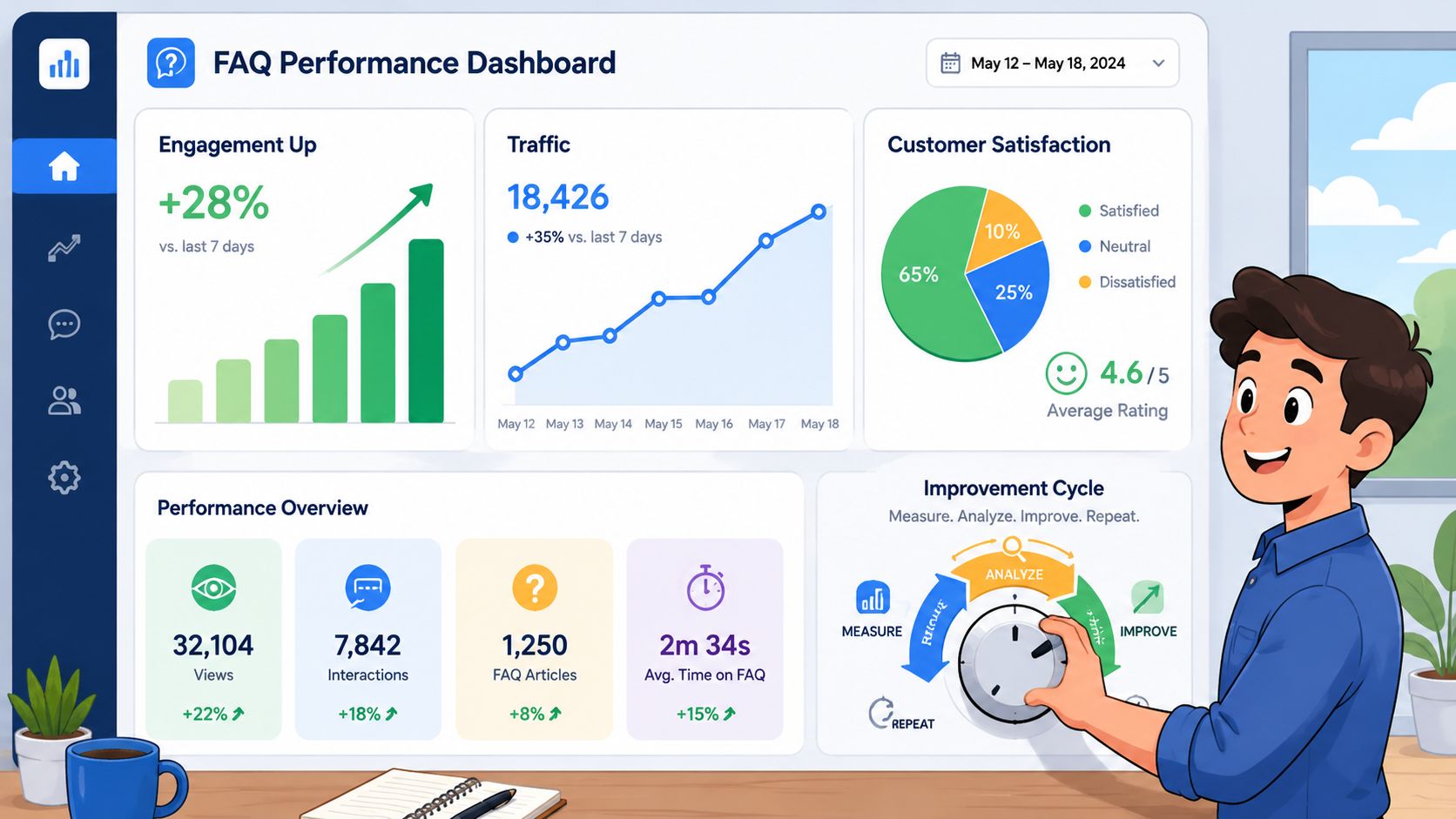
Publishing the FAQ is only half the job. The true value comes from checking whether it changes visibility, engagement, and the quality of enquiries.
What to check in Google Search Console
Search Console tells you whether Google is surfacing the content.
Look for:
- Impressions on pages with FAQ sections
- Clicks from question-led queries
- Queries containing towns, postcodes, and service modifiers
- Page-level changes after adding or expanding FAQ blocks
If you've added schema, monitor whether those pages begin to show broader visibility for related long-tail terms. Even when rankings don't jump instantly, impression growth often tells you Google is understanding the page better.
What to check in analytics and lead tracking
Analytics shows whether the FAQ helps users move forward instead of stalling.
Watch for:
- Time on page for service and location pages with FAQs
- Scroll depth if your setup tracks it
- Clicks to contact or booking pages from FAQ-heavy pages
- Reduced basic support queries over time
You should also compare the questions your team receives before and after publication. If common pre-sales questions start appearing less often by phone or email, that's a practical sign the content is doing its job.
A lot of businesses miss one useful comparison. Check your website performance alongside your local profile visibility. If your FAQs improve page relevance, that can support the wider local ecosystem around your listings, which is why it helps to review your Google Business Profile audit tool data at the same time.
Improve the FAQ like a live sales asset
Don't freeze the page once it's published.
Refresh it when:
- Customers start asking new questions
- You expand into new towns
- Your pricing or process changes
- Search Console reveals new query patterns
A good FAQ grows with the business. It becomes sharper because it reflects real objections, real local searches, and real conversion friction.
Some of the best content updates come from non-SEO teams. Receptionists, sales staff, and account managers often know exactly which answers are missing.
If you're also building authority around those pages through broader coverage and links, reviewing strong examples such as digital PR success stories can help you think beyond on-page content alone.
A useful FAQ in website strategy is measurable when it brings in better-qualified traffic, reduces repetitive questions, and helps more visitors reach the enquiry stage without needing hand-holding.
If your site has the traffic but not enough enquiries, or your team keeps answering the same local questions every week, it's time to treat FAQs as an SEO asset instead of a support afterthought. Bare Digital helps UK businesses turn local search visibility into measurable leads with practical on-page SEO, Google Business Profile optimisation, location pages, and technical fixes that support rankings where it counts.