
You log into Facebook to check messages and find two pages for the same business. One has your current logo but hardly any activity. The other was created years ago, still shows an old phone number, and has followers you didn't realise were there. If you run more than one location, it's often worse. You might have a main brand page, a branch page, and an accidental duplicate someone set up during a rebrand.
That kind of mess doesn't just look untidy. It splits your audience, confuses customers, and weakens the consistency that local marketing depends on. If you're trying to rank well in your town or across several service areas, cleaning up duplicate Facebook pages is one of those jobs that feels administrative but has real commercial value.
Why Merging Matters for Your UK Business
A lot of UK businesses sit on duplicate Facebook pages for years because the damage is easy to miss. Staff change. Agencies come and go. A venue gets renamed. A second page gets created for a new branch, then another person creates an unofficial one after checking in at the location. The result is a scattered brand presence that nobody fully owns.
That matters because Facebook still has scale in the UK. As of 2023, Facebook had approximately 45 million monthly active users in the UK, and up to 24% of small businesses manage multiple pages unintentionally, which can dilute engagement metrics by as much as 40% across fragmented profiles, according to Boxcar Marketing's overview of Facebook page merging.

What duplicate pages actually cost you
A duplicate page problem usually shows up in ordinary ways:
- Missed enquiries: A prospect messages the wrong page and gets no reply.
- Bad trust signals: One page shows the correct opening hours, another shows old details.
- Split social proof: Likes, check-ins and audience activity sit across several places instead of building one strong profile.
- Brand confusion: Customers don't know which page is official.
For local businesses, that confusion is expensive. A wedding venue, funeral director, caterer, architect, electrician, or builder often wins business because the customer feels reassured quickly. If the social presence looks disorganised, people hesitate.
Practical rule: If two pages represent the same real-world business, one strong page nearly always performs better than two weak ones.
Merging is a visibility decision, not just a tidy-up
Most generic advice treats this as a Facebook admin task. It isn't. It's a local visibility task.
A single, authoritative page gives customers one place to follow, one place to message, and one consistent brand identity. It also makes the rest of your marketing easier. Your ads point to one destination. Your website links to one destination. Your team doesn't have to remember which page should be updated.
If you're still building your organic presence, this step-by-step guide for small businesses is useful for tightening up your main page before or after a merge. It pairs well with a broader approach to social media for small business marketing, where the main goal is consistency across every place customers find you.
Your Pre-Merge Checklist Getting Ready to Combine Pages
Most failed merge attempts happen before the request is ever submitted. The problem usually isn't Facebook being random. It's mismatched business data, weak page access, or duplicate pages that were set up differently over time.
If you want to merge facebook pages without wasting time, treat preparation as the main job.
The non-negotiables before you click anything
You need full admin control of every page involved. Not editor access. Not task access buried inside Meta Business Suite. Proper admin rights. If one page still belongs to a former staff member or an old agency login, sort that out first.
You also need the business details to match closely enough that Facebook can see both pages represent the same entity. That means checking the page name, address, phone number, category, website link, and branding assets.
Here's the checklist I'd work through before opening the merge tool.
| Requirement | Action Needed | Bare Digital Tip |
|---|---|---|
| Admin access | Confirm you're an admin on every page involved through Meta Business Suite or Page settings | If access is split across old staff accounts, resolve ownership before touching names or addresses |
| Page names | Align the page names so they clearly refer to the same business | Keep naming practical and consistent. Avoid extra slogans, emojis, or branch nicknames |
| Address details | Match the address format exactly, including postcode style | Use the same formatting you use publicly elsewhere so your business data stays consistent |
| Phone number | Standardise the main contact number across pages | Use one customer-facing number where possible, not mobile on one page and landline on another |
| Categories | Make sure both pages use the same or closely related business category | A mismatch here often creates avoidable friction |
| Images | Use the same profile and cover images on both pages | This helps signal that the pages belong to the same business |
| URL records | Save the page URLs and review which page you intend to keep | If you need help locating the correct page link, this guide from Reviews To The Top is a handy reference |
| Existing content | Download anything important from the page you expect to remove | Don't assume old posts, photos, or review context will stay visible after the merge |
| Customer reputation | Check where your strongest recent engagement lives | If one page is weak but has the best review history elsewhere in your marketing, document it before merging |
What to align for UK businesses
For UK pages, consistency matters more than people think. If one page says “Road” and another says “Rd”, that may not always cause a problem, but enough small differences stacked together can.
Use the same details you'd want customers to find anywhere else online. That includes your postcode formatting, phone presentation, and your trading name exactly as you use it publicly. If your reviews are a major part of your lead generation, it's also worth tightening up your wider reputation process before the merge. This guide on how to get more reviews helps if your Facebook cleanup is part of a larger local trust-building job.
Don't rush the naming step. The fastest way to delay a merge is to submit pages that still look like two different businesses.
Choose the page you want to keep
Businesses often make the wrong call when deciding which page to keep. The page to keep should usually be the one with the strongest current identity. That often means the one with the better follower base, cleaner branding, more check-ins, or the most accurate public details.
Sometimes the older page has more history but worse information. Sometimes the newer page has cleaner branding but fewer followers. In those cases, decide which page gives you the strongest long-term home for the brand, then align everything else around it.
The Step-by-Step Process for Merging Your Pages
Once the setup is clean, the actual merge process is usually straightforward. The key is to move in the right order and not skip the follower notice.
Start with the pages themselves
Before submitting anything, make sure both pages are visible, active, and showing matching business information. For UK businesses, names should have at least 95% similarity and all details, including the UK postcode format and the +44 phone prefix, should be synced. Before merging, post a pinned notice informing followers to comply with GDPR. A Bare Digital analysis of over 50 UK merges shows an 82% first-try approval rate when all details match precisely, as noted in Agorapulse's Facebook merge guide.
That pinned notice doesn't need to be complicated. Keep it clear and dated. Tell followers that page A is merging into page B, give them the destination page link, and explain where future updates will appear.
A simple notice could read along these lines:
We're moving all updates to our main Facebook page. This page will be merged into our official page on [date]. Please follow us there for future news, offers and messages.
Use the merge tool in the right sequence
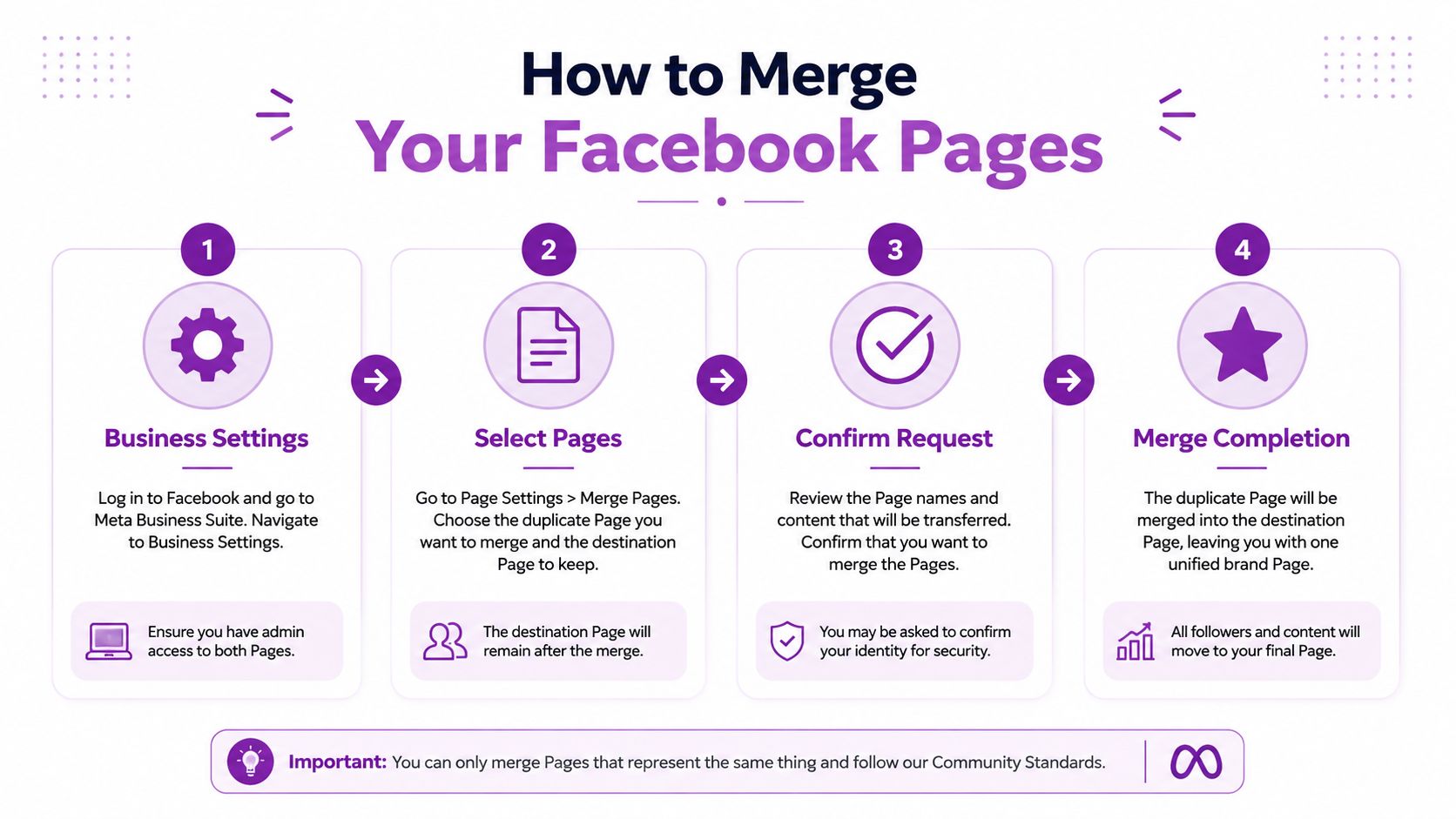
Once the pages are aligned, go to the Facebook merge interface and complete the request from the account that holds admin access on both pages.
Follow this order:
Log into the correct admin account
Use the profile that has full control over both pages. If Facebook asks you to switch identities, make sure you're acting as the right account.Open the merge request area
Facebook may route you through page settings or the direct merge path depending on interface changes.Select the page you want to keep
This is your destination page. Choose carefully because this is the page that remains live after the merge.Select the duplicate page to merge into it
This is the page that will be absorbed and removed.Review names and details one last time
If something still looks off, stop and correct it first.Confirm the request
Facebook may ask for your password or a final security check.
Facebook then reviews the submission. In practice, that review isn't always instant, so don't assume a delay means rejection.
To see the basic flow in action, this walkthrough is helpful:
What transfers and what doesn't
It's important to understand the outcome of the merge. The surviving page keeps operating as your main page. The duplicate page doesn't stay around as an archive.
In general, businesses should expect followers and check-in value to consolidate onto the chosen page, while old posts and page-specific content from the removed page may not carry over in a way you can still use publicly. That's why exporting anything important before the request goes in is good practice.
If you run paid campaigns, review any ads tied to the page you plan to remove. Also check connected Instagram accounts, lead forms, and any links from your website. If social is part of your acquisition plan, it's worth reviewing your wider social media advertising for small businesses setup after the merge so you're not sending traffic to a dead asset.
The trade-off most businesses should accept
Merging gives you one stronger destination, but you may lose some old clutter in the process. That's usually a good trade. Businesses get into trouble when they try to preserve every weak page just in case. In nearly every local SEO context, one trusted page beats a messy network of half-managed ones.
Troubleshooting Common Facebook Page Merge Errors
Even when the process is done properly, Facebook can still throw up a vague error. Most of the time, the message is frustratingly short and the actual problem is simple.

Pages can't be merged
This usually means Facebook doesn't believe the two pages represent the same business. Check the obvious first. Are the names still too different? Do the categories match? Is one address incomplete?
If you've recently changed the page name, give it a little time to settle before trying again. Businesses often create their own problem by editing details and submitting the merge request immediately.
You don't have permission
This one is nearly always an access issue. You may be logged into the right personal profile but still lack proper admin rights on one of the pages.
Check page roles, Business Manager ownership, and whether the page is attached to an older business portfolio. If previous access changes have made your page management messy, it's worth reviewing related platform issues too, especially if you've seen reputation assets behave oddly. Problems like Google reviews disappear for one reason, while page permissions fail for another, but both usually point to weak control over core local assets.
The locations don't match
For multi-location brands, this is one of the biggest stumbling blocks. If one page lists a Leeds postcode and the other lists London, Facebook may treat them as separate entities rather than duplicates.
That doesn't always mean you should force a merge. Sometimes the right answer is to keep separate pages for distinct branches. Merging only makes sense when both pages point to the same underlying business location or the same official brand destination.
If the pages represent different branches serving different postcodes, don't merge them just because managing multiple pages feels annoying.
One page is unpublished or incomplete
An unpublished page, a page with missing business fields, or a page with inconsistent public details can block the request. Bring it into a complete, usable state first. Fill in the missing details, tidy the branding, and make sure the page clearly looks like part of the same business.
The merge request keeps failing without explanation
When Facebook gives no useful detail, strip the problem back to basics:
- Recheck the page names and remove extra descriptors where possible.
- Match the business category on both pages.
- Standardise the address using one consistent format.
- Confirm the contact number is presented the same way.
- Replace mismatched imagery with the same profile and cover assets.
- Retry from desktop rather than hopping between mobile app screens.
Most stubborn merge failures come from small inconsistencies layered together.
Post-Merge Actions and Local SEO Impact
A successful merge isn't the end of the job. It's the point where your Facebook presence becomes useful again for local marketing.
For UK multi-location businesses, that matters because 76% of “near me” searches happen on Google Maps, and a unified Facebook Page with a consistent address that matches your Google Business Profile and Companies House data strengthens local SEO signals. The same source notes that failing to align UK postcodes is a major cause of merge failures for these businesses, according to Arvo's guide on merging Facebook pages for 2025.
What to do straight after the merge
The first job is verification. Check that the surviving page shows the correct business name, address, phone number, website, opening hours, category, and profile imagery. Then test every public touchpoint.
Use this quick post-merge checklist:
- Review your page details: Make sure the surviving page matches your website, directory listings, and Google Business Profile.
- Update your links: Replace any website links, footer icons, booking pages, or email signatures that still point to the old page.
- Pin a fresh announcement: Tell followers where future updates will appear and reassure them that they're in the right place.
- Monitor messages closely: Customers may still refer to the old page for a while, so respond quickly and clearly.
- Check brand consistency: If your trading name, branch wording, or address formatting varies across platforms, clean that up now.
Why this helps local visibility
Google doesn't use your Facebook page as a direct shortcut to rankings in the simple way many marketers claim. But a unified social profile supports the signals local businesses do need: consistency, trust, and clear brand identity.
If your Google Business Profile says one thing, your website says another, and Facebook says something else again, customers notice. So do platforms that rely on entity consistency to understand your business. That's why this work pairs naturally with tightening up your Google Business Profile basics.
A merged page works best when it becomes the social version of your core business record. Same name. Same postcode. Same contact details. Same brand.
Multi-location brands need an extra layer of discipline
If you operate in more than one town, decide whether your Facebook structure should support a brand-level page, location-level pages, or both. The wrong move is mixing branch-specific data into a page that's meant to represent the whole company.
A construction firm with one real office but several service areas should usually keep one strong page and use content to target local areas. A business with separate trading locations may need separate assets if customers visit those branches in person.
That distinction matters for lead generation. Trades businesses often put a lot of effort into paid lead flow once their local profile is stable. If that's your model, looking at practical campaign ideas such as this guide to pressure washing advertising for 2026 can be useful after your foundations are sorted, because ad performance is always easier to manage when your brand signals point to one clean destination.
Frequently Asked Questions About Merging Pages
Can I undo a Facebook page merge?
No. Treat it as permanent. Download anything important before you submit the request.
What happens to posts and photos from the page being removed?
Don't assume they'll remain available on the surviving page in a useful way. If there's anything you need for records, content reuse, or customer context, export it first.
What if one page has better branding but the other has more followers?
Usually keep the page that gives you the strongest long-term base, then bring the branding into line before the merge. Don't make the decision on aesthetics alone.
Should I merge pages for different branches?
Not automatically. If they represent different physical locations or distinct trading entities, separate pages may be the right setup. Merge only when the pages duplicate the same business presence.
What happens to ads linked to the old page?
Review them manually. If a campaign points to the page being removed, update the destination and page association before or immediately after the merge.
Can I merge if one page is unpublished?
It's better to make the page complete and properly configured first. Incomplete or unpublished pages often create unnecessary friction.
Will reviews transfer cleanly?
Treat reviews cautiously and document what matters before merging. The safest approach is to preserve records in advance rather than hoping Facebook will display everything exactly as you expect after consolidation.
If you've got duplicate pages, inconsistent business details, or branch-level confusion that's affecting your local visibility, Bare Digital can help you clean up the structure and align it with your wider local SEO strategy. That includes Facebook, Google Business Profile, location signals, and the practical fixes that turn messy online presence into more enquiries.