

If you've added a second, fifth, or fifteenth branch and your local visibility still depends on the original site ranking, you're not alone. Many UK businesses stall at this point. The home city performs well, branded searches are fine, but the new branches barely appear in Maps, their landing pages look interchangeable, and reporting rolls everything into one vague SEO number that doesn't tell you which location is pulling its weight.
That's the challenge with SEO for multiple locations. It isn't just more pages, more listings, or more admin. It's an operational problem. If the system isn't built properly, every new branch adds complexity faster than it adds visibility.
For trades, hospitality groups, healthcare providers, wedding venues, and retail brands, the fix is usually the same. Stop treating multi-location SEO like a checklist and start treating it like infrastructure. Each branch needs its own digital footprint, but the business still needs central control over standards, data, content quality, and measurement.
Laying the Foundation Your Multi-Location SEO Blueprint
A common scenario looks like this. A plumbing company in Birmingham opens in Coventry and Wolverhampton. The Birmingham page ranks because it has age, links, reviews, and brand familiarity. The new locations get a token paragraph on a general “areas we cover” page, each Google Business Profile links back to the homepage, and nobody owns citation cleanup. Months later, the business assumes the new areas are “just more competitive”.
Usually, they're not losing because of competition alone. They're losing because there's no blueprint.
The three pillars that make multi-location SEO work
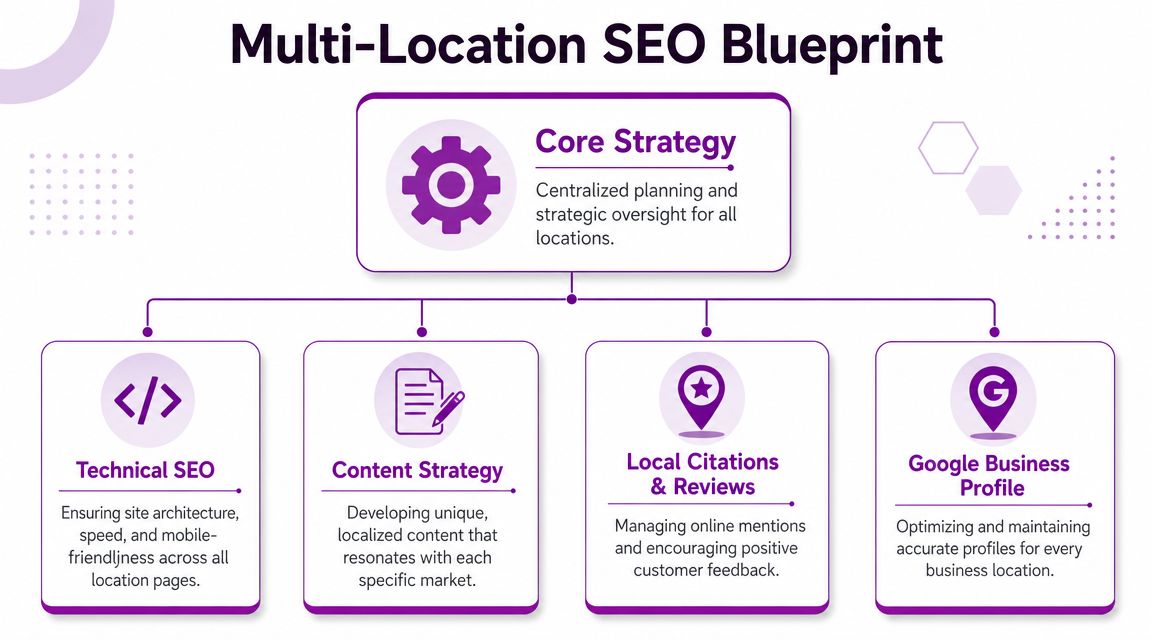
A scalable setup rests on three connected assets.
- Website architecture: Each branch needs a dedicated, indexable page on the main domain. Not a filtered map result, not a JavaScript locator with no crawlable content, and not a paragraph hidden on a services page.
- Google Business Profile: Each real-world location needs its own profile, tied to its own branch page. Google's local model relies on relevance, distance, and prominence, and separate location pages plus matching profile data give each branch a better chance to rank for its own area, as outlined in Ahrefs' guide to SEO for multiple locations.
- Off-page authority signals: Citations, reviews, local links, and mentions help Google trust what your site and profile say about each branch.
That sounds simple, but the value comes from how these three pillars reinforce each other. A London restaurant page with local photos, a proper address, and borough-specific content is stronger when its Google Business Profile points to that exact page. That page is stronger again when directories, Apple Maps, Bing, and review platforms repeat the same details.
Practical rule: If one branch closes, moves, changes phone number, or expands its opening hours, your website, Google Business Profile, citations, and reporting should all be updated through one operating process. If they aren't, the SEO setup won't scale.
Build a system, not a rescue mission
The businesses that struggle most are usually managing branch SEO in fragments. A regional manager edits a listing. A web team adds a page. Someone in customer service replies to reviews. Nobody owns the full picture.
A better approach is to centralise standards and decentralise inputs. Head office controls templates, URL structure, NAP formatting, schema rules, review processes, and reporting. Local teams supply the raw material. Team bios, branch photos, project examples, nearby landmarks, FAQs, and customer proof.
If your organisation also juggles brand sites, microsites, or franchise properties, this wider guide on how to manage multiple websites effectively is useful for avoiding governance problems that later spill into local SEO.
A good starting point is a repeatable audit framework. This local SEO checklist is the sort of document that helps teams spot structural gaps before they spend money on content or link building.
Architecting Your Website for Local Growth
Most multi-location SEO problems start with poor structure. Businesses often focus on copy first, when the bigger decision is where those branch pages live and how authority flows to them.
For most UK businesses, one domain with location pages in subfolders is the strongest default. It keeps authority consolidated, simplifies governance, and makes internal linking far easier to control.
The structure decision that affects everything else
Here's the comparison that matters most.
| Attribute | Subfolder Structure (Recommended) | Subdomain Structure |
|---|---|---|
| Example | yoursite.co.uk/locations/manchester | manchester.yoursite.co.uk |
| Authority flow | Consolidates authority on one main domain | Tends to split authority across separate entities |
| Reporting | Easier to segment and compare in one property | Usually creates messier analytics and ownership |
| Development control | Cleaner for central templates and updates | Often drifts into branch-by-branch inconsistency |
| Internal linking | Straightforward hub-and-spoke model | More friction between sections of the site |
| Best fit | Most service brands, hospitality groups, clinics, retail chains | Rare cases with distinct local businesses needing genuine independence |
Subdomains aren't always wrong. They can work if each branch is effectively operating as a separate business with its own stock, team, editorial output, and local marketing control. But that's not how most regional UK businesses operate. Most need consistency, not fragmentation.
Put bluntly, if all branches trade under one brand, one site usually gives you the best chance to grow authority across every location.
Use a proper location hub
Your main locations page matters, but not as a ranking substitute for branch pages. It should act as a hub.
A strong location hub does three jobs:
- Helps users find the right branch quickly
- Passes internal authority to every branch page
- Creates a clean crawl path for search engines
For example, a hotel group might have /locations/ as the parent page, then /locations/york/, /locations/leeds/, and /locations/chester/. The hub page can list regions, counties, or services by place. It shouldn't be a dead-end map widget with no useful text and no crawlable links.
URL and internal linking rules that hold up at scale
Keep URLs clean and predictable. Use real place names and avoid parameter-heavy location finder outputs.
Good patterns look like this:
- Single branch page:
/locations/cambridge/ - Nested local content:
/locations/cambridge/parking/ - Branch-specific service page:
/locations/cambridge/emergency-plumbing/
What doesn't work well is muddled architecture. Examples include a branch page under /contact-us/cambridge-office-final/ or multiple URLs targeting the same place with slight wording changes.
Internal links should reinforce place relevance without becoming spammy. Link from service pages to relevant branches. Link nearby branches to each other where that helps users. Link blog posts about local projects or events back to the branch page that owns that area.
Think like a chain, not a single site
Larger brands often underperform by building one branch page per location and stopping there. But some locations need deeper support.
A trades company with a competitive Leeds branch may need extra subpages for service areas, parking details, testimonials, emergency call-out coverage, or local project galleries. A wedding venue group may need branch-level pages for open days, accommodation, local transport advice, and nearby attractions.
That doesn't mean every branch gets a microsite. It means your architecture should allow stronger branches to expand without rebuilding the whole domain later.
Building Location Pages That Convert
A location page shouldn't exist just to give Google a city name. It should answer the questions a real customer has before they call, visit, or book.
For UK businesses with multiple locations, the most reliable model is to create one dedicated landing page per location, keep NAP perfectly consistent, and connect each page to a verified Google Business Profile. Those pages also need to be built for mobile use because Ofcom reports that 94% of UK adults used a smartphone in 2025, which makes mobile-first design, speed, and quick actions like tap-to-call especially important, as noted in this multi-location local SEO guide.
What every location page needs
Start with the essentials. If these aren't in place, the page is incomplete.
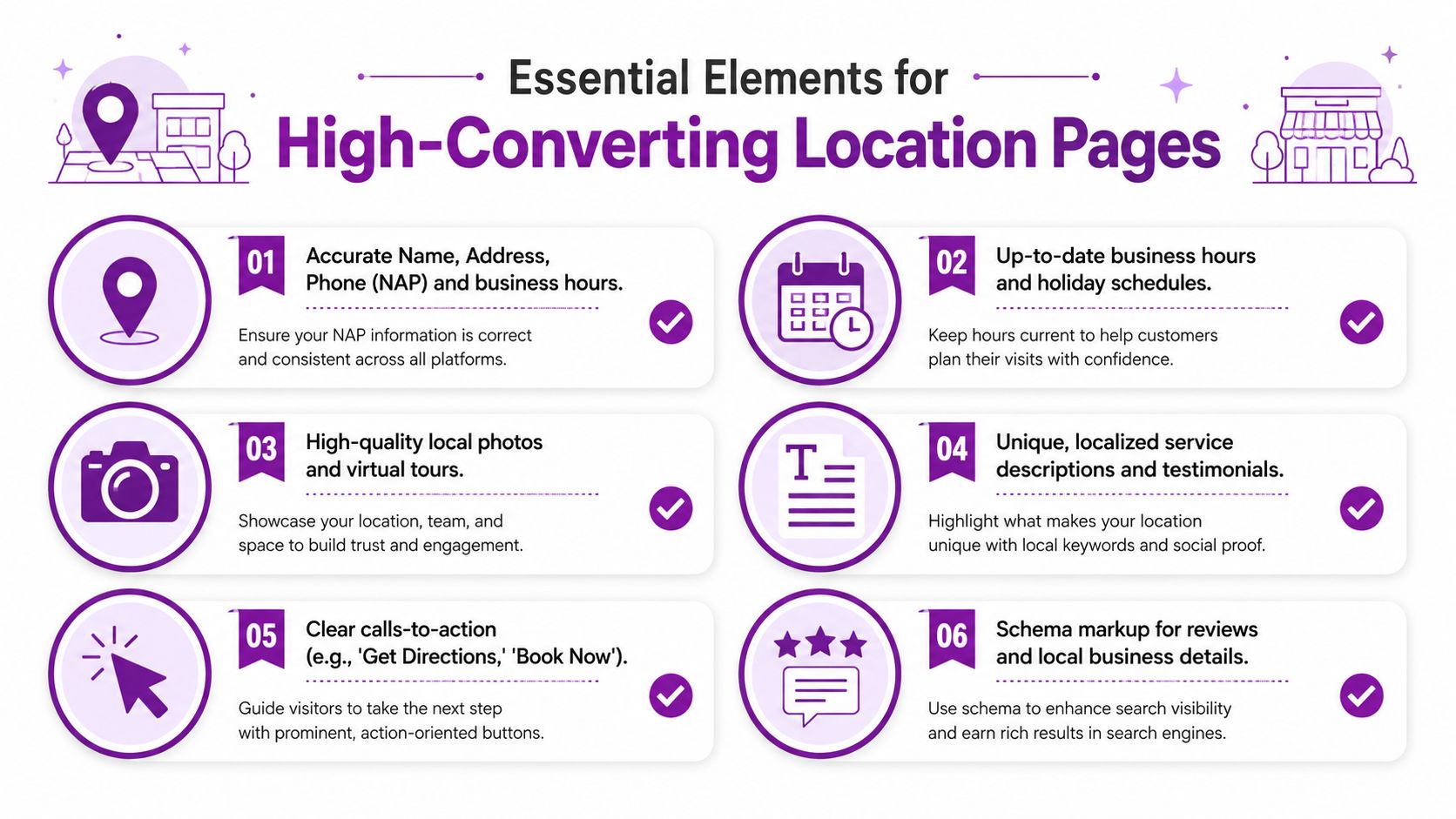
- Clear NAP details: Show the exact business name, address, and local phone number in plain text. Don't hide them inside an image.
- Opening hours: Include standard hours and update seasonal or holiday changes promptly.
- Primary call to action: “Call now”, “Book a table”, “Request a quote”, or “Get directions” should be visible without hunting.
- Map and travel context: An embedded map helps, but also add practical directions, parking notes, public transport details, or service area clarification.
- Unique local copy: Explain what that branch does, who it serves, and any local specifics.
- Structured data: Add LocalBusiness details, address, opening hours, and review markup where appropriate.
For a quick example of what stronger local landing pages look like in practice, this page on SEO services in Cambridge shows how location relevance and service intent can sit together on one URL.
What makes a page genuinely local
Most businesses cut corners. They clone the same template, swap “Bristol” for “Bath”, and wonder why half the pages struggle.
A page becomes useful when it carries local proof. For example:
- Trades: Recent boiler installations in specific neighbourhoods, with short summaries of the work
- Hospitality: Photos of the actual branch, menu highlights, parking advice, nearby attractions, and accessibility details
- Healthcare: Clinician names, treatment availability, referral notes, and directions from nearby landmarks
- Wedding venues: Real event galleries, local accommodation suggestions, and branch-specific FAQs
Thin location pages often rank poorly because they don't help a customer decide. Google usually reflects that same weakness.
This video gives a useful visual walkthrough of local page thinking in practice.
A simple page framework that scales
A repeatable structure helps content teams move quickly without creating duplicates.
Local heading and intro
State the branch, what it offers, and who it serves.Practical visit or enquiry details
Hours, phone, address, parking, coverage area, map, and directions.Branch-specific trust signals
Reviews, testimonials, staff bios, accreditations, and local photos.Location-specific FAQs
Answer questions people in that area ask.Strong next action
Call, book, enquire, get directions, or check availability.
What to avoid
Some shortcuts actively weaken the page.
- City-name swapping: If every paragraph is identical apart from the place name, it won't hold up.
- Stock imagery only: Customers want to see the actual branch, team, venue, or vans.
- Homepage links in local assets: The branch page should be the destination for that branch.
- No conversion path: If mobile users can't quickly call, book, or get directions, the page wastes intent.
Scaling Google Business Profile Management
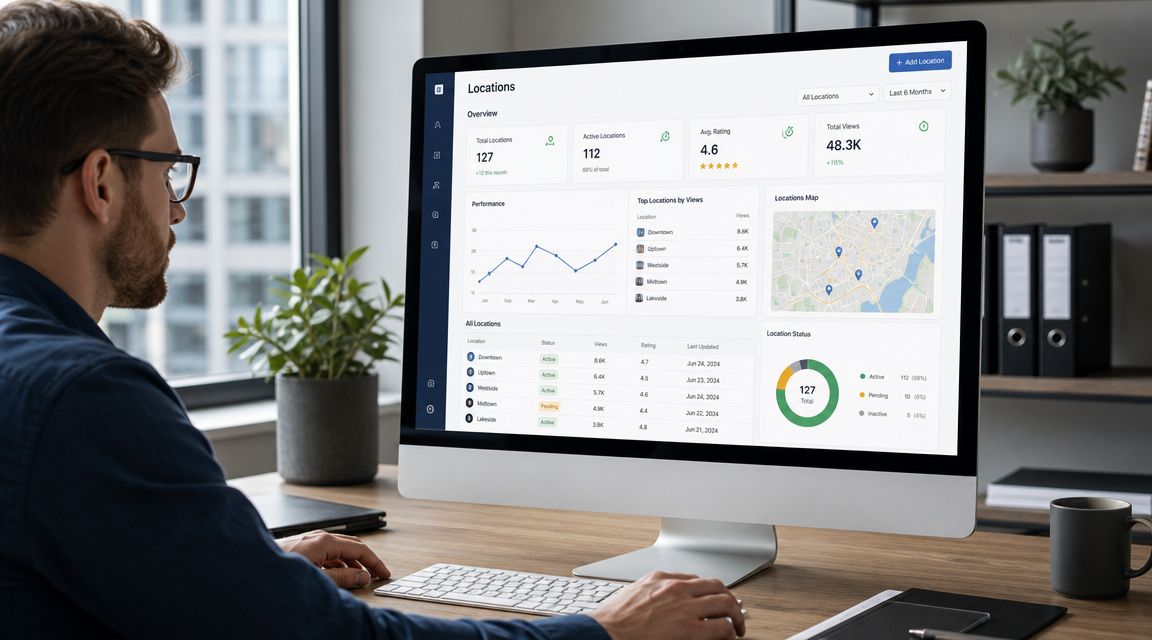
A common multi-location failure looks like this. The Leeds branch links to the homepage, Bristol still shows Christmas opening hours in February, Manchester has three customer photos from 2021, and nobody knows who should reply to reviews. Rankings dip, calls go to the wrong place, and head office cannot see which branch is slipping.
That is rarely a Google problem. It is an operating model problem.
Google Business Profile and location pages need to be managed as one local visibility system. Each branch should have its own profile, its own landing page, and a clear owner internally. Google explains the local ranking factors behind this in its own guidance on how to improve your local ranking on Google.
Set up control before you start optimising
Brands with five, ten, or fifty branches need role clarity first. If everyone can edit everything, profile quality drifts fast. Staff update the wrong location. Agencies lose access after a manager leaves. Branch teams overwrite central decisions on categories or URLs.
Use location groups in Google Business Profile and map permissions to actual responsibilities:
- Central owner access for the marketing lead or agency
- Regional manager access for a defined patch of branches
- Local contributor access for photos, opening hours, and day-to-day corrections
- One internal naming format so the branch name in GBP matches your reporting and support records
This sounds administrative, but it affects performance. I have seen chains lose branded local traffic because duplicate edits created confusion around the correct landing page and phone number.
Enforce profile standards
Every branch should follow the same rules, even if the local offer varies slightly.
| Area | Standard to enforce |
|---|---|
| Website link | Link to the matching location page, not the homepage |
| Core details | Business name, address, phone number, and opening hours must match the approved branch record |
| Categories | Choose centrally, then change only if the real service mix changes |
| Photos | Upload real branch imagery on a schedule |
| Services and descriptions | Keep them accurate, specific, and relevant to that branch |
| Review responses | Use a shared structure, then personalise the detail |
If you need a baseline before rolling changes out, this Google Business Profile audit tool helps teams spot missing fields, weak profile signals, and branch-to-branch inconsistency.
One trade-off matters here. Central control keeps standards tight, but branch teams often know the local reality better than head office. The fix is not to hand everything to one side. It is to centralise the rules and let branches submit changes through a simple approval process.
Build a maintenance schedule your team will actually keep
Profiles do not need constant tinkering. They do need regular checks.
A monthly cycle works well for many UK multi-location businesses:
- Week one: Check hours, categories, phone numbers, and landing page URLs
- Week two: Upload fresh local photos
- Week three: Publish a post if the branch has a relevant update, offer, event, or seasonal service
- Week four: Clear unanswered Q&A and review response backlog
The content of that rhythm changes by sector. A restaurant group might update menus, event imagery, and booking information. A plumbing or electrical brand can post recent job photos, emergency availability, and seasonal demand messages. A dental or physio clinic can highlight practitioner availability, treatment updates, and practical arrival details.
The point is consistency, not activity for its own sake.
Create branch reply systems that still sound human
Review replies often break at scale. Head office writes one safe template, every branch copies it, and the result reads like a legal disclaimer. Customers notice. So does Google.
Use templates for structure only:
- Opening lines for positive, neutral, and negative reviews
- Local references such as the branch name, service delivered, or team member where appropriate
- Escalation rules for complaints involving safety, refunds, no-shows, or disputes
- A named owner for Q&A so questions do not sit unanswered for weeks
This is also where review operations start feeding ROI reporting. If one branch gets strong visibility but weak review velocity, that usually points to a service or process issue, not an SEO issue. If another branch has solid reviews but weak clicks, the profile itself may be under-optimised.
For teams building a more repeatable response workflow, this guide on how agencies manage customer feedback is a useful reference point.
Use branch inputs without letting quality slip
The practical challenge for multi-location brands is scale. Head office cannot create every photo, answer every local question, or spot every opening-hour issue in time. Branch staff can. But they also need guardrails.
A simple system works best:
- branch staff submit photos, service updates, and temporary hour changes
- central marketing reviews anything that affects categories, descriptions, or URLs
- one shared tracker records what changed, who approved it, and when it went live
That gives you local relevance without losing control. It also makes troubleshooting much easier when one location drops out of the local pack and you need to know what changed.
A System for Citations and Customer Reviews
Citations and reviews are often handled as separate tasks. In practice, they support the same outcome. Trust.
If your branch details vary across the web, review credibility gets weaker because customers and platforms aren't always sure they're looking at the same business entity. If your details are consistent but your reviews are thin, the listing lacks proof. Strong local trust needs both.
Start with a citation audit
The first job is to find where each branch exists online and whether the details match your master record.
Check the obvious platforms first. Google Business Profile, Bing, Apple Maps, Yelp, Facebook, industry directories, local chambers, and sector-specific listings. Then check aggregators and older citations that may still carry previous phone numbers, suite numbers, or trading styles.
Use one master spreadsheet or platform record for each branch with the exact approved format for:
- Business name
- Street address
- Phone number
- Website URL
- Opening hours
- Primary category
From there, fix the highest-value listings first. The goal isn't perfection on every obscure directory before launch day. The goal is control over the places that shape trust and visibility most.
Reviews work better when the process is operational
The best review generation systems don't rely on staff remembering to ask. They build the ask into normal service delivery.
For example:
- Trades businesses: Send a follow-up text once the work is signed off
- Restaurants and venues: Add a QR prompt on receipts or booking follow-up emails
- Clinics: Include review requests in post-appointment communication
- Wedding venues: Request feedback after the event and again after final content delivery if photography or coordination is involved
A good process includes timing, message templates, escalation rules, and branch ownership. This resource on how agencies manage customer feedback is useful because it frames feedback handling as a system rather than a one-off request.
Reviews are easiest to scale when staff don't have to improvise. Give them the trigger, the wording, and the follow-up path.
Connect review growth to branch standards
Not every location needs the same script. A hotel branch should ask differently from an emergency electrician. But the framework should stay central.
Choose the trigger point
Ask when the customer has received the value, not at a random admin moment.Route unhappy customers properly
Don't ignore poor experiences. Give staff a clear internal escalation path.Respond consistently
Thank positive reviewers, answer concerns, and address specifics where possible.Feed insights back into operations
If one branch gets repeated complaints about waiting times, parking, or missed calls, that's not just a reputation issue. It's an operational one.
Multi-location SEO offers commercial utility. Reviews don't just improve visibility. They also tell you why one branch converts better than another.
Generating Local Content and Links at Scale
A branch network usually breaks here. Head office wants 30 location pages live by quarter end, so the team copies one draft, swaps the town name, drops in a generic stock image, and calls it local SEO. The result is predictable. Pages get indexed, but they do not build local relevance, attract useful links, or give each branch a fair chance to rank and convert.
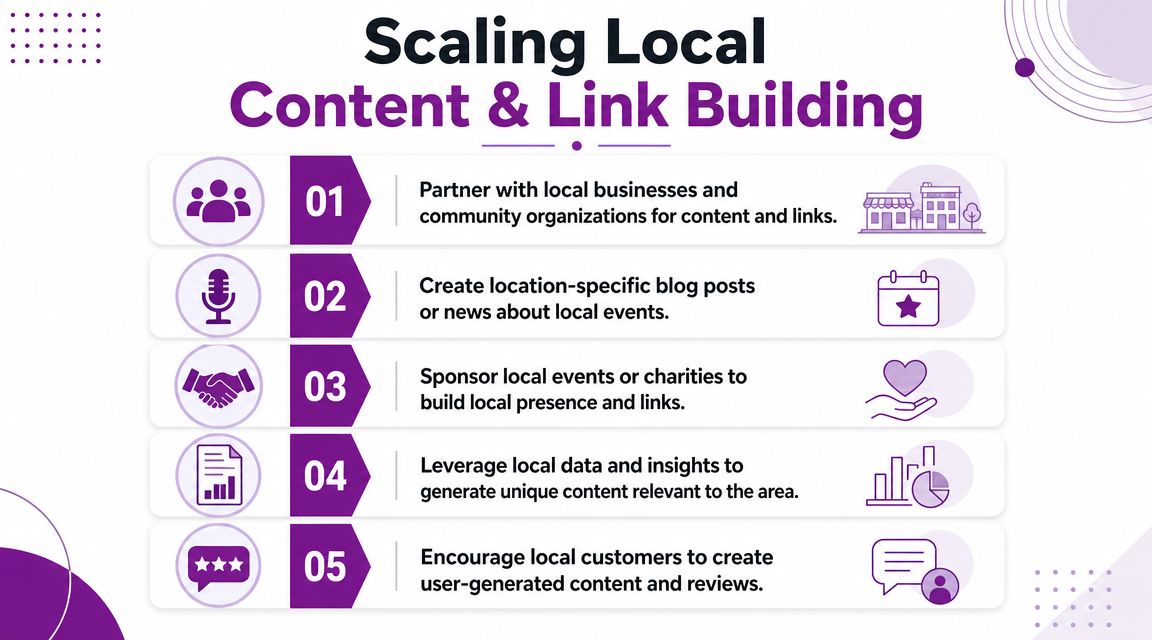
A major gap in multi-location SEO advice is how to scale differentiation. For UK businesses with multiple sites, the challenge is not coming up with ideas. It is building an operating system that gets branch-specific content out of staff, turns it into publishable assets, and repeats that process without quality falling off after location five.
Use operational inputs as content sources
The best local content rarely starts with a writer. It starts with operations.
Branch teams already sit on the raw material that makes pages rank and convert: recent jobs, awkward access notes, service quirks by area, local partnerships, recurring customer questions, and photos from real work. A plumbing firm can use completed jobs in specific postcodes, common boiler issues by housing stock, and travel times to nearby villages. A hospitality group can use event setup examples, nearby transport advice, local supplier relationships, and seasonal demand patterns by venue.
Build a simple intake process around that material:
- Project work: Before-and-after jobs, installs, refurbishments, event setups
- Branch staff: Team intros, qualifications, specialist services, local knowledge
- Customer questions: FAQs that come up repeatedly at branch level
- Partnerships: Suppliers, venues, charities, schools, clubs, and local organisations
- Area specifics: Parking, access, neighbourhood coverage, venue logistics, local regulations
This is how location content becomes scalable. You are not asking a central team to invent local detail. You are collecting it from the people who deal with customers every day.
A wedding venue group is a good example. Each venue can publish useful local content around accommodation nearby, ceremony formats, styling ideas by season, and photo locations couples ask about. Our guide to SEO for wedding venues shows how that local intent can sit alongside commercial pages without turning the site into a blog full of filler.
Build editorial rules that stop duplication
Branch pages do not need completely different templates. They need different evidence.
The fix is a central brief with required local inputs. That gives writers and branch managers a repeatable standard, and it stops the usual problem where "make it unique" gets interpreted as changing a few sentences near the top.
Use rules like these:
| Content block | Example of local differentiation |
|---|---|
| FAQ | “Do you cover villages outside Harrogate?” |
| Testimonial | Customer from the branch catchment area |
| Team section | Named staff based at that location |
| Proof | Recent job, event, or service delivery nearby |
| Local context | Landmark, transport note, borough, or postcode coverage |
I usually advise clients to set a minimum threshold before a page can go live. If a branch page has no named staff, no local proof, no catchment detail, and no branch-specific FAQs, it is not finished. That sounds strict, but it prevents a bigger problem later. Thin pages create reporting noise because underperformance comes from weak inputs, not from the channel itself.
If a branch manager cannot recognise their own location in the page, the page is still too generic.
Earn links that belong to the branch
Local link building works best when it reflects how the branch operates in its area.
A hotel or wedding venue can earn links through local supplier pages, tourism guides, event features, and partnerships with photographers or florists. A trades business usually gets better returns from community sponsorships, merchant relationships, case studies tied to local jobs, and coverage of branch openings or charity work. Healthcare brands often have opportunities through local associations, referral partners, and area resource pages.
The practical routes are usually straightforward:
- Community sponsorships: Local events, schools, sports clubs, or charities
- Partnership pages: Suppliers, venues, and complementary service providers
- Local PR: Branch openings, refurbishments, awards, seasonal campaigns
- Useful resources: Area guides, accessibility information, checklists, or planning content tied to that branch
The trade-off is time. One strong local partnership page that sends referral traffic and supports local relevance is worth more than a batch of low-value directory submissions nobody checks. For multi-location brands, that means choosing link tactics a branch can repeat with some head office support, not tactics that only work during a one-off campaign.
The brands that do this well treat local content and local links as one workflow. Publish a useful branch asset. Give local partners a reason to reference it. Then feed the results back into the next location rollout. That is how multi-location SEO scales without becoming a template exercise.
Tracking KPIs and Reporting on Local Success
If reporting still rolls all performance into one domain-wide view, branch SEO becomes hard to defend and harder to improve. You need location-level measurement.
Google's move to mobile-first indexing for all websites in March 2021 made this more important for UK multi-location businesses because local and “near me” behaviour is heavily mobile-led, so branch pages need to perform well on small screens if they're going to convert searchers who are ready to act, as covered in this analysis of mobile-first indexing and local SEO.
The KPIs that matter per branch
Track performance by location page and by Google Business Profile, then line those signals up.
- Local pack visibility: Which branch appears for its target area terms
- Organic landing page traffic: To the specific branch page, not the domain overall
- Calls, forms, bookings, and direction requests: Actions tied to each location
- Review velocity and response coverage: Enough to show whether the branch is actively managed
- Engagement on mobile: If users bounce, fail to click, or struggle to convert on phones, fix usability first
A simple Looker Studio dashboard can work well if it groups data branch by branch. Pair Search Console landing page data with Analytics conversions and GBP activity, then compare branches against each other.
Use reporting to make decisions, not just prove activity
Reporting should surface what needs attention.
If one branch gets impressions but few actions, the page or profile may be weak. If another branch converts well but barely appears, it may need stronger internal linking, local content, reviews, or citation cleanup. If a high-value branch underperforms, prioritise it rather than spreading effort equally across every location.
For businesses where lead value varies by branch, tying local SEO work to commercial return matters. A tool such as this self-storage ROI calculator for SEO shows the wider principle. Visibility is useful, but branch-level return is what justifies investment.
Multi-location SEO works when each branch is treated like its own local entity within one controlled system. If you want help building that system, Bare Digital can audit your current setup, fix the structural gaps, and turn your locations into measurable local growth channels rather than scattered listings and duplicated pages.